This blog post demonstrates how to use the Publish/Subscribe building block of Dapr and .NET Aspire to build distributed applications. The Publish and subscribe (pub/sub) enables (micro/macro/mini)services to communicate with each other using messages for event-driven architectures. Dapr Publish/Subscribe building block takes care of the integration details by providing an abstraction over different message brokers, so you can switch between them effortlessly without touching your core logic.
For a complete list of currently supported Pub/Sub brokers, refer to the Pub/sub brokers documentation.
This post builds on the concepts introduced in my earlier article, Dapr State Management & .NET Aspire. Before proceeding, ensure that all steps from that article are completed, except for configuring multiple state stores (for example, Postgres and MySQL). In this post, we will use a single state store such as MySQL. The focus here is specifically on Pub/Sub management; deployment steps are therefore not included.
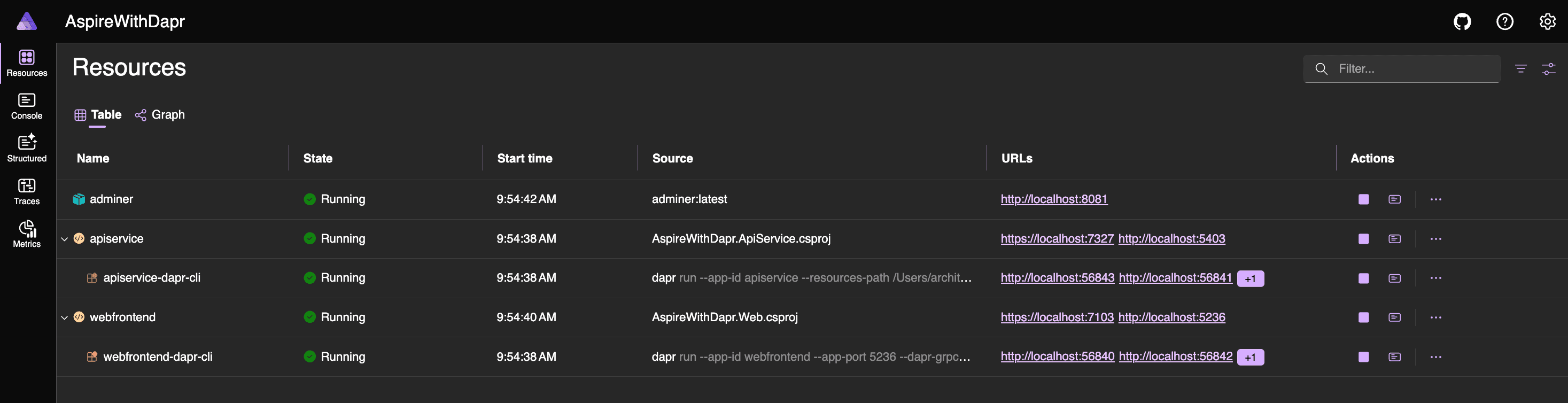
Upon successful completion, you can access the Aspire Dashboard by clicking the URL in the host section of the terminal window. The dashboard will list two additional resources apiservice-dapr-cli and webfrontend-dapr-cli which represent the Dapr sidecars, along with Adminer to analyze stored data in MySQL.
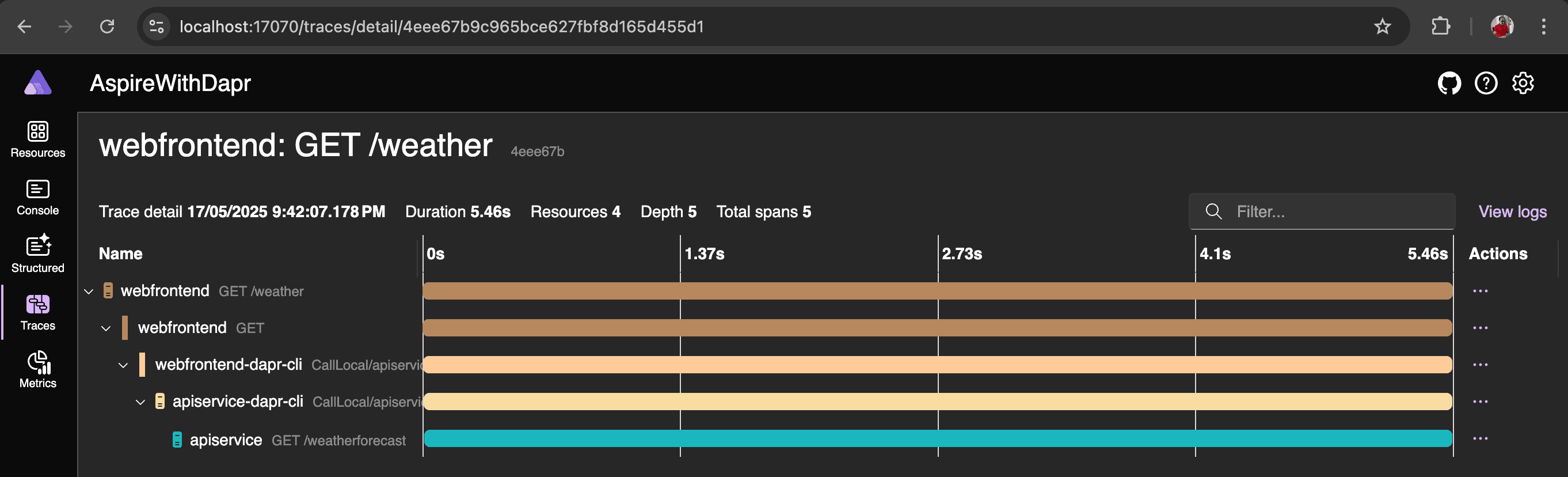
From the dashboard, you can launch the webfrontend application and initiate a request to the backend API by selecting the Weather menu. This allows you to observe the complete request flow.

Use of Adminer
Refer to Use of Adminer section in the earlier blog post for details. With help of Adminer, you can explore and analyze the data stored in MySQL.
Adding Pub/Sub (external)
IMPORTANT .NET Aspire and Dapr complement each other in developing and deploying distributed applications. Both excel in their respective domains but present a few challenges when used together. You may also notice a lack of documentation and sample projects. The official resources from Microsoft and Dapr do not provide all the necessary details.
Based on my observation, when .NET Aspire manages resources, it assigns different ports with each run. However, Dapr sidecars require fixed ports to function correctly. This means that to make them work together, you need to manage the resources externally. If you're not integrating Dapr with .NET Aspire, both Aspire and Dapr run smoothly on their own.
Now, let’s prepare a Docker Compose file to run Apache Kafka, MQTT, and RabbitMQ as containers.
# docker-compose.yml
services:
  zookeeper:
    image: confluentinc/cp-zookeeper:7.5.0
    container_name: zookeeper
    environment:
      ZOOKEEPER_CLIENT_PORT: 2181
      ZOOKEEPER_TICK_TIME: 2000

  kafka:
    image: confluentinc/cp-kafka:7.5.0
    container_name: kafka
    depends_on:
      - zookeeper
    ports:
      - "9092:9092"
    environment:
      KAFKA_BROKER_ID: 1
      KAFKA_ZOOKEEPER_CONNECT: zookeeper:2181
      KAFKA_LISTENERS: PLAINTEXT://0.0.0.0:9092,PLAINTEXT_INTERNAL://0.0.0.0:9093
      KAFKA_ADVERTISED_LISTENERS: PLAINTEXT://localhost:9092,PLAINTEXT_INTERNAL://kafka:9093
      KAFKA_LISTENER_SECURITY_PROTOCOL_MAP: PLAINTEXT:PLAINTEXT,PLAINTEXT_INTERNAL:PLAINTEXT
      KAFKA_INTER_BROKER_LISTENER_NAME: PLAINTEXT_INTERNAL
      KAFKA_OFFSETS_TOPIC_REPLICATION_FACTOR: 1

  emqx:
    image: emqx/emqx:latest
    container_name: emqx
    ports:
      - "1883:1883"   # MQTT port
      - "8883:8883"   # MQTT SSL port
      - "8083:8083"   # WebSocket port
      - "8084:8084"   # WebSocket SSL port
      - "18083:18083" # Dashboard
    environment:
      EMQX_NAME: emqx
      EMQX_HOST: 127.0.0.1
      EMQX_DASHBOARD__DEFAULT_USERNAME: admin
      EMQX_DASHBOARD__DEFAULT_PASSWORD: public
    volumes:
      - emqx-data:/opt/emqx/data
      - emqx-log:/opt/emqx/log

  rabbitmq:
    image: rabbitmq:3-management
    container_name: rabbitmq
    ports:
      - "5672:5672"   # AMQP port
      - "15672:15672" # Management UI
    environment:
      RABBITMQ_DEFAULT_USER: guest
      RABBITMQ_DEFAULT_PASS: guest

volumes:
  emqx-data:
  emqx-log:
To run below command to start the containers.
docker compose up -dAfter successful execution, you can verify that all containers are running using Docker Desktop or the Docker CLI.
To run below command to stop the containers.
docker compose down -vCreate Pub/Sub components
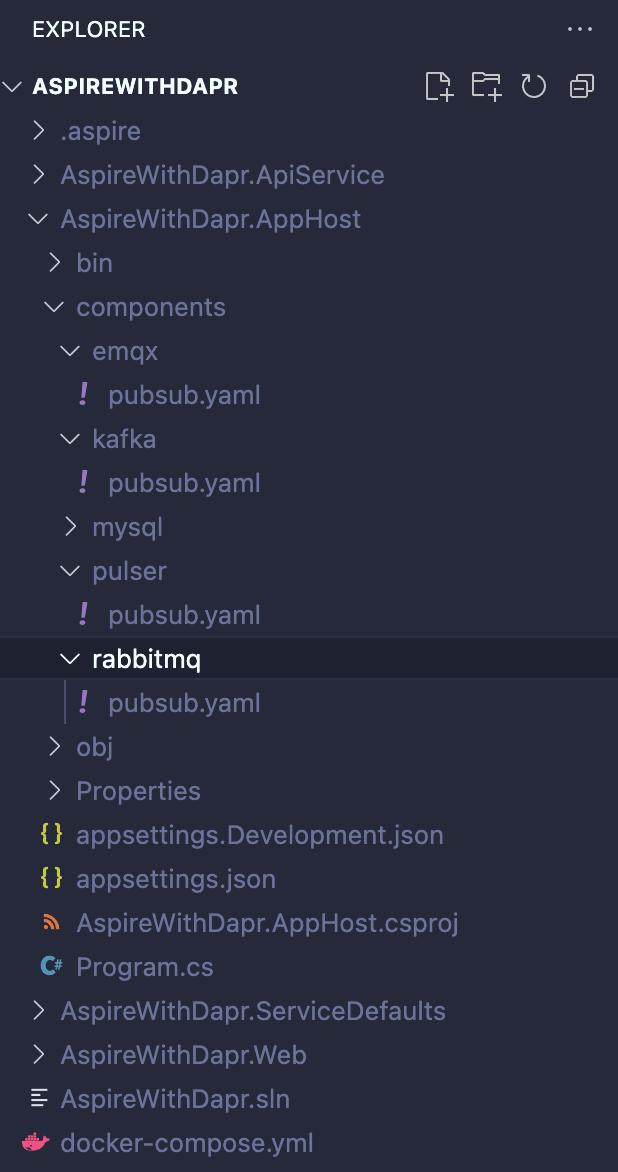
Follow the folder structure shown below and create four pubsub.yaml files one for each broker. For simplicity, include the complete connection details directly in these files. In a production environment, however, such details should be stored securely using a secrets management solution.
# MQTT
apiVersion: dapr.io/v1alpha1
kind: Component
metadata:
  name: pubsub
spec:
  type: pubsub.mqtt3
  version: v1
  metadata:
  # MQTT broker URL
  - name: url
    value: "tcp://localhost:1883"

  # Client ID
  - name: consumerID
    value: "dapr-consumer-{appId}"

  # QoS level (0, 1, or 2)
  # 0 = At most once
  # 1 = At least once
  # 2 = Exactly once
  - name: qos
    value: "1"

  # Retain messages
  - name: retain
    value: "false"

  # Clean session
  - name: cleanSession
    value: "true"

  # Connection timeout (seconds)
  - name: connectTimeout
    value: "30"

  # Keep alive interval (seconds)
  - name: keepAlive
    value: "60"
# Kafka
apiVersion: dapr.io/v1alpha1
kind: Component
metadata:
name: pubsub
spec:
type: pubsub.kafka
version: v1
metadata:
# Kafka broker connection
- name: brokers
value: "localhost:9092"
# Consumer group for Dapr
- name: consumerGroup
value: "dapr-consumer-group"
# Consumer ID (optional)
- name: consumerID
value: "dapr-consumer-{appId}"
# Authentication type (none for local dev)
- name: authType
value: "none"
# Enable idempotent producer for exactly-once semantics
- name: enableIdempotence
value: "true"
# Message delivery timeout
- name: maxMessageBytes
value: "1024000"
# Auto-create topics if they don't exist
- name: autoCreateTopic
value: "true"# RabbitMQ
apiVersion: dapr.io/v1alpha1
kind: Component
metadata:
name: pubsub
spec:
type: pubsub.rabbitmq
version: v1
metadata:
# RabbitMQ connection string
- name: host
value: "amqp://guest:guest@localhost:5672"
# Durable messages (persist to disk)
- name: durable
value: "true"
# Delete queue when unused
- name: deleteWhenUnused
value: "false"
# Auto-acknowledge messages
- name: autoAck
value: "false"
# Delivery mode (0=non-persistent, 1=persistent, 2=persistent)
- name: deliveryMode
value: "2"
# Request/response timeout
- name: requeueInFailure
value: "true"
# Prefetch count (number of messages to fetch at once)
- name: prefetchCount
value: "10"
# Reconnect wait time in seconds
- name: reconnectWait
value: "3"
# Concurrency mode (single or parallel)
- name: concurrency
value: "parallel"Code Change in AppHost
Update the Program.cs file in the AppHost project as shown in the code snippet below. This configuration sets up the pub/sub integration based on the selected broker.
Additionally, it pulls the Adminer and kafkaUi and runs them as a container as part of the Aspire resources. You can later use Adminer to connect to the MySQL database and Kafka UI to view and analyze the messages stored in Kafka.
NOTE: MQTT and RabbitMQ come with integrated UIs to view and analyze messages, so there is no need to configure any external tools as containers.
using CommunityToolkit.Aspire.Hosting.Dapr;

var builder = DistributedApplication.CreateBuilder(args);

// The YAML file points to an external state store instance
var stateStore = builder.AddDaprStateStore("statestore", new DaprComponentOptions
{
    // Path to your Dapr component YAML file - MySQL
     LocalPath = "../AspireWithDapr.AppHost/components/mysql/statestore.yaml"
});

// The YAML file points to an external pub/sub instance
var pubsub = builder.AddDaprPubSub("pubsub", new DaprComponentOptions
{
    // Path to your Dapr component YAML file - RabbitMQ
    // LocalPath = "../AspireWithDapr.AppHost/components/rabbitmq/pubsub.yaml"

    // Path to your Dapr component YAML file - Kafka
    // LocalPath = "../AspireWithDapr.AppHost/components/kafka/pubsub.yaml"

    // Path to your Dapr component YAML file - EMQX
    LocalPath = "../AspireWithDapr.AppHost/components/emqx/pubsub.yaml"

});

// Optional data-visualization GUIs for local development.
// Adminer (MySQL & PostgreSQL) - lightweight DB browser.
var adminer = builder.AddContainer("adminer", "adminer", "latest")
    .WithEndpoint(port: 8081, targetPort: 8080, name: "adminer", scheme: "http");

// Kafka UI - web UI for viewing Kafka clusters
var kafkaUi = builder.AddContainer("kafka-ui", "provectuslabs/kafka-ui", "latest")
    .WithEndpoint(port: 8080, targetPort: 8080, name: "kafka-ui", scheme: "http")
    .WithEnvironment("KAFKA_CLUSTERS_0_NAME", "local")
    .WithEnvironment("KAFKA_CLUSTERS_0_BOOTSTRAPSERVERS", "host.docker.internal:19092")
    .WithEnvironment("KAFKA_CLUSTERS_0_ZOOKEEPER", "host.docker.internal:2181");

// Api Service and Web Frontend
var apiService = builder.AddProject<Projects.AspireWithDapr_ApiService>("apiservice")
    .WithHttpHealthCheck("/health")
    .WithReference(stateStore)
    .WithReference(pubsub)
    .WithDaprSidecar();

builder.AddProject<Projects.AspireWithDapr_Web>("webfrontend")
    .WithExternalHttpEndpoints()
    .WithHttpHealthCheck("/health")
    .WaitFor(apiService)
    .WithReference(apiService)
    .WithDaprSidecar();

builder.Build().Run();
After applying the above changes, run the application and verify that the Dapr sidecar successfully loads the state store and pub/sub components without any issues. You can review the Dapr sidecar logs and look for the entries shown below, corresponding to the state store and the selected pub/sub broker.
# For MySQL
msg="Component loaded: statestore (state.mysql/v1)" app_id=apiservice
# For MQTT
msg="Component loaded: pubsub (pubsub.mqtt3/v1)" app_id=apiservice# For Kafka
msg="Component loaded: pubsub (pubsub.kafka/v1)" app_id=apiservice# For RabbitMQ
msg="Component loaded: pubsub (pubsub.rabbitmq/v1)" app_id=apiserviceNow that the state stores and pub/sub brokers are defined and loaded properly, let's use them in the apiService.
Code Change in ApiService
The ApiService has been updated to store and retrieve data from the state store and to publish an event to the broker whenever a forecast is added or created. With the introduction of this new capability, a new endpoint has also been added.
NOTE: What’s interesting here is that the ApiService doesn’t need to know anything about MySQL or any pub/sub broker such as Kafka, RabbitMQ and MQTT. There are no SDK references or connection details in the code. This is exactly where Dapr shines, handling all the heavy lifting behind the scenes.
using Dapr.Client;
using System.ComponentModel.DataAnnotations;
using AspireWithDapr.ApiService;
using System.Text.Json.Serialization;

var builder = WebApplication.CreateBuilder(args);

// Add service defaults & Aspire client integrations.
builder.AddServiceDefaults();

// Add Dapr client
builder.Services.AddDaprClient();

// Register application services
builder.Services.AddScoped<IWeatherForecastService, WeatherForecastService>();

// Add services to the container.
builder.Services.AddProblemDetails();

// Learn more about configuring OpenAPI at https://aka.ms/aspnet/openapi
builder.Services.AddOpenApi();

var app = builder.Build();

// Configure the HTTP request pipeline.
app.UseExceptionHandler();

if (app.Environment.IsDevelopment())
{
    app.MapOpenApi();
}

// POST endpoint to create a weather forecast
app.MapPost("/weatherforecast", async (
    CreateWeatherForecastRequest request,
    IWeatherForecastService weatherService) =>
{
    // Validate input
    var validationResults = new List<ValidationResult>();
    var validationContext = new ValidationContext(request);

    if (!Validator.TryValidateObject(request, validationContext, validationResults, true))
    {
        var errors = validationResults.Select(vr => vr.ErrorMessage).ToList();
        return Results.ValidationProblem(errors.ToDictionary(e => "ValidationError", e => new[] { e ?? "Validation failed" }));
    }

    try
    {
        var (key, forecast) = await weatherService.CreateWeatherForecastAsync(request);
        return Results.Created($"/weatherforecast/{key}", new { Key = key, Forecast = forecast });
    }
    catch (Exception ex)
    {
        return Results.Problem(
            title: "Error creating weather forecast",
            detail: ex.Message,
            statusCode: StatusCodes.Status500InternalServerError
        );
    }
})
.WithName("CreateWeatherForecast");

// GET endpoint to retrieve all weather forecasts
app.MapGet("/weatherforecast", async (IWeatherForecastService weatherService) =>
{
    try
    {
        var forecasts = await weatherService.GetWeatherForecastsAsync();
        return Results.Ok(forecasts);
    }
    catch (Exception ex)
    {
        return Results.Problem(
            title: "Error retrieving weather forecasts",
            detail: ex.Message,
            statusCode: StatusCodes.Status500InternalServerError
        );
    }
})
.WithName("GetWeatherForecast");

app.MapDefaultEndpoints();

app.Run();

public record WeatherForecast
{
    public DateOnly Date { get; set; }
    public int TemperatureC { get; set; }
    public string? Summary { get; set; }

    [JsonIgnore]
    public int TemperatureF => 32 + (int)(TemperatureC / 0.5556);
}

public record CreateWeatherForecastRequest
{
    [Required(ErrorMessage = "Date is required")]
    public DateOnly Date { get; set; }

    [Required(ErrorMessage = "TemperatureC is required")]
    [Range(-100, 100, ErrorMessage = "Temperature must be between -100 and 100 degrees Celsius")]
    public int TemperatureC { get; set; }

    [Required(ErrorMessage = "Summary is required")]
    [StringLength(100, MinimumLength = 3, ErrorMessage = "Summary must be between 3 and 100 characters")]
    public string Summary { get; set; } = string.Empty;
}
A new WeatherForecastService class and IWeatherForecastService interface have been added to avoid making the endpoint code longer and to align with recommended best practices.
using Dapr.Client;

namespace AspireWithDapr.ApiService;

public interface IWeatherForecastService
{
    Task<(string Key, WeatherForecast Forecast)> CreateWeatherForecastAsync(
        CreateWeatherForecastRequest request,
        CancellationToken cancellationToken = default);

    Task<WeatherForecast[]> GetWeatherForecastsAsync(CancellationToken cancellationToken = default);
}

public class WeatherForecastService : IWeatherForecastService
{
    private readonly DaprClient _daprClient;
    private readonly ILogger<WeatherForecastService> _logger;
    private const string StateStoreName = "statestore";
    private const string PubSubName = "pubsub";
    private const string TopicName = "weather-created";

    public WeatherForecastService(DaprClient daprClient, ILogger<WeatherForecastService> logger)
    {
        _daprClient = daprClient ?? throw new ArgumentNullException(nameof(daprClient));
        _logger = logger ?? throw new ArgumentNullException(nameof(logger));
    }

    public async Task<(string Key, WeatherForecast Forecast)> CreateWeatherForecastAsync(
        CreateWeatherForecastRequest request,
        CancellationToken cancellationToken = default)
    {
        ArgumentNullException.ThrowIfNull(request);

        // Generate unique key
        var key = $"weather-{DateTimeOffset.UtcNow.ToUnixTimeMilliseconds()}";

        var weatherForecast = new WeatherForecast
        {
            Date = request.Date,
            TemperatureC = request.TemperatureC,
            Summary = request.Summary
        };

        try
        {
            // Save to state store
            await _daprClient.SaveStateAsync(
                StateStoreName,
                key,
                weatherForecast,
                cancellationToken: cancellationToken);

            // Update the keys registry
            await UpdateKeysRegistryAsync(key, isAdd: true, cancellationToken);

            _logger.LogInformation(
                "Weather forecast saved: Key={Key}, Date={Date}, Temp={Temp}°C",
                key, weatherForecast.Date, weatherForecast.TemperatureC);

            // Publish event to pub/sub
            await PublishWeatherCreatedEventAsync(key, weatherForecast, cancellationToken);

            return (key, weatherForecast);
        }
        catch (Exception ex)
        {
            _logger.LogError(ex, "Failed to create weather forecast with key {Key}", key);
            throw;
        }
    }

    public async Task<WeatherForecast[]> GetWeatherForecastsAsync(CancellationToken cancellationToken = default)
    {
        try
        {
            // Retrieve the list of all weather keys from registry
            var keysRegistry = await _daprClient.GetStateAsync<List<string>>(
                StateStoreName,
                "weather-keys-registry",
                cancellationToken: cancellationToken) ?? new List<string>();

            if (!keysRegistry.Any())
            {
                _logger.LogInformation("No weather forecasts found in registry");
                return Array.Empty<WeatherForecast>();
            }

            // Fetch all weather forecasts
            var forecasts = new List<WeatherForecast>();
            foreach (var key in keysRegistry)
            {
                try
                {
                    var forecast = await _daprClient.GetStateAsync<WeatherForecast>(
                        StateStoreName,
                        key,
                        cancellationToken: cancellationToken);

                    if (forecast != null)
                    {
                        forecasts.Add(forecast);
                    }
                }
                catch (Exception ex)
                {
                    _logger.LogWarning(ex, "Failed to retrieve weather forecast for key {Key}", key);
                }
            }

            // Sort by date descending (most recent first)
            return forecasts.OrderByDescending(f => f.Date).ToArray();
        }
        catch (Exception ex)
        {
            _logger.LogError(ex, "Failed to retrieve weather forecasts");
            throw;
        }
    }

    private async Task UpdateKeysRegistryAsync(string key, bool isAdd, CancellationToken cancellationToken)
    {
        try
        {
            // Get current registry
            var keysRegistry = await _daprClient.GetStateAsync<List<string>>(
                StateStoreName,
                "weather-keys-registry",
                cancellationToken: cancellationToken) ?? new List<string>();

            if (isAdd && !keysRegistry.Contains(key))
            {
                keysRegistry.Add(key);
                await _daprClient.SaveStateAsync(
                    StateStoreName,
                    "weather-keys-registry",
                    keysRegistry,
                    cancellationToken: cancellationToken);

                _logger.LogInformation("Added key {Key} to registry. Total keys: {Count}", key, keysRegistry.Count);
            }
        }
        catch (Exception ex)
        {
            _logger.LogError(ex, "Failed to update keys registry for key {Key}", key);
            // Don't throw - this is not critical enough to fail the entire operation
        }
    }

    private async Task PublishWeatherCreatedEventAsync(
        string key,
        WeatherForecast forecast,
        CancellationToken cancellationToken)
    {
        // Attempt a few retries when publishing fails (transient network or broker issues are common)
        var maxAttempts = 3;
        var attempt = 0;
        Exception? lastEx = null;

        var eventData = new WeatherForecastCreatedEvent
        {
            Key = key,
            // DateOnly doesn't serialize by default in some serializers used by Dapr client,
            // so convert to DateTime (UTC midnight) for the event payload.
            Date = forecast.Date.ToDateTime(new TimeOnly(0)),
            TemperatureC = forecast.TemperatureC,
            Summary = forecast.Summary,
            CreatedAt = DateTimeOffset.UtcNow
        };

        while (attempt < maxAttempts)
        {
            attempt++;
            try
            {
                await _daprClient.PublishEventAsync(
                    PubSubName,
                    TopicName,
                    eventData,
                    cancellationToken);

                _logger.LogInformation(
                    "Weather created event published: Topic={Topic}, Key={Key}, Attempt={Attempt}",
                    TopicName, key, attempt);
                return;
            }
            catch (Exception ex) when (attempt < maxAttempts)
            {
                lastEx = ex;
                _logger.LogWarning(ex,
                    "Publish attempt {Attempt} failed for key {Key}. Retrying...",
                    attempt, key);

                // Exponential backoff before retrying
                var delayMs = 200 * (int)Math.Pow(2, attempt - 1);
                try
                {
                    await Task.Delay(delayMs, cancellationToken);
                }
                catch (OperationCanceledException) when (cancellationToken.IsCancellationRequested)
                {
                    // If cancellation was requested, stop retrying
                    break;
                }
            }
            catch (Exception ex)
            {
                lastEx = ex;
                // Non-retryable or final attempt
                _logger.LogError(ex,
                    "Failed to publish weather created event for key {Key}. State was saved successfully.",
                    key);
                break;
            }
        }

        if (lastEx != null)
        {
            // Final log with exception details if all attempts failed
            _logger.LogError(lastEx,
                "Failed to publish weather created event for key {Key} after {Attempts} attempts. State was saved successfully.",
                key, attempt);
        }
    }
}

public record WeatherForecastCreatedEvent
{
    public required string Key { get; init; }
    // Use DateTime here to avoid serialization issues with DateOnly when publishing via Dapr
    public required DateTime Date { get; init; }
    public required int TemperatureC { get; init; }
    public required string? Summary { get; init; }
    public required DateTimeOffset CreatedAt { get; init; }
}
Code Change in Web Application
Since a new capability has been added to the ApiService to support creating a forecast, corresponding changes are required in the web app to support it.
// WeatherApiClient.cs

using Dapr.Client;
using System.ComponentModel.DataAnnotations;
using System.Text.Json.Serialization;

namespace AspireWithDapr.Web;

public class WeatherApiClient(DaprClient daprClient, ILogger<WeatherApiClient> logger)
{
    public async Task<WeatherForecast[]> GetWeatherAsync(int maxItems = 100, CancellationToken cancellationToken = default)
    {
        try
        {
            // Use Dapr service invocation to call the API service
            var forecasts = await daprClient.InvokeMethodAsync<WeatherForecast[]>(
                HttpMethod.Get,
                "apiservice",
                "weatherforecast",
                cancellationToken);

            return forecasts?.Take(maxItems).ToArray() ?? [];
        }
        catch (Exception ex)
        {
            logger.LogError(ex, "Failed to retrieve weather forecasts from API service");
            throw;
        }
    }

    public async Task CreateWeatherAsync(WeatherForecast forecast, CancellationToken cancellationToken = default)
    {
        try
        {
            await daprClient.InvokeMethodAsync<object>(
                HttpMethod.Post,
                "apiservice",
                "weatherforecast",
                forecast,
                cancellationToken);
        }
        catch (Exception ex)
        {
            logger.LogError(ex, "Failed to create weather forecast via API service");
            throw;
        }
    }
}

public class WeatherForecastFormModel
{
    [Required(ErrorMessage = "Date is required")]
    [DataType(DataType.Date)]
    public DateOnly Date { get; set; } = DateOnly.FromDateTime(DateTime.Now);

    [Required(ErrorMessage = "Temperature is required")]
    [Range(-100, 100, ErrorMessage = "Temperature must be between -100°C and 100°C")]
    public int TemperatureC { get; set; }

    [Required(ErrorMessage = "Summary is required")]
    [StringLength(100, MinimumLength = 1, ErrorMessage = "Summary must be between 1 and 100 characters")]
    public string? Summary { get; set; } = string.Empty;

    public WeatherForecast ToWeatherForecast() => new(Date, TemperatureC, Summary);
}

public record WeatherForecast(DateOnly Date, int TemperatureC, string? Summary)
{
    public int TemperatureF => 32 + (int)(TemperatureC / 0.5556);
}

public class WeatherApiValidationException : WeatherApiException
{
    public string? Detail { get; }
    public Dictionary<string, string[]>? Errors { get; }

    public WeatherApiValidationException(string message, string? detail = null, Dictionary<string, string[]>? errors = null)
        : base(message)
    {
        Detail = detail;
        Errors = errors;
    }
}

public class WeatherApiException : Exception
{
    public WeatherApiException(string message) : base(message) { }
    public WeatherApiException(string message, Exception innerException) : base(message, innerException) { }
}
// Weather.razor
@page "/weather"
@attribute [StreamRendering(true)]
@rendermode InteractiveServer
@using System.ComponentModel.DataAnnotations
@inject WeatherApiClient WeatherApi
<PageTitle>Weather</PageTitle>
<h1>Weather Forecasts</h1>
<p>This component showcases data retrieval from a backend API service and includes the ability to create a new forecast. After a forecast is successfully created, it emits an event to support further workflows or integrations.</p>
<div class="mb-4">
<EditForm Model="@newForecast" OnValidSubmit="@HandleCreateForecast">
<DataAnnotationsValidator />
<ValidationSummary class="alert alert-danger" />
<div class="create-align-row">
<div class="col-md-3 mb-3">
<label for="date" class="form-label">Date <span class="text-danger">*</span></label>
<InputDate class="@GetInputClass("Date")" id="date" @bind-Value="newForecast.Date" />
<ValidationMessage For="@(() => newForecast.Date)" />
<small class="form-text text-muted" style="visibility: hidden;">Placeholder</small>
</div>
<div class="col-md-3 mb-3">
<label for="temperature" class="form-label">Temperature (C) <span class="text-danger">*</span></label>
<InputNumber class="@GetInputClass("TemperatureC")" id="temperature" @bind-Value="newForecast.TemperatureC" />
<ValidationMessage For="@(() => newForecast.TemperatureC)" />
<small class="form-text text-muted">Range: -100°C to 100°C</small>
</div>
<div class="col-md-4 mb-3">
<label for="summary" class="form-label">Summary <span class="text-danger">*</span></label>
<InputText class="@GetInputClass("Summary")" id="summary" @bind-Value="newForecast.Summary" />
<ValidationMessage For="@(() => newForecast.Summary)" />
<small class="form-text text-muted">1-100 characters</small>
</div>
<div class="mb-3">
<label class="form-label" style="visibility: hidden; margin-bottom: 0.5rem;">Spacer</label>
<button type="submit" class="btn btn-primary" disabled="@isCreating">
@if (isCreating)
{
<span class="spinner-border spinner-border-sm me-2" role="status" aria-hidden="true"></span>
<text>Creating...</text>
}
else
{
<text>Create</text>
}
</button>
</div>
</div>
</EditForm>
@if (!string.IsNullOrEmpty(errorMessage))
{
<div class="alert alert-danger alert-dismissible fade show" role="alert">
<strong>Error:</strong> @errorMessage
@if (validationErrors != null && validationErrors.Count > 0)
{
<ul class="mb-0 mt-2">
@foreach (var error in validationErrors)
{
<li><strong>@error.Key:</strong> @string.Join(", ", error.Value)</li>
}
</ul>
}
<button type="button" class="btn-close" aria-label="Close" @onclick="() => { errorMessage = null; validationErrors = null; }"></button>
</div>
}
@if (!string.IsNullOrEmpty(successMessage))
{
<div class="alert alert-success alert-dismissible fade show" role="alert">
@successMessage
<button type="button" class="btn-close" aria-label="Close" @onclick="() => successMessage = null"></button>
</div>
}
</div>
@if (forecasts == null)
{
<p><em>Loading...</em></p>
}
else
{
<table class="table">
<thead>
<tr>
<th>Date</th>
<th aria-label="Temperature in Celsius">Temp. (C)</th>
<th aria-label="Temperature in Farenheit">Temp. (F)</th>
<th>Summary</th>
</tr>
</thead>
<tbody>
@foreach (var forecast in forecasts)
{
<tr>
<td>@forecast.Date.ToShortDateString()</td>
<td>@forecast.TemperatureC</td>
<td>@forecast.TemperatureF</td>
<td>@forecast.Summary</td>
</tr>
}
</tbody>
</table>
}
@code {
private WeatherForecast[]? forecasts;
private WeatherForecastFormModel newForecast = new();
private bool isCreating = false;
private string? errorMessage;
private string? successMessage;
private Dictionary<string, string[]>? validationErrors;
protected override async Task OnInitializedAsync()
{
await LoadForecastsAsync();
}
private async Task LoadForecastsAsync()
{
try
{
forecasts = await WeatherApi.GetWeatherAsync();
}
catch (Exception ex)
{
errorMessage = $"An unexpected error occurred: {ex.Message}";
}
}
private async Task HandleCreateForecast()
{
if (isCreating) return;
isCreating = true;
errorMessage = null;
successMessage = null;
validationErrors = null;
try
{
var forecast = newForecast.ToWeatherForecast();
await WeatherApi.CreateWeatherAsync(forecast);
successMessage = $"Successfully created weather forecast for {newForecast.Date.ToShortDateString()}";
newForecast = new WeatherForecastFormModel();
await LoadForecastsAsync();
}
catch (WeatherApiValidationException ex)
{
errorMessage = ex.Message;
if (!string.IsNullOrEmpty(ex.Detail))
{
errorMessage += $": {ex.Detail}";
}
validationErrors = ex.Errors;
}
catch (Exception ex)
{
errorMessage = $"An unexpected error occurred: {ex.Message}";
}
finally
{
isCreating = false;
}
}
private string GetInputClass(string fieldName)
{
var baseClass = "form-control";
if (validationErrors != null && validationErrors.ContainsKey(fieldName))
{
return $"{baseClass} is-invalid";
}
return baseClass;
}
}/* /Components/Pages/Weather.razor.rz.scp.css */
.create-align-row {
display: flex;
gap: 0.5rem;
flex-wrap: wrap;
align-items: flex-start;
}
.create-align-row .form-group {
flex: 1 1 auto;
}
.create-align-row > div {
display: flex;
flex-direction: column;
}
.create-align-row > div > label {
margin-bottom: 0.5rem;
}
.create-align-row button {
margin-top: 0;
margin-bottom: 0;
height: fit-content;
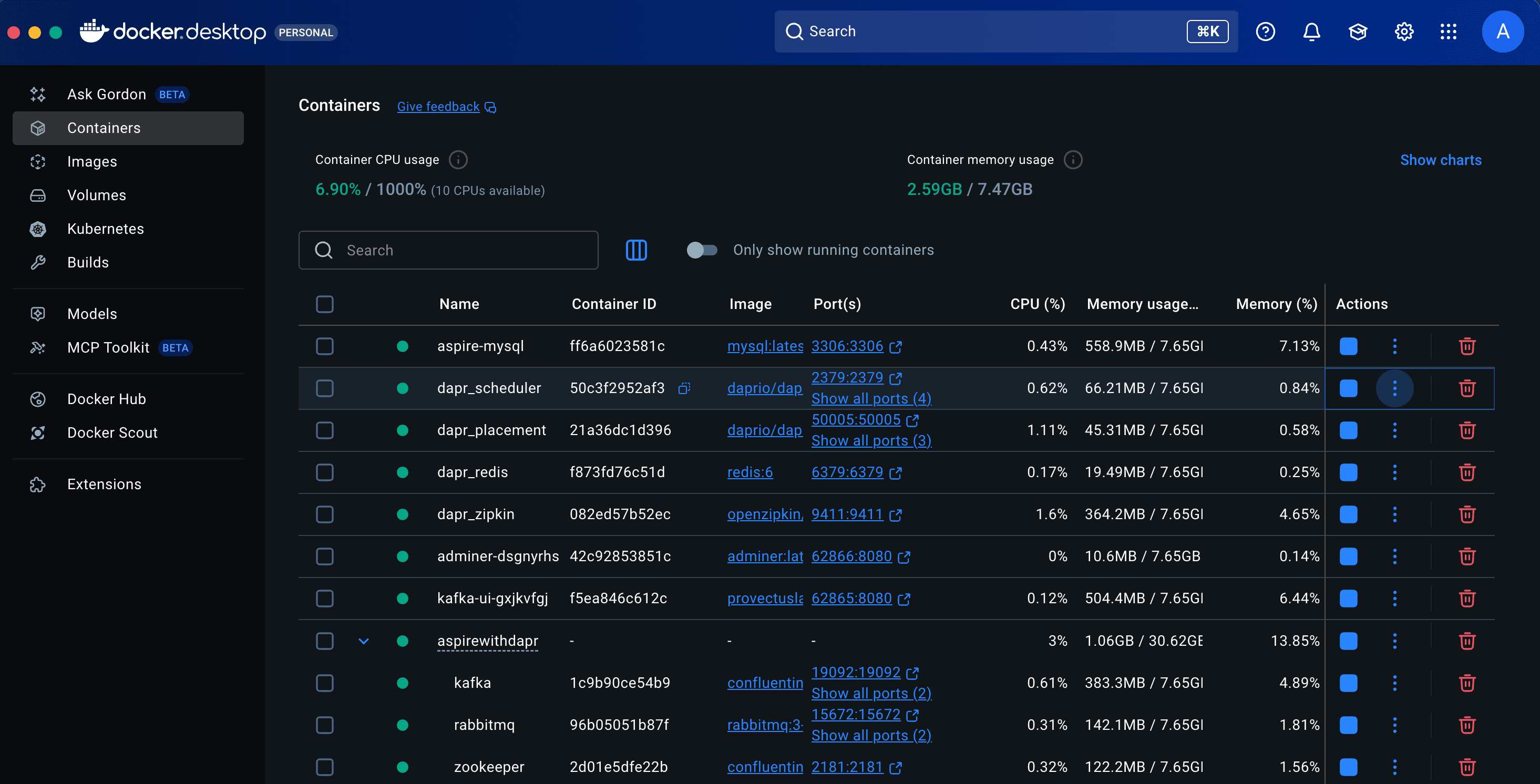
}Everything is now wired up, so let’s run the application and verify its behavior. Make sure all external dependencies are running in containers before you start the application. Once running, you should observe results similar to the screenshots below.
dotnet run --project AspireWithDapr.AppHost/AspireWithDapr.AppHost.csproj or
aspire runGo ahead and open the Aspire Dashboard to check that all resources are up and running.
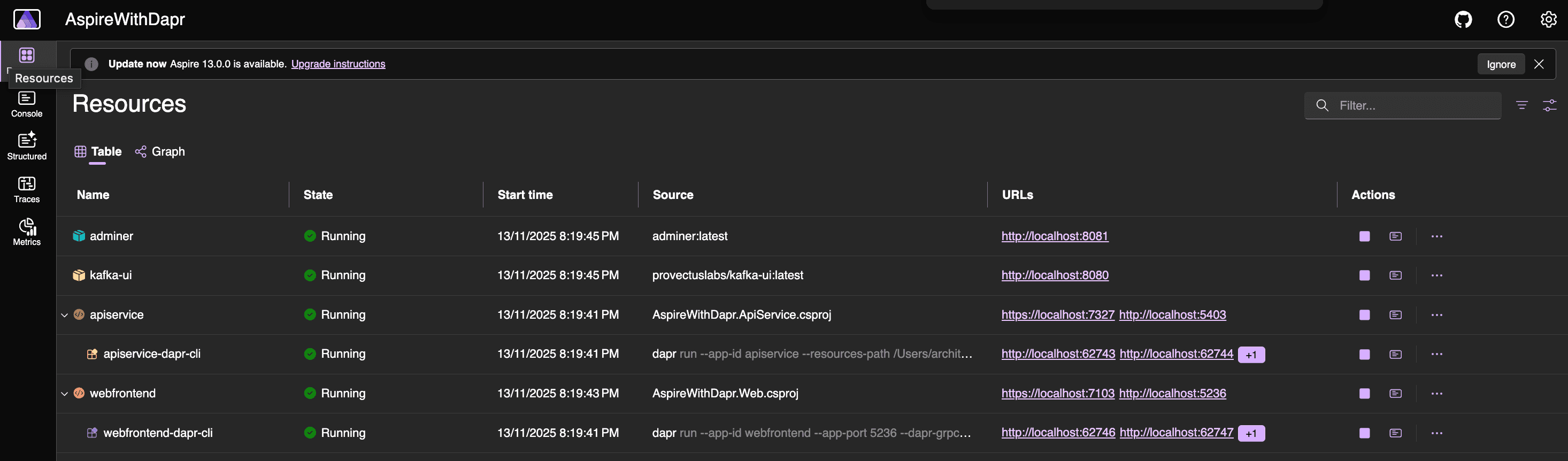
From there, open the web frontend application and click the Weather menu to access the option for creating a new forecast. Let’s create a few forecasts and then view the data in the state store and the pub/sub broker.
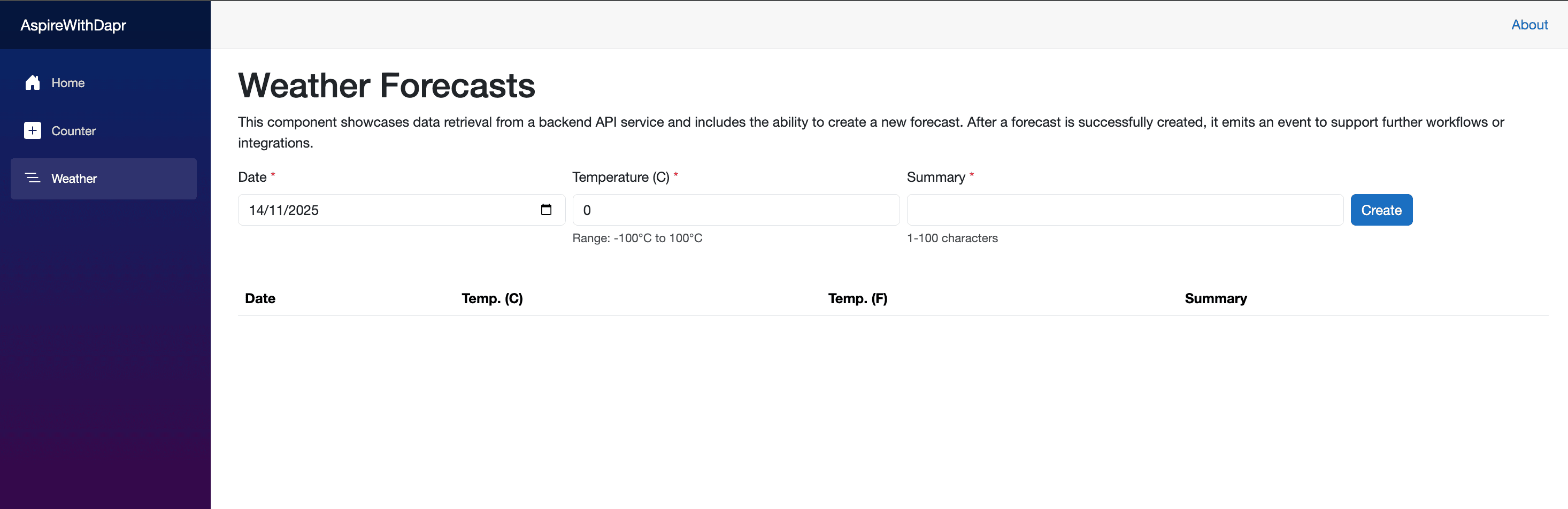
I created a test entry to verify the behavior, and here is the result. For reference, MQTT was configured as the pub/sub component in this test. Let’s verify it using the EMQX UI.
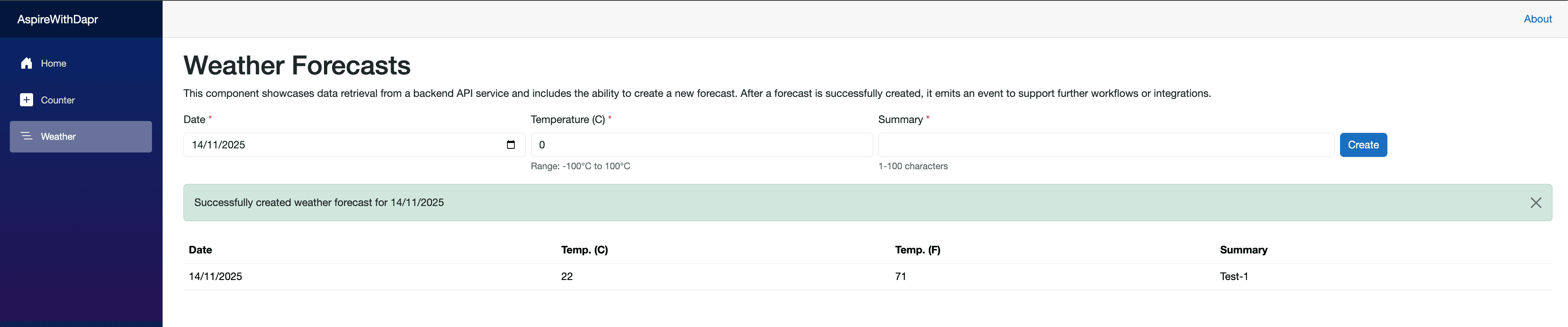
Use of EMQX UI
To access the EMQX UI, refer to the Docker Compose file, which includes the port mapping for the EMQX dashboard (e.g., 18083:18083) as well as the username and password. You should see the login screen and dashboard similar to the examples shown below.

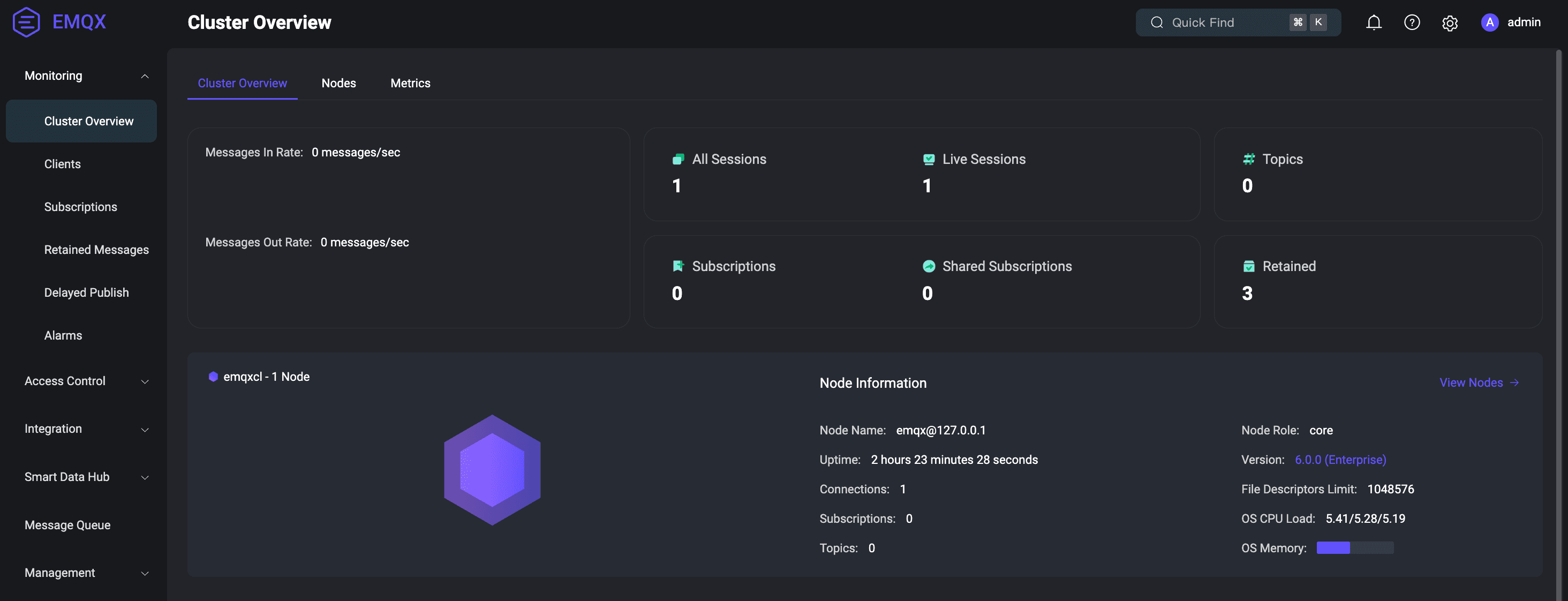
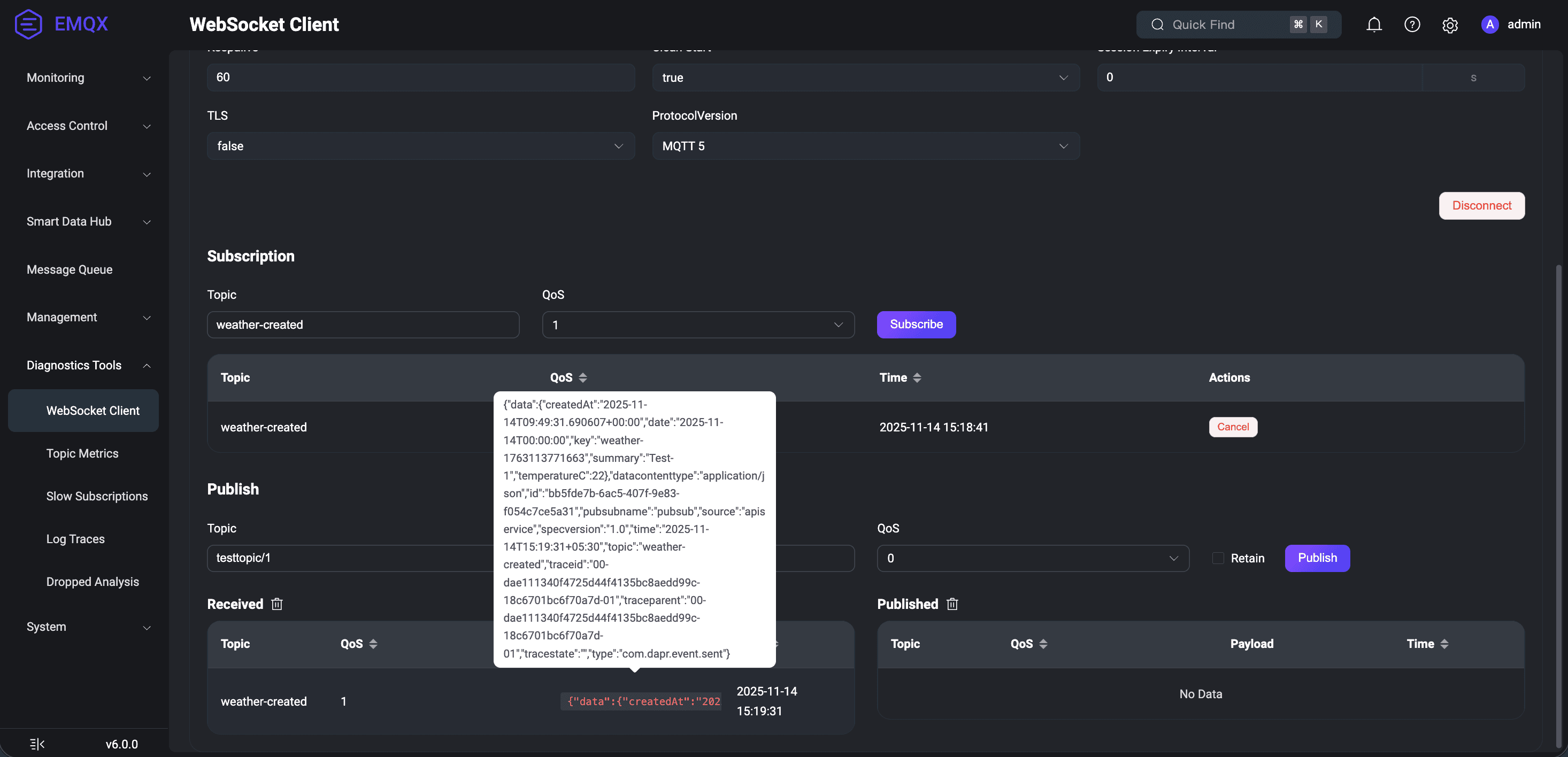
Once you reach the dashboard, navigate to Diagnostic Tools and select WebSocket. Then click the Connect button. After the connection is established, subscribe to the weather-created topic by clicking the Subscribe button. Once subscribed, you should start seeing the messages being captured. Refer to the screenshot below.
Use of Kafka UI
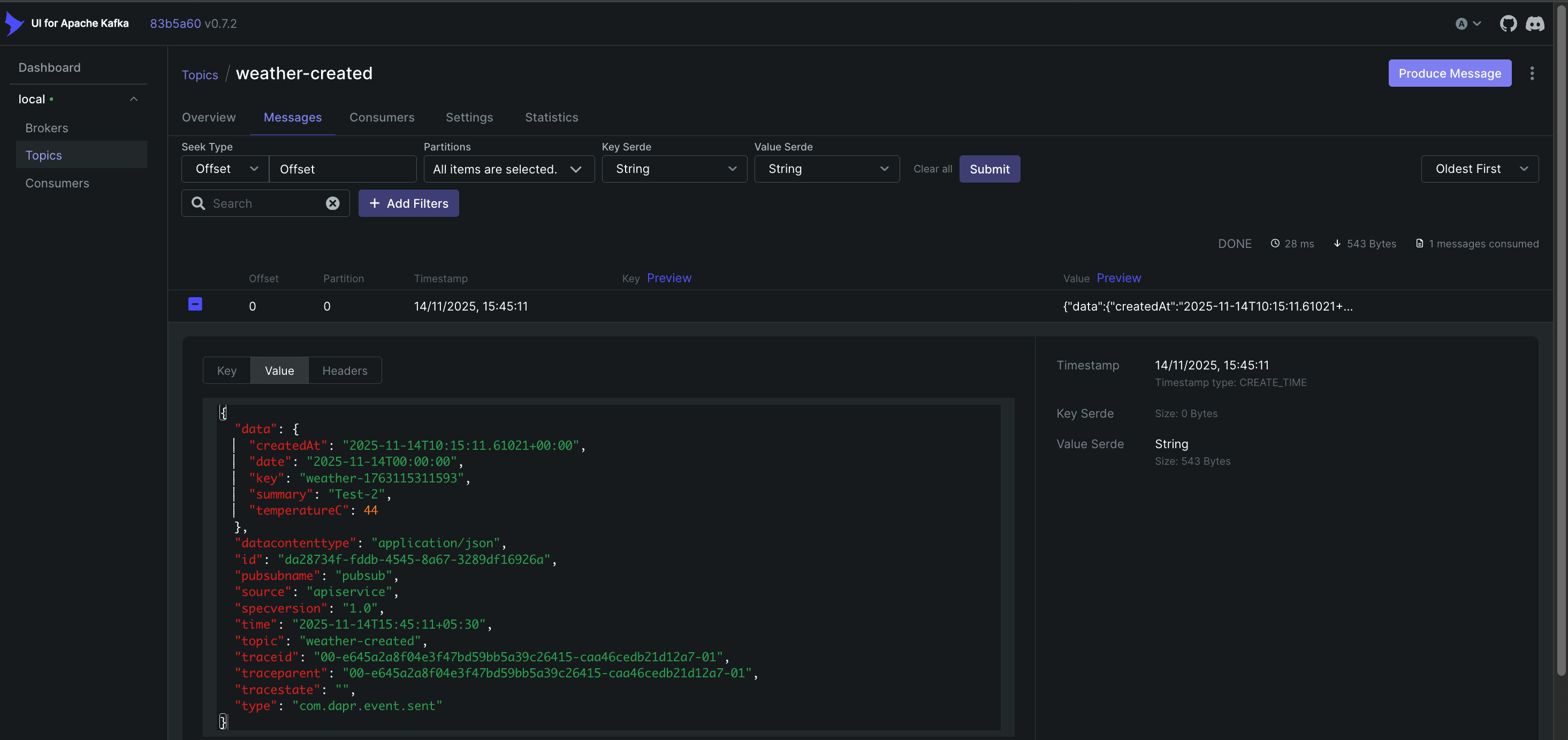
I created another test entry after reseting statestore and configuring Kafka as pub/sub broker, and here is the result. Let’s verify it using the Kafka UI.

Conclusion
Together, these technologies complement each other beautifully. Dapr handles runtime concerns like service communication, state management and pub/sub, while .NET Aspire streamlines the development and deployment workflow. While integrating them does require careful consideration of port management and resource orchestration (as highlighted in this post), the resulting developer experience and application portability make it a compelling combination for building modern distributed applications.