In earlier blog post Dapr - Agent Integrations & .NET Aspire, I talked about how Agent Integrations augments and enhances other agentic frameworks e.g., CrewAI, LangGraph, Strands Agents, Microsoft Agent Framework, Google ADK, OpenAI Agents, Pydantic AI, Deep Agents by providing them with key capabilities that production systems demand.
This blog post walks through building sample demo applications based on the AI Agent Web API (aiagent-webapi) project template, demonstrating how durability is achieved using both Dapr Agent Integrations and Durable Task Scheduler.
The entire setup, including both demo applications and their supporting dashboards such as Diagrid Dashboard, Durable Task Scheduler Dashboard, and Dapr Sidecar is orchestrated and managed through Aspire.
Prerequisites
Solution Structure
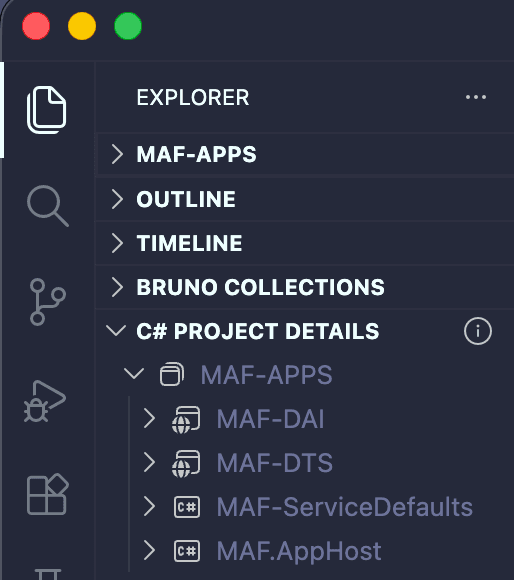
The solution consists of two APIs MAF-DAI (Microsoft Agent Framework - Dapr Agents Integrations) and MAF-DTS (Microsoft Agent Framework - Durable Task Scheduler) along with two supporting projects MAF-ServiceDefaults and MAF-AppHost, which enable Aspire orchestration across both applications.
Refer to the screenshot below for the complete solution structure.
AppHost
With the solution structure in place, let us now proceed to orchestrate MAF-DAI, MAF-DTS, and their associated dashboards. As a prerequisite, ensure both projects references are correctly configured and the NuGet package CommunityToolkit.Aspire.Hosting.Dapr is added to the MAF-AppHost project.
dotnet add package CommunityToolkit.Aspire.Hosting.Dapr --version 13.3.0// AppHost.cs
using CommunityToolkit.Aspire.Hosting.Dapr;
var builder = DistributedApplication.CreateBuilder(args);
builder.AddDapr(options =>
{
options.EnableTelemetry = true;
});
// 01. Dapr - Agent Integrations is used to provide durability
// Diagrid Dashboard
var diagridDashboard = builder.AddContainer("diagrid-dashboard", "ghcr.io/diagridio/diagrid-dashboard", "latest")
.WithHttpEndpoint(8083, 8080, name: "dashboard");
builder.AddProject<Projects.MAF_DAI>("maf-dai")
.WithDaprSidecar("maf-dai")
.WaitFor(diagridDashboard);
// 02. Durable Task Scheduler is used to provide durablity
// Durable Task Scheduler Dashboard
var durableTaskScheduler = builder
.AddContainer("durable-task-scheduler", "mcr.microsoft.com/dts/dts-emulator", "latest")
.WithEndpoint(targetPort: 8080, port: 8080, scheme: "http", name: "scheduler")
.WithEndpoint(targetPort: 8082, port: 8082, scheme: "http", name: "dashboard");
const string durableTaskSchedulerConnectionString =
"Endpoint=http://localhost:8080;TaskHub=default;Authentication=None";
// Agents, Workflows based on Microsoft Agent Framework (MAF)
builder.AddProject<Projects.MAF_DTS>("maf-dts")
.WithEnvironment("DURABLE_TASK_SCHEDULER_CONNECTION_STRING", durableTaskSchedulerConnectionString)
.WaitFor(durableTaskScheduler);
builder.Build().Run();
MAF-DAI
The MAF-DAI project is based on the AI Agent Web API template and code has been modified to support durability via Dapr Agent Integrations. Additionaly an API endpoint been exposed to submit prompts, along with Scalar UI integration for interactive API exploration.
dotnet add package Diagrid.AI.Microsoft.AgentFramework --version 1.0.2dotnet add package Scalar.AspNetCore --version 2.14.1// Program.cs
using System.ClientModel;
using System.ComponentModel;
using Diagrid.AI.Microsoft.AgentFramework.Abstractions;
using Diagrid.AI.Microsoft.AgentFramework.Hosting;
using Microsoft.Agents.AI;
using Microsoft.Agents.AI.DevUI;
using Microsoft.Agents.AI.Hosting;
using Microsoft.Agents.AI.Workflows;
using Microsoft.Extensions.AI;
using OpenAI;
using OpenAI.Chat;
using Scalar.AspNetCore;
var builder = WebApplication.CreateBuilder(args);
builder.AddServiceDefaults();
var chatClient = new ChatClient(
"gpt-4o-mini",
new ApiKeyCredential(builder.Configuration["GITHUB_TOKEN"] ?? throw new InvalidOperationException("Missing configuration: GITHUB_TOKEN")),
new OpenAIClientOptions { Endpoint = new Uri("https://models.inference.ai.azure.com") })
.AsIChatClient();
builder.Services.AddChatClient(chatClient);
builder.AddAIAgent("writer", "You write short stories (300 words or less) about the specified topic.");
builder.AddAIAgent("editor", (sp, key) => new ChatClientAgent(
chatClient,
name: key,
instructions: "You edit short stories to improve grammar and style, ensuring the stories are less than 300 words. Once finished editing, you select a title and format the story for publishing.",
tools: [AIFunctionFactory.Create(FormatStory)]
));
builder.AddWorkflow("publisher", (sp, key) => AgentWorkflowBuilder.BuildSequential(
workflowName: key,
agents:
[
sp.GetRequiredKeyedService<AIAgent>("writer"),
sp.GetRequiredKeyedService<AIAgent>("editor")
]
)).AddAsAIAgent("publisher");
// Register the existing Agents and workflow with Diagrid
builder.Services.AddDaprAgents()
.WithAgent(sp => sp.GetRequiredKeyedService<AIAgent>("writer"))
.WithAgent(sp => sp.GetRequiredKeyedService<AIAgent>("editor"))
.WithAgent(sp => sp.GetRequiredKeyedService<AIAgent>("publisher"));
builder.Services.AddOpenAIResponses();
builder.Services.AddOpenAIConversations();
builder.Services.AddOpenApi();
var app = builder.Build();
app.UseHttpsRedirection();
app.MapOpenAIResponses();
app.MapOpenAIConversations();
app.MapPost("/agent/chat", async (IDaprAgentInvoker invoker, RunRequest request, CancellationToken cancellationToken) =>
{
if (string.IsNullOrWhiteSpace(request.Prompt))
{
return Results.ValidationProblem(new Dictionary<string, string[]>
{
[nameof(request.Prompt)] = ["Prompt is required."]
});
}
try
{
var agent = invoker.GetAgent(request.AgentName);
var result = await invoker.RunAgentAsync(agent, request.Prompt, cancellationToken: cancellationToken);
return Results.Ok(new { agent = request.AgentName, response = (string?)result?.Text ?? result?.ToString() });
}
catch (InvalidOperationException)
{
return Results.BadRequest(new
{
error = $"Unknown agent '{request.AgentName}'.",
availableAgents = new[] { "writer", "editor", "publisher" }
});
}
})
.WithName("RunAgent")
.WithSummary("Runs one of the registered agents.")
.WithDescription("Runs the writer, editor, or publisher agent with the supplied prompt.");
if (builder.Environment.IsDevelopment())
{
app.MapOpenApi();
app.MapScalarApiReference();
app.MapDevUI();
}
app.Run();
[Description("Formats the story for publication, revealing its title.")]
string FormatStory(string title, string story) => $"""
**Title**: {title}
{story}
""";
sealed record RunRequest(string Prompt, string AgentName = "publisher");The below diagram walks through the request lifecycle of the MAF-DAI application, from the Scalar UI to the POST /agent/chat endpoint, where requests are intelligently routed to the writer, editor, or publisher agent via IDaprAgentInvoker, all backed by GitHub Models. The Dapr Agent Integrations layer ensures durable execution, with telemetry data flowing to the Diagrid Dashboard.

MAF-DTS
The MAF-DTS project is based on the AI Agent Web API template and code has been modified to support durability via Durabale Task Scheduler. Additionaly an API endpoint been exposed to submit prompts, along with Scalar UI integration for interactive API exploration.
dotnet add package Microsoft.Agents.AI.DurableTask --version 1.6.1-preview.260514.1
dotnet add package Microsoft.DurableTask.Client.AzureManaged --version 1.24.2
dotnet add package Microsoft.DurableTask.Worker.AzureManaged --version 1.24.2
dotnet add package Scalar.AspNetCore --version 2.14.1// Program.cs
using System.ClientModel;
using System.ComponentModel;
using Microsoft.Agents.AI;
using Microsoft.Agents.AI.DevUI;
using Microsoft.Agents.AI.DurableTask;
using Microsoft.Agents.AI.DurableTask.Workflows;
using Microsoft.Agents.AI.Hosting;
using Microsoft.Agents.AI.Workflows;
using Microsoft.DurableTask.Client.AzureManaged;
using Microsoft.DurableTask.Worker.AzureManaged;
using Microsoft.Extensions.AI;
using OpenAI;
using OpenAI.Chat;
using Scalar.AspNetCore;
var builder = WebApplication.CreateBuilder(args);
builder.AddServiceDefaults();
var chatClient = new ChatClient(
"gpt-4o-mini",
new ApiKeyCredential(builder.Configuration["GITHUB_TOKEN"] ?? throw new InvalidOperationException("Missing configuration: GITHUB_TOKEN")),
new OpenAIClientOptions { Endpoint = new Uri("https://models.inference.ai.azure.com") })
.AsIChatClient();
builder.Services.AddChatClient(chatClient);
var writerAgent = new ChatClientAgent(
chatClient,
name: "writer",
instructions: "You write short stories (300 words or less) about the specified topic.");
var editorAgent = new ChatClientAgent(
chatClient,
name: "editor",
instructions: "You edit short stories to improve grammar and style, ensuring the stories are less than 300 words. Once finished editing, you select a title and format the story for publishing.",
tools: [AIFunctionFactory.Create(FormatStory)]);
var durablePublisherWorkflow = BuildDurablePublisherWorkflow(
workflowName: "publisher",
writerAgent: writerAgent,
editorAgent: editorAgent);
builder.AddAIAgent("writer", (_, _) => writerAgent);
builder.AddAIAgent("editor", (_, _) => editorAgent);
builder.AddWorkflow("publisher", (_, _) => AgentWorkflowBuilder.BuildSequential(
workflowName: "publisher",
agents:
[
writerAgent,
editorAgent
])).AddAsAIAgent("publisher");
builder.Services.AddOpenAIResponses();
builder.Services.AddOpenAIConversations();
builder.Services.AddOpenApi();
if (builder.Environment.IsDevelopment())
{
builder.AddDevUI();
}
var durableTaskSchedulerConnectionString =
builder.Configuration["DurableTaskScheduler:ConnectionString"] ??
Environment.GetEnvironmentVariable("DURABLE_TASK_SCHEDULER_CONNECTION_STRING") ??
"Endpoint=http://localhost:8080;TaskHub=default;Authentication=None";
builder.Services.ConfigureDurableOptions(
options =>
{
options.Agents.AddAIAgents([writerAgent, editorAgent]);
options.Workflows.AddWorkflow(durablePublisherWorkflow);
},
workerBuilder: durableWorkerBuilder =>
durableWorkerBuilder.UseDurableTaskScheduler(durableTaskSchedulerConnectionString),
clientBuilder: durableClientBuilder =>
durableClientBuilder.UseDurableTaskScheduler(durableTaskSchedulerConnectionString));
var app = builder.Build();
app.UseHttpsRedirection();
app.MapOpenAIResponses();
app.MapOpenAIConversations();
string[] availableAgents = ["writer", "editor", "publisher"];
app.MapPost("/agent/chat", async (
IServiceProvider services,
RunRequest request,
CancellationToken cancellationToken) =>
{
if (string.IsNullOrWhiteSpace(request.Prompt))
{
return Results.ValidationProblem(new Dictionary<string, string[]>
{
[nameof(request.Prompt)] = ["Prompt is required."]
});
}
if (!availableAgents.Contains(request.AgentName, StringComparer.OrdinalIgnoreCase))
{
return Results.BadRequest(new
{
error = $"Unknown agent '{request.AgentName}'.",
availableAgents
});
}
if (string.Equals(request.AgentName, "publisher", StringComparison.OrdinalIgnoreCase))
{
var workflowClient = services.GetRequiredService<IWorkflowClient>();
var run = await workflowClient.RunAsync(
durablePublisherWorkflow,
request.Prompt,
runId: null,
cancellationToken: CancellationToken.None);
return Results.Accepted(value: new
{
agent = "publisher",
workflow = durablePublisherWorkflow.Name,
runId = run.RunId,
dashboard = "http://localhost:8082"
});
}
var agent = services
.GetRequiredKeyedService<AIAgent>(request.AgentName)
.AsDurableAgentProxy(services);
var response = await agent.RunAsync(request.Prompt, cancellationToken: cancellationToken);
return Results.Ok(new
{
agent = request.AgentName,
response = response.Text
});
})
.WithName("RunAgent")
.WithSummary("Runs one of the registered agents.")
.WithDescription("Runs writer and editor synchronously, or starts the publisher durable workflow and returns its Durable Task run ID.");
if (builder.Environment.IsDevelopment())
{
app.MapOpenApi();
app.MapScalarApiReference();
app.MapDevUI();
}
app.Run();
[Description("Formats the story for publication, revealing its title.")]
string FormatStory(string title, string story) => $"""
**Title**: {title}
{story}
""";
Workflow BuildDurablePublisherWorkflow(string workflowName, AIAgent writerAgent, AIAgent editorAgent)
{
Func<string, CancellationToken, ValueTask<PublisherDraft>> writerHandler = WriteDraftAsync;
Func<PublisherDraft, CancellationToken, ValueTask<string>> editorHandler = EditDraftAsync;
Func<string, string> outputHandler = OutputMessages;
var writerExecutor = writerHandler.BindAsExecutor("writer");
var editorExecutor = editorHandler.BindAsExecutor("editor");
var outputExecutor = outputHandler.BindAsExecutor("OutputMessages");
return new WorkflowBuilder(writerExecutor)
.AddEdge(writerExecutor, editorExecutor)
.AddEdge(editorExecutor, outputExecutor)
.WithName(workflowName)
.WithOutputFrom(outputExecutor)
.Build();
async ValueTask<PublisherDraft> WriteDraftAsync(string prompt, CancellationToken cancellationToken)
{
var writerResponse = await writerAgent.RunAsync(prompt, cancellationToken: cancellationToken);
return new PublisherDraft(writerResponse.Text ?? string.Empty);
}
async ValueTask<string> EditDraftAsync(PublisherDraft draft, CancellationToken cancellationToken)
{
var editorResponse = await editorAgent.RunAsync(draft.Draft, cancellationToken: cancellationToken);
return editorResponse.Text ?? string.Empty;
}
string OutputMessages(string message) => message;
}
sealed record RunRequest(string Prompt, string AgentName = "publisher");
sealed record PublisherDraft(string Draft);The diagram walks through the complete request lifecycle of the MAF-DTS application, from the Scalar UI to the POST /agent/chat endpoint, where incoming requests are intelligently routed based on the agent name. Writer and editor agents are served through a durable agent proxy, ensuring reliable and durable execution against GitHub Models. For publisher requests, the flow is delegated to IWorkflowClient, which drives workflow orchestration through the Durable Task Scheduler, the core durability layer of the application. Telemetry from the Durable Task Scheduler is continuously streamed to the DTS Dashboard, providing real-time visibility into workflow execution.

Firing It Up
With all the pieces in place, we are now ready to run both applications and observe their behavior in action.
aspire run
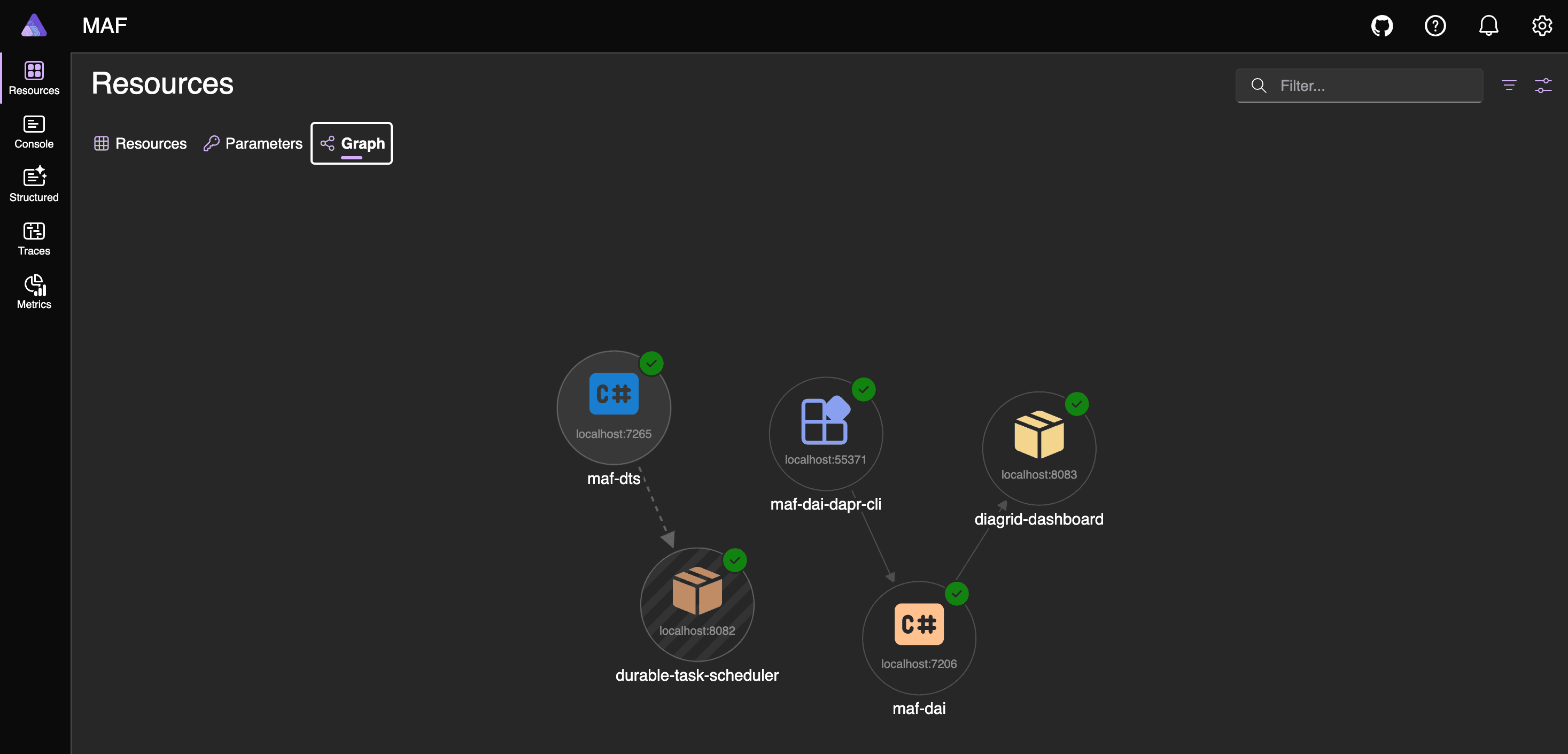
The Aspire dashboard provides quick access to the Diagrid Dashboard, DTS Dashboard, and both APIs. Note that the Dev UI is launched by default for APIs switch to Scalar, simply update the respective URL in the browser.
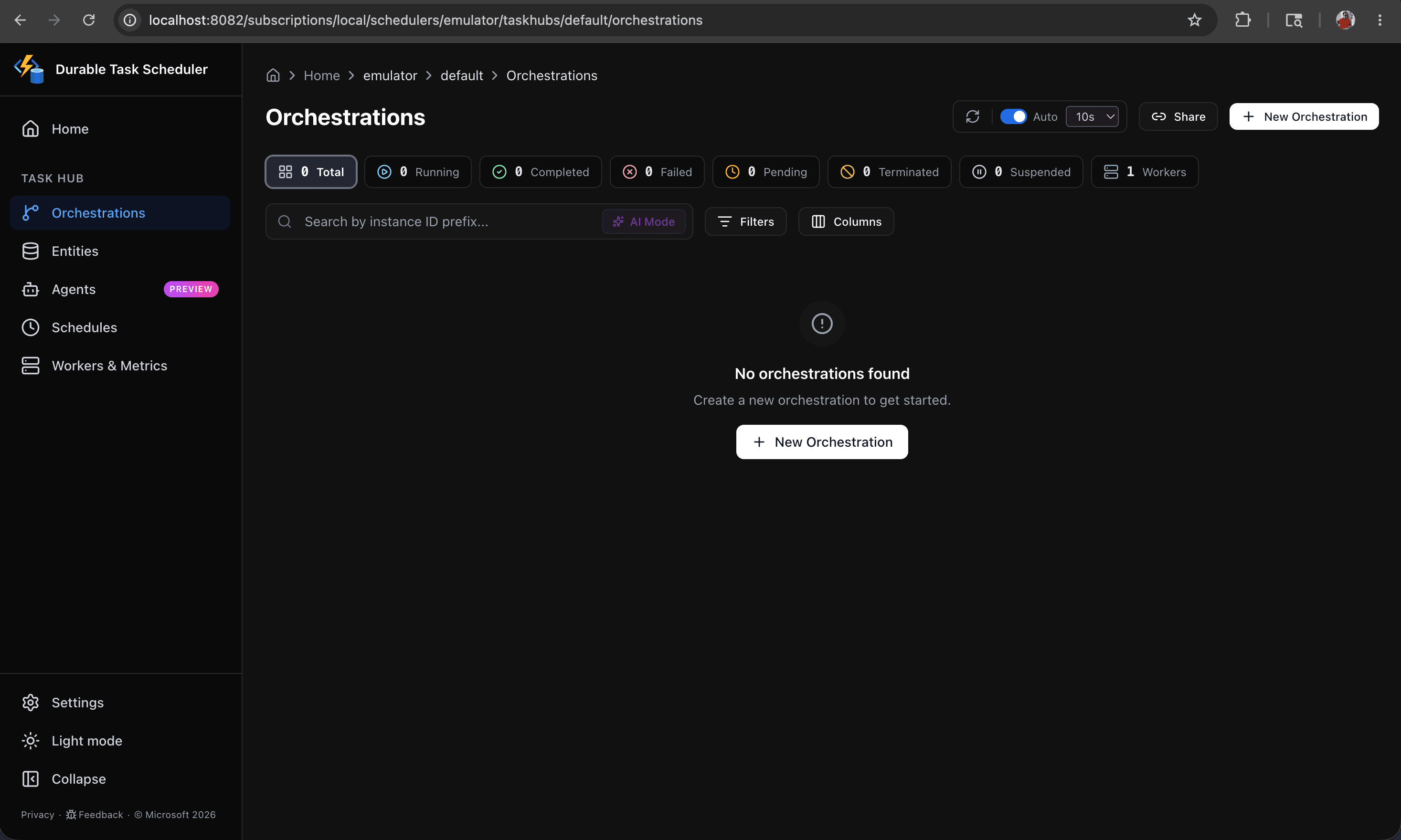
On the initial run, it is expected that both dashboards will have no entries — this is normal, as no requests have been submitted yet.


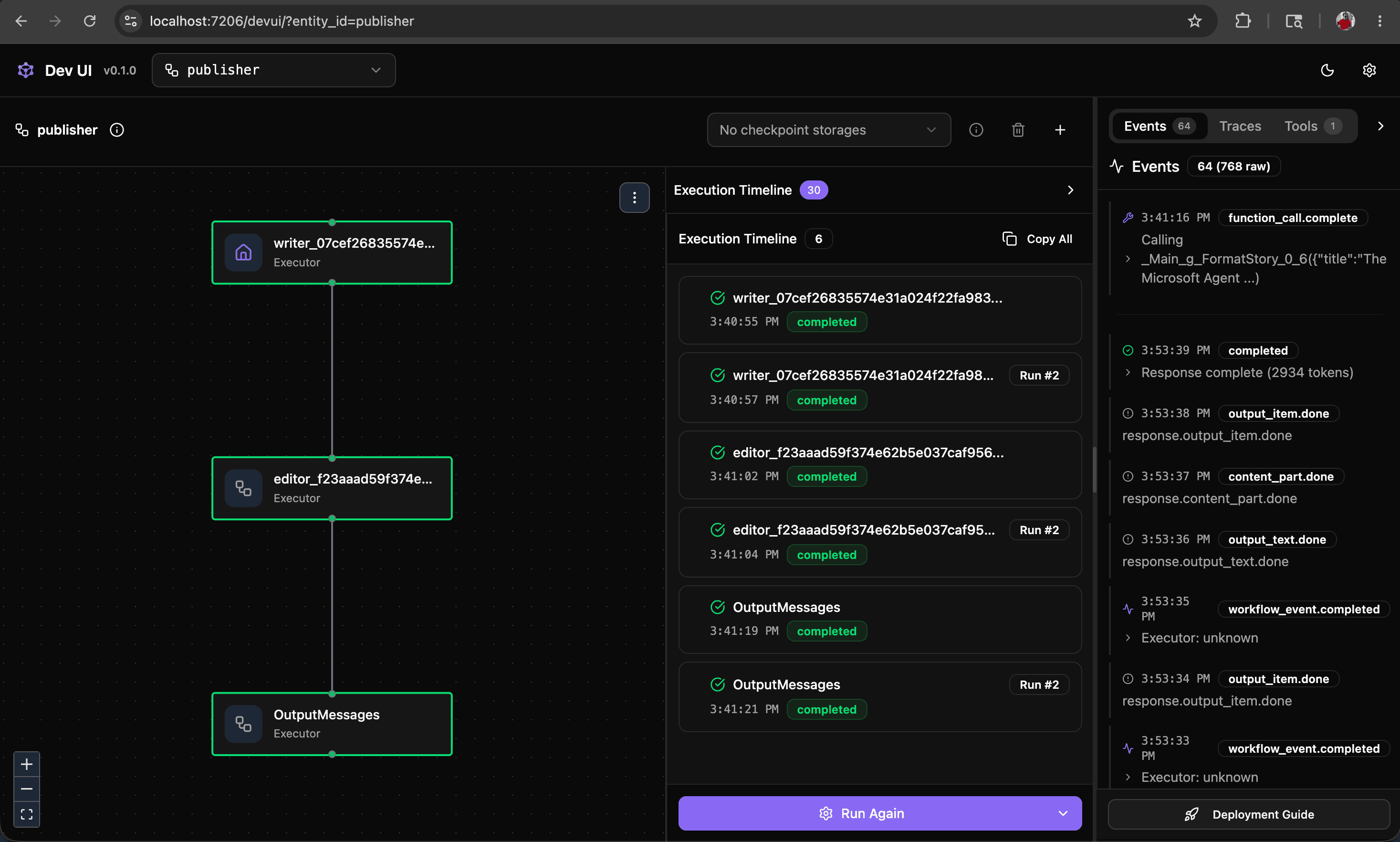
NOTE: While the Dev UI can be used to submit prompts and explore the application's behavior, note that no entries will be reflected in either dashboard.
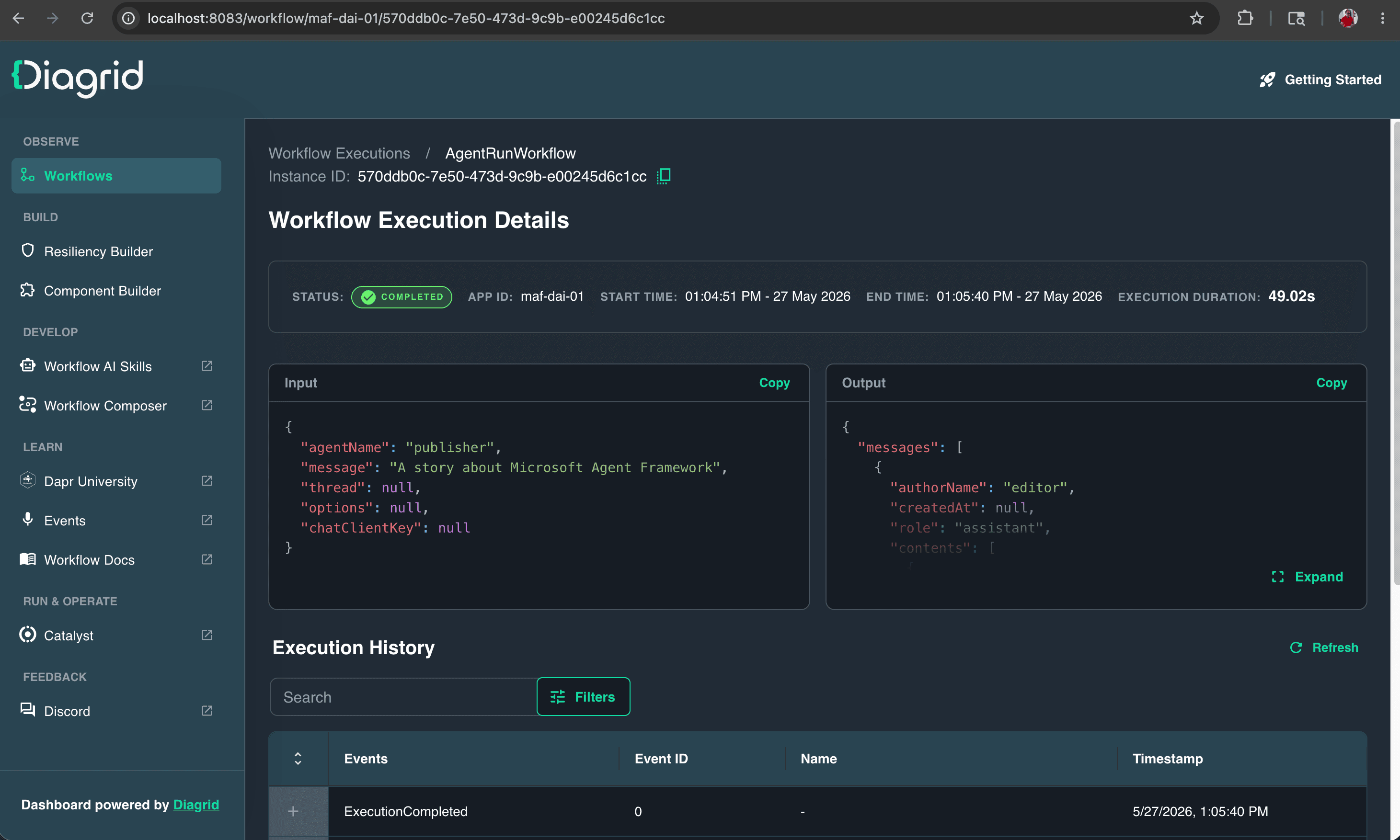
The screenshots below capture the end-to-end execution of MAF-DAI, with the resulting data visible in the Diagrid Dashboard.


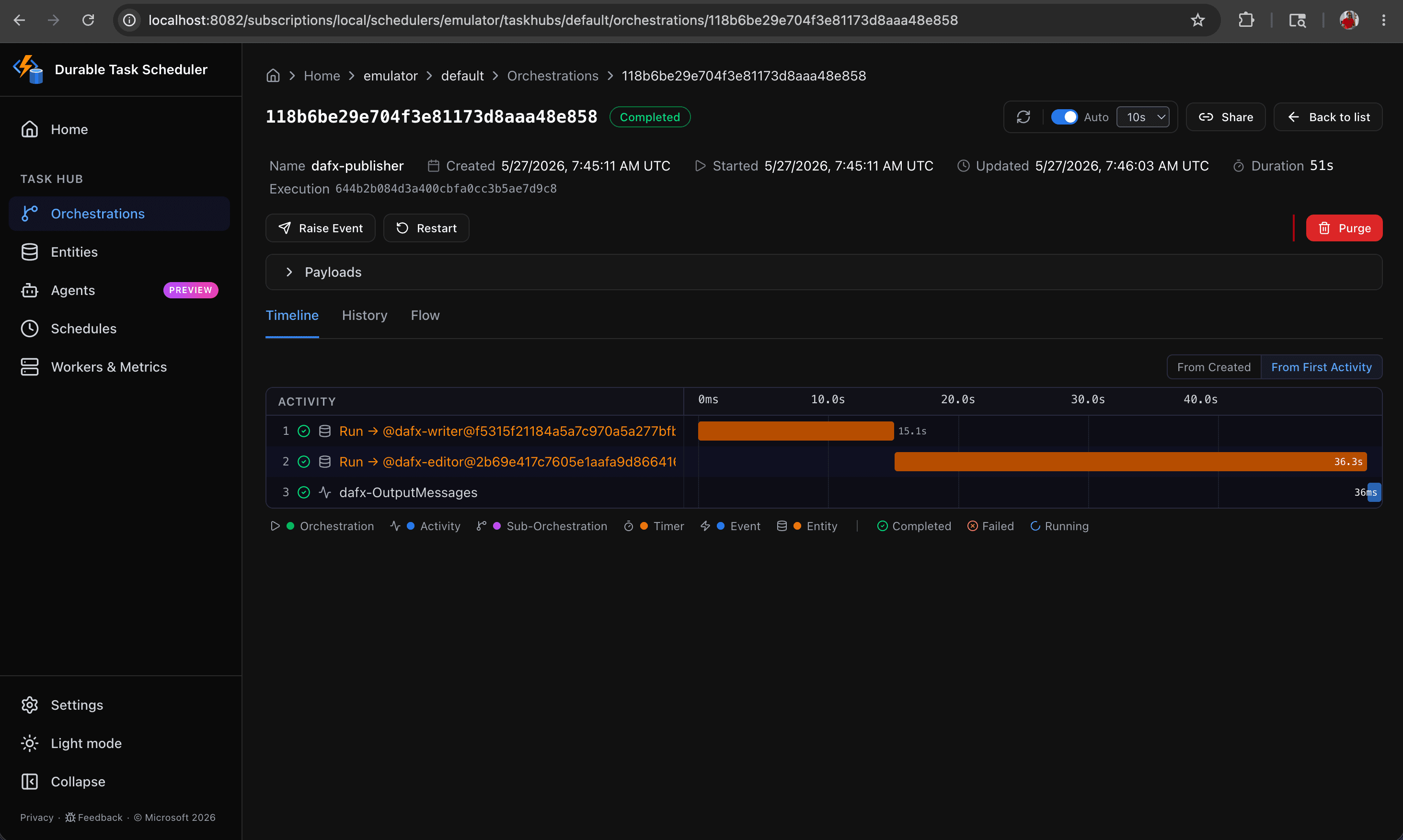
The screenshots below capture the end-to-end execution of MAF-DTS, with the resulting data visible in the DTS Dashboard.


NOTE: To put durability to the test, you can interrupt the application either manually or programmatically and observe how seamlessly the implementation recovers from the interruption. From Aspire dashboard, click Stop resource option to interrupt the resource, and click Start resource to resume and watch the implementation pick up exactly where it left off.
IMPORTANT: It is worth noting that the Diagrid Dashboard persists each execution outcome, backed by a locally running Redis instance. The Durable Task Scheduler, however, does not persist execution data out of the box.
Comparison DAI vs DTS
This blog presents a structured comparison of Dapr Agent Integrations (DAI) and Durabale Task Scheduler (DTS), two approaches to supporting durabality in applications built on the Microsoft Agent Framework (MAF).
Dapr Agent Integrations (DAI) stands out as the more pragmatic and developer-friendly choice, requiring just a single NuGet package and as few as 2–3 additional lines of code to achieve full durability. The Durable Task Scheduler (DTS), by contrast, remains in preview and introduces measurable code overhead, demanding three NuGet packages, significant code restructure, and considerably more complexity to achieve the same outcome.
Conclusion
DAI wins today. A single NuGet package, 2–3 lines of code, and full durability. No restructuring, no heavy dependencies, no preview caveats. For any team building on the Microsoft Agent Framework, DAI is the path of least resistance and the highest confidence. DTS is one to watch. Its preview status and complexity make it premature for production adoption right now. Revisit it when it reaches general availability. Until then, ship with DAI.