This blog post demonstrates how to use Diagrid Catalyst, which manages Dapr sidecars and the control plane, enabling you to focus on building distributed applications. In other words, Diagrid Catalyst is Dapr offered as a managed service that removes infrastructure complexity and provides built-in observability, security, and developer-friendly APIs for distributed systems. To learn more, you can visit the Diagrid Catalyst.
The blog post starts with a simple application based on the .NET Aspire project template and gradually progresses through multiple stages, including local applications with local Dapr, local applications with Catalyst-managed Dapr, and KinD workloads with cluster-side Dapr injection, ultimately ending with KinD workloads with Catalyst-managed Dapr. This structured approach helps readers understand the key differences and benefits of each setup, as well as how Dapr, Catalyst, and .NET Aspire make distributed application development easier.
Prerequisites
- Dapr - Dapr is a portable, event-driven runtime that makes it easy for any developer to build resilient, stateless, and stateful applications that run on the cloud and edge and embraces the diversity of languages and developer frameworks.
- Aspire - Aspire gives you a unified, code-first toolkit to compose, debug, and deploy distributed apps and agents, all from a single AppHost.
- Docker Desktop - Docker Desktop enhances your development experience by offering a powerful, user-friendly platform for container management.
- KinD - KinD is a tool for running local Kubernetes clusters using Docker container “nodes”.
- Helm - Helm helps you manage Kubernetes applications — Helm Charts help you define, install, and upgrade even the most complex Kubernetes application.
- Headlamp - Headlamp is a user-friendly Kubernetes UI focused on extensibility
- Diagrid CLI - The Diagrid CLI allows you to manage and interact with your Catalyst resources.
- Diagrid Catalyst Account - Start with the free trial to evaluate developer experience.
Demo App
The demo app is based on the Aspire starter template, which includes a frontend (ASP.NET Core Blazor App), a backend (ASP.NET Core Minimal API), Service Defaults, and an AppHost project to demonstrate Aspire's capabilities.
dotnet new aspire-starter --output Aspire-Dapr-CatalystOnce the demo application is created successfully, you can run it using the command below.
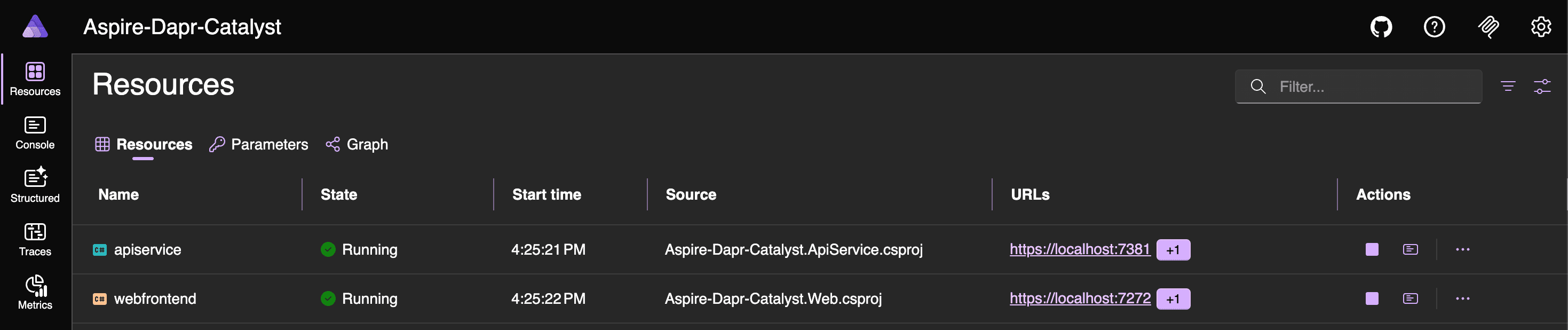
aspire runWhen the app starts, you can open the dashboard using the URL shown in the host section of the terminal window. The dashboard includes Resources, Console Logs, Structured Logs, Traces, and Metrics.
Dapr-ization of the App
Let's start by installing the Dapr CLI and setting up the local environment.
# Install via Homebrew
brew install dapr/tap/dapr-cli
# Verify the installation
dapr -hTo initialize Dapr in your local environment, use the Dapr CLI. This process fetches and installs the Dapr sidecar binaries locally and creates a development environment that streamlines application development with Dapr. The recommended development environment requires Docker. Although you can initialize Dapr without Docker, this blog post uses Docker.
Dapr initialization includes
- Running a Redis container instance to be used as a local state store and message broker.
- Running a Zipkin container instance for observability.
- Creating a default components folder with component definitions for the above.
- Running a Dapr placement service container instance for local actor support.
- Running a Dapr scheduler service container instance for job scheduling.
# self-hosted mode
dapr init
Note: You can use different flags with the dapr init command. To see the supported flags, run dapr init -h.
# Verify Dapr Version
dapr -v
CLI version: 1.16.5
Runtime version: 1.17.2The dapr init command launches several containers that help you get started. You can check their status using the command below or in the Docker dashboard.
docker ps --filter "name=dapr" --format "table {{.Names}}\t{{.Image}}\t{{.Status}}\t{{.Ports}}"NAMES IMAGE STATUS PORTS
dapr_zipkin openzipkin/zipkin Up 3 days (healthy) 0.0.0.0:9411->9411/tcp, [::]:9411->9411/tcp
dapr_placement daprio/dapr:1.17.2 Up 3 days 0.0.0.0:50005->50005/tcp, [::]:50005->50005/tcp, 0.0.0.0:58080->8080/tcp, [::]:58080->8080/tcp, 0.0.0.0:59090->9090/tcp, [::]:59090->9090/tcp
dapr_scheduler daprio/dapr:1.17.2 Up 3 days 0.0.0.0:2379->2379/tcp, [::]:2379->2379/tcp, 0.0.0.0:50006->50006/tcp, [::]:50006->50006/tcp, 0.0.0.0:58081->8080/tcp, [::]:58081->8080/tcp, 0.0.0.0:59091->9090/tcp, [::]:59091->9090/tcp
dapr_redis redis:6 Up 3 days 0.0.0.0:6379->6379/tcp, [::]:6379->6379/tcpAs both the Aspire-Based App and Dapr development environment are now ready, you can start Dapr-ization of the application.
Run the command below to add the CommunityToolKit.Aspire.Hosting.Dapr Package to the Aspire-Dapr-Catalyst.AppHost project.
dotnet add package CommunityToolKit.Aspire.Hosting.DaprAfter adding the package, update the Program.cs file using the code snippets below.
// Program.cs
var builder = DistributedApplication.CreateBuilder(args);

var apiService = builder.AddProject<Projects.Aspire_Dapr_Catalyst_ApiService>("apiservice")
    .WithHttpHealthCheck("/health")
    .WithDaprSidecar();

builder.AddProject<Projects.Aspire_Dapr_Catalyst_Web>("webfrontend")
    .WithExternalHttpEndpoints()
    .WithHttpHealthCheck("/health")
    .WaitFor(apiService)
    .WithDaprSidecar();

builder.Build().Run();
Also update the Program.cs file of the web application using the code snippets below.
// Program.cs
using Aspire_Dapr_Catalyst.Web;
using Aspire_Dapr_Catalyst.Web.Components;

var builder = WebApplication.CreateBuilder(args);

// Add service defaults & Aspire client integrations.
builder.AddServiceDefaults();

// Add services to the container.
builder.Services.AddRazorComponents()
    .AddInteractiveServerComponents();

builder.Services.AddOutputCache();

builder.Services.AddHttpClient<WeatherApiClient>(client =>
{
    var daprPort = builder.Configuration["DAPR_HTTP_PORT"];

    if (string.IsNullOrWhiteSpace(daprPort))
    {
        throw new InvalidOperationException(
            "DAPR_HTTP_PORT is not configured. Start the web app with a Dapr sidecar.");
    }

    client.BaseAddress = new Uri($"http://127.0.0.1:{daprPort}/v1.0/invoke/apiservice/method/");
});

var app = builder.Build();

if (!app.Environment.IsDevelopment())
{
    app.UseExceptionHandler("/Error", createScopeForErrors: true);
    // The default HSTS value is 30 days. You may want to change this for production scenarios, see https://aka.ms/aspnetcore-hsts.
    app.UseHsts();
}

app.UseHttpsRedirection();

app.UseAntiforgery();

app.UseOutputCache();

app.MapStaticAssets();

app.MapRazorComponents<App>()
    .AddInteractiveServerRenderMode();

app.MapDefaultEndpoints();

app.Run();
Note: Dapr uses the sidecar pattern to run alongside your application. The Dapr sidecar is a lightweight, portable, and stateless HTTP server that listens for incoming HTTP requests from your app.
Now run the application with the command below to verify that the Dapr sidecars are working correctly.
aspire runWhen the app starts, open the dashboard using the URL shown in the host section of the terminal window. You will see two additional resources: apiservice-dapr-cli and webfrontend-dapr-cli, which correspond to the Dapr sidecars.


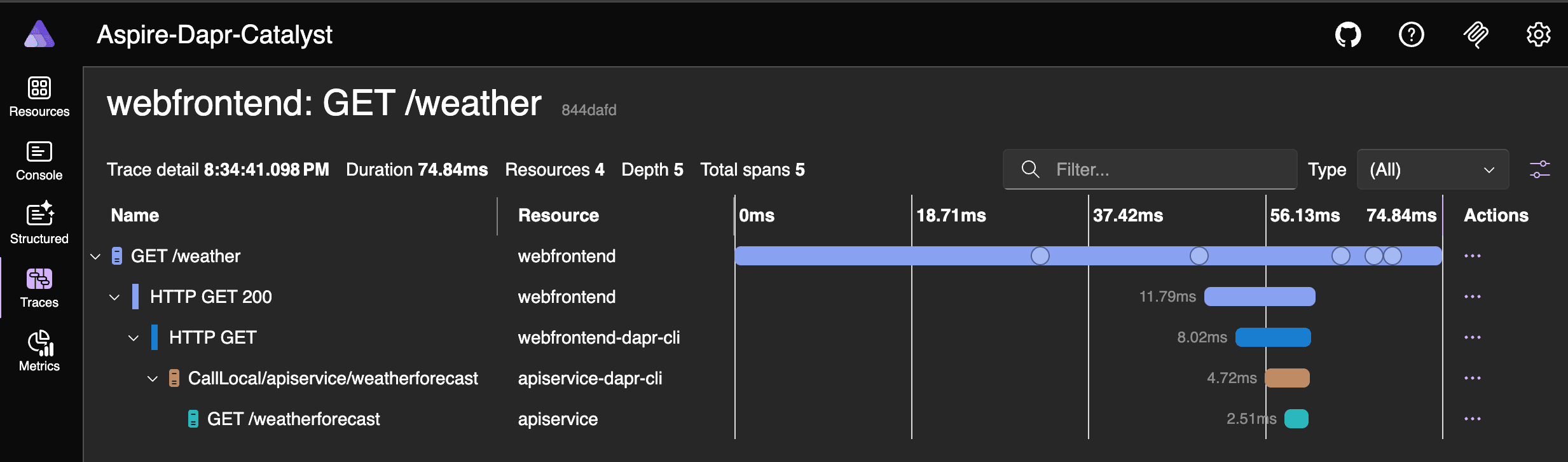
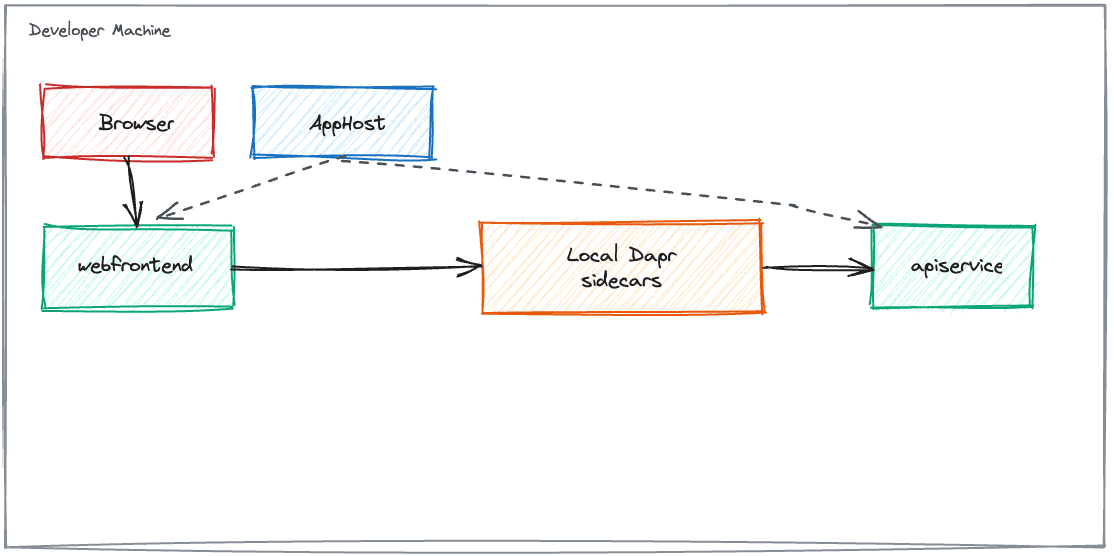
This shows local applications with local Dapr sidecars, as illustrated in the diagram below.
Next, let’s look at local applications with Catalyst-managed Dapr. Start by creating an account on Diagrid Catalyst and installing the Diagrid CLI.
curl -o- https://downloads.diagrid.io/cli/install.sh | bashOnce installed, you can run the following command to learn how to use it.
diagrid -h

██████╗ ██╗ █████╗  ██████╗ ██████╗ ██╗██████╗
██╔══██╗██║██╔══██╗██╔════╝ ██╔══██╗██║██╔══██╗
██║  ██║██║███████║██║  ███╗██████╔╝██║██║  ██║
██║  ██║██║██╔══██║██║   ██║██╔══██╗██║██║  ██║
██████╔╝██║██║  ██║╚██████╔╝██║  ██║██║██████╔╝
╚═════╝ ╚═╝╚═╝  ╚═╝ ╚═════╝ ╚═╝  ╚═╝╚═╝╚═════╝
────────────────────────────────────────────────
Diagrid Cloud CLI [version: 1.21.0]

Current product is "catalyst" on "free" plan.
To switch to "conductor", run:
	> diagrid product use conductor

Usage:
  diagrid [command]

Region Commands:
  region         Manage regions

Project Commands:
  apply          Apply declarative configuration
  project        Manage projects
  agent          Manage AI Agents
  appid          Manage App IDs
  component      Manage components
  configuration  Manage Dapr configurations
  export         Export resources to Dapr manifests
  httpendpoint   Manage Dapr HTTP endpoints
  resiliency     Manage resiliencies
  subscription   Manage pub/sub topic subscriptions
  workflow       Explore workflow executions

Managed Services Commands:
  kv             Manage Diagrid KV (Key-Value) Stores
  pubsub         Manage Diagrid Pub/Sub Services

Local Development Commands:
  call           Call commands to invoke the Catalyst APIs directly
  dev            Run and connect code to the Catalyst APIs for development
  listen         Establish a local app connection from an App ID to your terminal to stream incoming requests

Operations & Diagnostics Commands:
  diagnose       Capture detailed Catalyst diagnostic information from your Kubernetes cluster

Administration Commands:
  serviceaccount Manage service accounts
  apikey         Manage API Keys
  auth           Show context information about the current logged in user
  completion     Generate autocompletion scripts for [bash, zsh, fish, powershell | psh]
  login          Log into Diagrid Cloud
  logout         Log out of Diagrid Cloud
  org            Manage the user's organizations
  product        Switch the current user's product [catalyst, conductor]
  update         Update the Diagrid CLI to the latest version
  user           Manage the users within an organization
  version        Get the CLI version
  web            Load the web console
  whoami         Show context information about the current logged in user
  help           Help about any command

Flags:
  -h, --help   help for diagrid

Use "diagrid [command] --help" for more information about a command.
Use the following commands to log in and verify a successful login, including your organization, user, product, and API details.
diagrid logindiagrid whoamiNext, add the Diagrid.Aspire.Hosting.Catalyst NuGet package to the AppHost project to enable seamless integration between your locally running Aspire applications and the live Diagrid Catalyst infrastructure.
dotnet add package Diagrid.Aspire.Hosting.Catalyst --version 0.0.5Because the application can run in four modes, the AppHost.cs logic is organized across multiple files.
// AppHost.cs
using Aspire_Dapr_Catalyst.ServiceDefaults;

var builder = DistributedApplication.CreateBuilder(args);
var appHostSettings = AppHostSettings.Create(builder);

var apiService = builder.AddProject<Projects.Aspire_Dapr_Catalyst_ApiService>(AppResourceNames.ApiService)
    .WithHttpHealthCheck("/health");

var webFrontend = builder.AddProject<Projects.Aspire_Dapr_Catalyst_Web>(AppResourceNames.WebFrontend)
    .WithExternalHttpEndpoints()
    .WithHttpHealthCheck("/health")
    .WithReference(apiService)
    .WaitFor(apiService);

// AppHost mode map:
// 1. aspire run
// 2. DAPR_EXECUTION_MODE=catalyst aspire run
// 3. aspire publish --non-interactive -o Aspire-Dapr-Catalyst.AppHost/aspire-output
// 4. DAPR_EXECUTION_MODE=catalyst aspire publish --non-interactive -o Aspire-Dapr-Catalyst.AppHost/aspire-output

LocalAppHostConfigurator.ConfigureServiceExecution(builder, appHostSettings, apiService, webFrontend);
LocalAppHostConfigurator.ConfigureLocalOtelServiceNames(appHostSettings, apiService, webFrontend);

KubernetesPublishingConfigurator.Configure(builder, appHostSettings, apiService, webFrontend);

builder.Build().Run();
// LocalAppHostConfigurator.cs
using Aspire_Dapr_Catalyst.ServiceDefaults;
using CommunityToolkit.Aspire.Hosting.Dapr;
using Diagrid.Aspire.Hosting.Catalyst;
internal static class LocalAppHostConfigurator
{
// Applies only to the two local run modes:
// 1. local Dapr sidecars
// 2. local Catalyst-managed Dapr
public static void ConfigureServiceExecution(
IDistributedApplicationBuilder builder,
AppHostSettings appHostSettings,
IResourceBuilder<ProjectResource> apiService,
IResourceBuilder<ProjectResource> webFrontend)
{
if (appHostSettings.IsPublishMode)
{
return;
}
if (appHostSettings.UseCatalyst)
{
builder.AddCatalystProject(appHostSettings.CatalystProjectName);
apiService
.WithCatalyst()
.WithEnvironment(AppEnvironmentVariables.DaprExecutionMode, ExecutionModes.Catalyst);
webFrontend
.WithCatalyst()
.WithEnvironment(AppEnvironmentVariables.DaprExecutionMode, ExecutionModes.Catalyst);
return;
}
apiService.WithDaprSidecar(CreateDaprSidecarOptions(AppResourceNames.ApiService));
webFrontend.WithDaprSidecar(CreateDaprSidecarOptions(AppResourceNames.WebFrontend));
}
// Applies only to the two local run modes.
// It does not turn tracing on; it only keeps local OTEL service names aligned with publish mode.
public static void ConfigureLocalOtelServiceNames(
AppHostSettings appHostSettings,
IResourceBuilder<ProjectResource> apiService,
IResourceBuilder<ProjectResource> webFrontend)
{
if (appHostSettings.IsPublishMode)
{
return;
}
apiService
.WithEnvironment(
AppEnvironmentVariables.OtelServiceName,
AppTelemetryConventions.GetServiceName(AppResourceNames.ApiService));
webFrontend
.WithEnvironment(
AppEnvironmentVariables.OtelServiceName,
AppTelemetryConventions.GetServiceName(AppResourceNames.WebFrontend));
}
// Applies only to mode 1, where AppHost starts local Dapr sidecars.
private static DaprSidecarOptions CreateDaprSidecarOptions(string appId) => new()
{
AppId = appId
};
}// AppHostSettings.cs
using Aspire_Dapr_Catalyst.ServiceDefaults;
// Shared across all four AppHost modes. Member comments call out narrower scope where useful.
internal sealed class AppHostSettings
{
private const string DefaultCatalystProjectName = "aspire-dapr-catalyst";
// True only for modes 3 and 4.
public bool IsPublishMode { get; private init; }
// True only for modes 2 and 4.
public bool UseCatalyst { get; private init; }
// Used only when Catalyst mode is active in mode 2 or 4.
public string CatalystProjectName { get; private init; } = DefaultCatalystProjectName;
public static AppHostSettings Create(IDistributedApplicationBuilder builder)
{
var executionMode = builder.Configuration[AppEnvironmentVariables.DaprExecutionMode];
var catalystProjectName = builder.Configuration[AppEnvironmentVariables.CatalystProjectName];
var isPublishMode = builder.ExecutionContext.IsPublishMode;
return new AppHostSettings
{
IsPublishMode = isPublishMode,
UseCatalyst = string.Equals(executionMode, ExecutionModes.Catalyst, StringComparison.OrdinalIgnoreCase),
CatalystProjectName = string.IsNullOrWhiteSpace(catalystProjectName)
? DefaultCatalystProjectName
: catalystProjectName.Trim()
};
}
}// AppHostComputeEnvironmentNames.cs
internal static class AppHostComputeEnvironmentNames
{
// Used only by modes 3 and 4.
public const string Kubernetes = "k8s";
}// AppTelemetryConventions.cs
internal static class AppTelemetryConventions
{
// Shared naming convention for local runs and published workloads.
public static string GetServiceName(string appId) => $"{appId}-app";
}To enable the use of AppResourceNames, AppEnvironmentVariables, and ExecutionModes across projects, they are added to the ServiceDefaults project, along with minor changes to the extension file. The following code snippets demonstrate the implementation.
// AppModel.cs
namespace Aspire_Dapr_Catalyst.ServiceDefaults;

// Shared identifiers used across the AppHost and app projects.
public static class AppResourceNames
{
    public const string ApiService = "apiservice";
    public const string WebFrontend = "webfrontend";
}

// Shared configuration keys injected or consumed across the solution.
public static class AppEnvironmentVariables
{
    public const string DaprExecutionMode = "DAPR_EXECUTION_MODE";
    public const string DaprHttpEndpoint = "DAPR_HTTP_ENDPOINT";
    public const string DaprGrpcEndpoint = "DAPR_GRPC_ENDPOINT";
    public const string DaprApiToken = "DAPR_API_TOKEN";
    public const string CatalystProjectName = "CATALYST_PROJECT_NAME";
    public const string DataProtectionKeysPath = "DATA_PROTECTION_KEYS_PATH";
    public const string OtelExporterOtlpEndpoint = "OTEL_EXPORTER_OTLP_ENDPOINT";
    public const string OtelExporterOtlpProtocol = "OTEL_EXPORTER_OTLP_PROTOCOL";
    public const string OtelServiceName = "OTEL_SERVICE_NAME";
}

public static class ExecutionModes
{
    public const string Catalyst = "catalyst";
}
// Extensions.cs
using Microsoft.AspNetCore.Builder;
using Microsoft.AspNetCore.Diagnostics.HealthChecks;
using Microsoft.Extensions.DependencyInjection;
using Microsoft.Extensions.Diagnostics.HealthChecks;
using Microsoft.Extensions.Logging;
using Microsoft.Extensions.ServiceDiscovery;
using OpenTelemetry;
using OpenTelemetry.Exporter;
using OpenTelemetry.Logs;
using OpenTelemetry.Metrics;
using OpenTelemetry.Trace;
namespace Microsoft.Extensions.Hosting;
// Adds common Aspire services: service discovery, resilience, health checks, and OpenTelemetry.
// This project should be referenced by each service project in your solution.
// To learn more about using this project, see https://aka.ms/dotnet/aspire/service-defaults
public static class Extensions
{
private const string HealthEndpointPath = "/health";
private const string AlivenessEndpointPath = "/alive";
public static TBuilder AddServiceDefaults<TBuilder>(this TBuilder builder) where TBuilder : IHostApplicationBuilder
{
builder.ConfigureOpenTelemetry();
builder.AddDefaultHealthChecks();
builder.Services.AddServiceDiscovery();
builder.Services.ConfigureHttpClientDefaults(http =>
{
// Turn on resilience by default
http.AddStandardResilienceHandler();
// Turn on service discovery by default
http.AddServiceDiscovery();
});
// Uncomment the following to restrict the allowed schemes for service discovery.
// builder.Services.Configure<ServiceDiscoveryOptions>(options =>
// {
// options.AllowedSchemes = ["https"];
// });
return builder;
}
public static TBuilder ConfigureOpenTelemetry<TBuilder>(this TBuilder builder) where TBuilder : IHostApplicationBuilder
{
var useOtlpExporter = !string.IsNullOrWhiteSpace(
builder.Configuration[Aspire_Dapr_Catalyst.ServiceDefaults.AppEnvironmentVariables.OtelExporterOtlpEndpoint]);
builder.Logging.AddOpenTelemetry(logging =>
{
logging.IncludeFormattedMessage = true;
logging.IncludeScopes = true;
if (useOtlpExporter)
{
logging.AddOtlpExporter();
}
});
builder.Services.AddOpenTelemetry()
.WithMetrics(metrics =>
{
metrics.AddAspNetCoreInstrumentation()
.AddHttpClientInstrumentation()
.AddRuntimeInstrumentation();
})
.WithTracing(tracing =>
{
tracing.AddSource(builder.Environment.ApplicationName)
.AddAspNetCoreInstrumentation(tracing =>
// Exclude health check requests from tracing
tracing.Filter = context =>
!context.Request.Path.StartsWithSegments(HealthEndpointPath)
&& !context.Request.Path.StartsWithSegments(AlivenessEndpointPath)
)
// Uncomment the following line to enable gRPC instrumentation (requires the OpenTelemetry.Instrumentation.GrpcNetClient package)
//.AddGrpcClientInstrumentation()
.AddHttpClientInstrumentation();
});
builder.AddOpenTelemetryExporters();
return builder;
}
private static TBuilder AddOpenTelemetryExporters<TBuilder>(this TBuilder builder) where TBuilder : IHostApplicationBuilder
{
var useOtlpExporter = !string.IsNullOrWhiteSpace(
builder.Configuration[Aspire_Dapr_Catalyst.ServiceDefaults.AppEnvironmentVariables.OtelExporterOtlpEndpoint]);
if (useOtlpExporter)
{
builder.Services.AddOpenTelemetry()
.WithMetrics(metrics => metrics.AddOtlpExporter())
.WithTracing(tracing => tracing.AddOtlpExporter());
}
// Uncomment the following lines to enable the Azure Monitor exporter (requires the Azure.Monitor.OpenTelemetry.AspNetCore package)
//if (!string.IsNullOrEmpty(builder.Configuration["APPLICATIONINSIGHTS_CONNECTION_STRING"]))
//{
// builder.Services.AddOpenTelemetry()
// .UseAzureMonitor();
//}
return builder;
}
public static TBuilder AddDefaultHealthChecks<TBuilder>(this TBuilder builder) where TBuilder : IHostApplicationBuilder
{
builder.Services.AddHealthChecks()
// Add a default liveness check to ensure app is responsive
.AddCheck("self", () => HealthCheckResult.Healthy(), ["live"]);
return builder;
}
public static WebApplication MapDefaultEndpoints(this WebApplication app)
{
// Adding health checks endpoints to applications in non-development environments has security implications.
// See https://aka.ms/dotnet/aspire/healthchecks for details before enabling these endpoints in non-development environments.
if (app.Environment.IsDevelopment())
{
// All health checks must pass for app to be considered ready to accept traffic after starting
app.MapHealthChecks(HealthEndpointPath);
// Only health checks tagged with the "live" tag must pass for app to be considered alive
app.MapHealthChecks(AlivenessEndpointPath, new HealthCheckOptions
{
Predicate = r => r.Tags.Contains("live")
});
}
return app;
}
}The following changes have been applied to the Program.cs file of the web application to enable support for all four modes.
// Program.cs
using Aspire_Dapr_Catalyst.Web;
using Aspire_Dapr_Catalyst.Web.Components;
using Aspire_Dapr_Catalyst.ServiceDefaults;
using Microsoft.AspNetCore.DataProtection;

var builder = WebApplication.CreateBuilder(args);
var startup = WebAppStartupSettings.Create(builder.Configuration);

// Shared across all four AppHost modes.
builder.AddServiceDefaults();

ConfigureUiServices(builder.Services);
ConfigureDataProtection(builder.Services, startup);
ConfigureWeatherApiClient(builder.Services, startup);

var app = builder.Build();

ConfigureRequestPipeline(app, startup);

app.Run();

static void ConfigureUiServices(IServiceCollection services)
{
    // Shared across all four AppHost modes.
    services.AddRazorComponents()
        .AddInteractiveServerComponents();

    services.AddOutputCache();
}

static void ConfigureDataProtection(IServiceCollection services, WebAppStartupSettings startup)
{
    // In this repo, the generated Kubernetes workloads for modes 3 and 4 mount a shared key directory.
    // Local run modes 1 and 2 leave this unset and use the default in-memory/file-system behavior.
    if (string.IsNullOrWhiteSpace(startup.DataProtectionKeysPath))
    {
        return;
    }

    services.AddDataProtection()
        .SetApplicationName(WebAppStartupSettings.DataProtectionApplicationName)
        .PersistKeysToFileSystem(new DirectoryInfo(startup.DataProtectionKeysPath));
}

static void ConfigureWeatherApiClient(IServiceCollection services, WebAppStartupSettings startup)
{
    startup.Validate();

    var apiServiceRoute = startup.ResolveApiServiceRoute();

    services.AddHttpClient<WeatherApiClient>(client =>
    {
        client.BaseAddress = apiServiceRoute.BaseAddress;

        if (apiServiceRoute.UseDaprAppIdHeader)
        {
            client.DefaultRequestHeaders.Add("dapr-app-id", AppResourceNames.ApiService);
        }

        if (!string.IsNullOrWhiteSpace(apiServiceRoute.DaprApiToken))
        {
            client.DefaultRequestHeaders.Add("dapr-api-token", apiServiceRoute.DaprApiToken);
        }
    });
}

static void ConfigureRequestPipeline(WebApplication app, WebAppStartupSettings startup)
{
    if (!app.Environment.IsDevelopment())
    {
        app.UseExceptionHandler("/Error", createScopeForErrors: true);
        app.UseHsts();
    }

    if (startup.HasHttpsEndpoint)
    {
        app.UseHttpsRedirection();
    }

    app.UseAntiforgery();
    app.UseOutputCache();
    app.MapStaticAssets();

    app.MapRazorComponents<App>()
        .AddInteractiveServerRenderMode();

    app.MapDefaultEndpoints();
}

internal sealed class WebAppStartupSettings
{
    private const string DaprHttpPortEnvironmentVariable = "DAPR_HTTP_PORT";
    private const string ApiServiceHttpEnvironmentVariable = "APISERVICE_HTTP";
    private const string ApiServiceHttpServiceDiscoveryKey = "services__apiservice__http__0";
    private const string HttpsPortsEnvironmentVariable = "HTTPS_PORTS";
    private const string AspNetCoreHttpsPortEnvironmentVariable = "ASPNETCORE_HTTPS_PORT";
    private const string AspNetCoreUrlsEnvironmentVariable = "ASPNETCORE_URLS";

    public const string DataProtectionApplicationName = "Aspire-Dapr-Catalyst.Web";

    // AppHost mode map:
    // 1. aspire run
    // 2. DAPR_EXECUTION_MODE=catalyst aspire run
    // 3. aspire publish --non-interactive -o Aspire-Dapr-Catalyst.AppHost/aspire-output
    // 4. DAPR_EXECUTION_MODE=catalyst aspire publish --non-interactive -o Aspire-Dapr-Catalyst.AppHost/aspire-output

    public string? DataProtectionKeysPath { get; private init; }

    // True only for modes 2 and 4.
    public bool IsCatalystMode { get; private init; }

    // Used in modes 2 and 4.
    public string? DaprHttpEndpoint { get; private init; }

    // Used in modes 1 and 3.
    public string? DaprHttpPort { get; private init; }

    // Required in modes 2 and 4; optional otherwise.
    public string? DaprApiToken { get; private init; }

    // Primarily a non-Dapr fallback when the web app is run outside the four intended AppHost modes.
    public string? ApiServiceHttp { get; private init; }

    // Shared across all four modes; used only to decide whether HTTPS redirection is safe.
    public bool HasHttpsEndpoint { get; private init; }

    public static WebAppStartupSettings Create(IConfiguration configuration)
    {
        var executionMode = Normalize(configuration[AppEnvironmentVariables.DaprExecutionMode]);
        var aspNetCoreUrls = configuration[AspNetCoreUrlsEnvironmentVariable];

        return new WebAppStartupSettings
        {
            DataProtectionKeysPath = Normalize(configuration[AppEnvironmentVariables.DataProtectionKeysPath]),
            IsCatalystMode = string.Equals(executionMode, ExecutionModes.Catalyst, StringComparison.OrdinalIgnoreCase),
            DaprHttpEndpoint = Normalize(configuration[AppEnvironmentVariables.DaprHttpEndpoint]),
            DaprHttpPort = Normalize(configuration[DaprHttpPortEnvironmentVariable]),
            DaprApiToken = Normalize(configuration[AppEnvironmentVariables.DaprApiToken]),
            ApiServiceHttp = Normalize(configuration[ApiServiceHttpEnvironmentVariable])
                ?? Normalize(configuration[ApiServiceHttpServiceDiscoveryKey]),
            HasHttpsEndpoint =
                !string.IsNullOrWhiteSpace(configuration[HttpsPortsEnvironmentVariable]) ||
                !string.IsNullOrWhiteSpace(configuration[AspNetCoreHttpsPortEnvironmentVariable]) ||
                (aspNetCoreUrls?.Contains("https://", StringComparison.OrdinalIgnoreCase) ?? false)
        };
    }

    // Applies only to Catalyst-backed execution in modes 2 and 4.
    // Modes 1 and 3 use DAPR_HTTP_PORT instead, and the direct service-discovery fallback needs neither.
    public void Validate()
    {
        if (IsCatalystMode && string.IsNullOrWhiteSpace(DaprHttpEndpoint))
        {
            throw new InvalidOperationException(
                "Catalyst mode requires DAPR_HTTP_ENDPOINT. Start the AppHost with DAPR_EXECUTION_MODE=catalyst and ensure the Diagrid CLI is installed and logged in.");
        }

        if (IsCatalystMode && string.IsNullOrWhiteSpace(DaprApiToken))
        {
            throw new InvalidOperationException(
                "Catalyst mode requires DAPR_API_TOKEN. Ensure the Catalyst runtime or Kubernetes deployment injects the App ID API token.");
        }
    }

    public ApiServiceRoute ResolveApiServiceRoute()
    {
        if (!string.IsNullOrWhiteSpace(DaprHttpEndpoint))
        {
            return ApiServiceRoute.ForCatalyst(DaprHttpEndpoint, DaprApiToken);
        }

        if (!string.IsNullOrWhiteSpace(DaprHttpPort))
        {
            return ApiServiceRoute.ForSidecar(DaprHttpPort, DaprApiToken);
        }

        return ApiServiceRoute.ForServiceDiscovery(ApiServiceHttp);
    }

    private static string? Normalize(string? value)
    {
        return string.IsNullOrWhiteSpace(value)
            ? null
            : value.Trim();
    }
}

internal sealed record ApiServiceRoute(Uri BaseAddress, bool UseDaprAppIdHeader, string? DaprApiToken)
{
    // Applies to Catalyst-backed execution in modes 2 and 4.
    public static ApiServiceRoute ForCatalyst(string daprHttpEndpoint, string? daprApiToken) => new(
        new Uri(AppendTrailingSlash(daprHttpEndpoint)),
        UseDaprAppIdHeader: true,
        DaprApiToken: daprApiToken);

    // Applies to classic Dapr execution in modes 1 and 3, where a sidecar listens on localhost.
    public static ApiServiceRoute ForSidecar(string daprHttpPort, string? daprApiToken) => new(
        new Uri($"http://localhost:{daprHttpPort}/"),
        UseDaprAppIdHeader: true,
        DaprApiToken: daprApiToken);

    // This keeps the web app runnable when no Dapr runtime is attached, which is usually outside the
    // normal four-mode AppHost flow for this repo.
    public static ApiServiceRoute ForServiceDiscovery(string? apiServiceHttp) => new(
        new Uri(apiServiceHttp ?? $"http://{AppResourceNames.ApiService}/"),
        UseDaprAppIdHeader: false,
        DaprApiToken: null);

    private static string AppendTrailingSlash(string endpoint)
    {
        return endpoint.EndsWith("/", StringComparison.Ordinal)
            ? endpoint
            : $"{endpoint}/";
    }
}
Note: You may notice some environment variables, constants, and classes that are not related to execution modes 1 or 2, as they are intended for upcoming execution modes 3 and 4.
With most of the changes for execution mode 2 in place, we can now run the application and see how it behaves.
DAPR_EXECUTION_MODE=catalyst aspire runWhen the command starts successfully, open the Aspire Dashboard and you will immediately notice that the Dapr sidecars are managed by Catalyst.
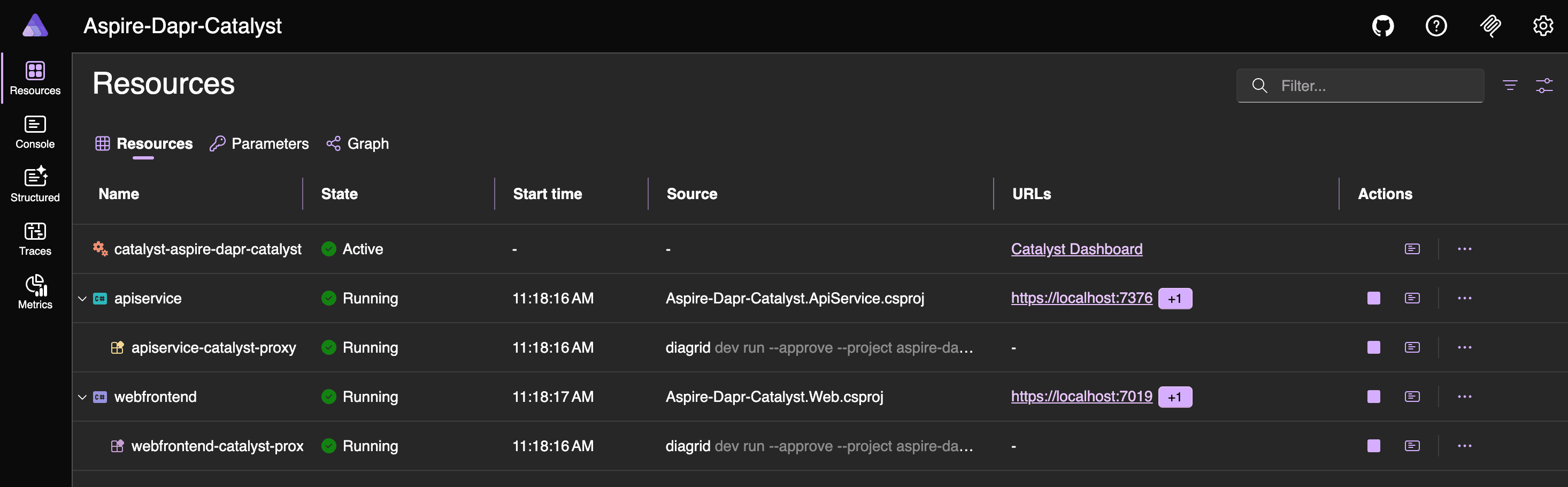
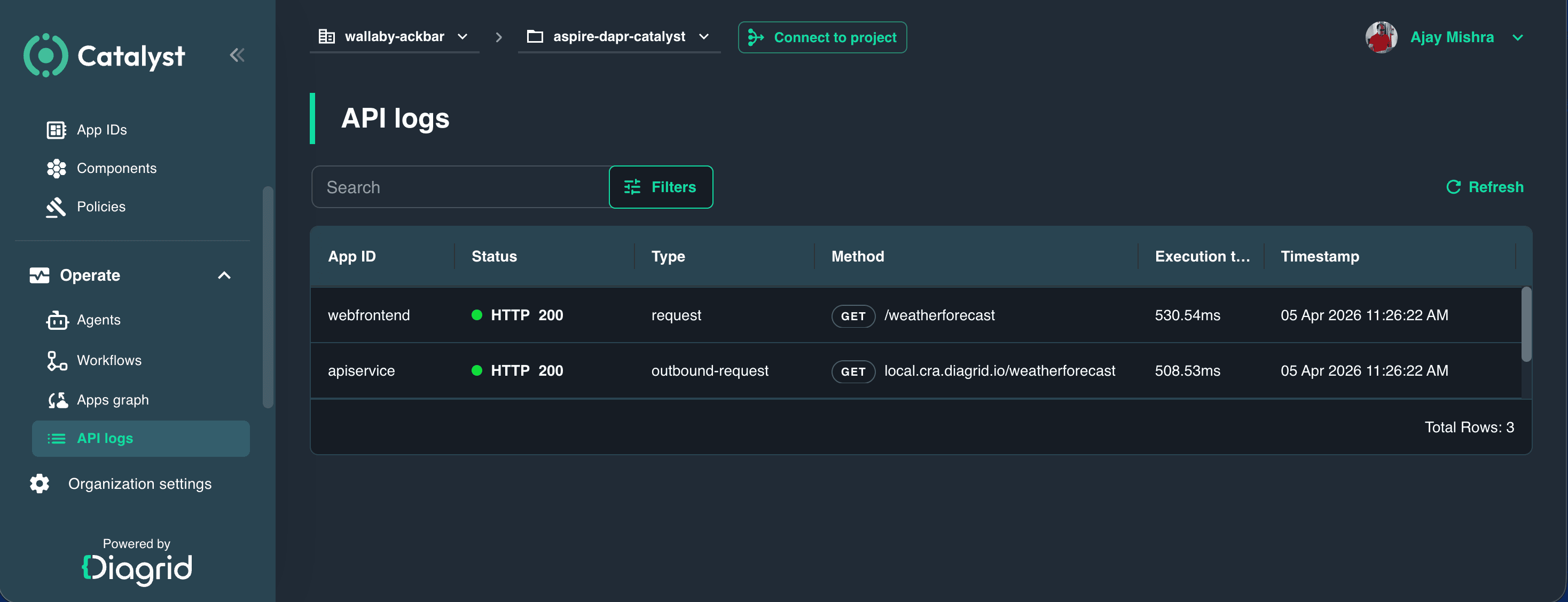
From the Aspire Dashboard, open the web application, navigate to the Weather menu, and then open the Catalyst Dashboard to explore App IDs, Apps graph, and API logs.


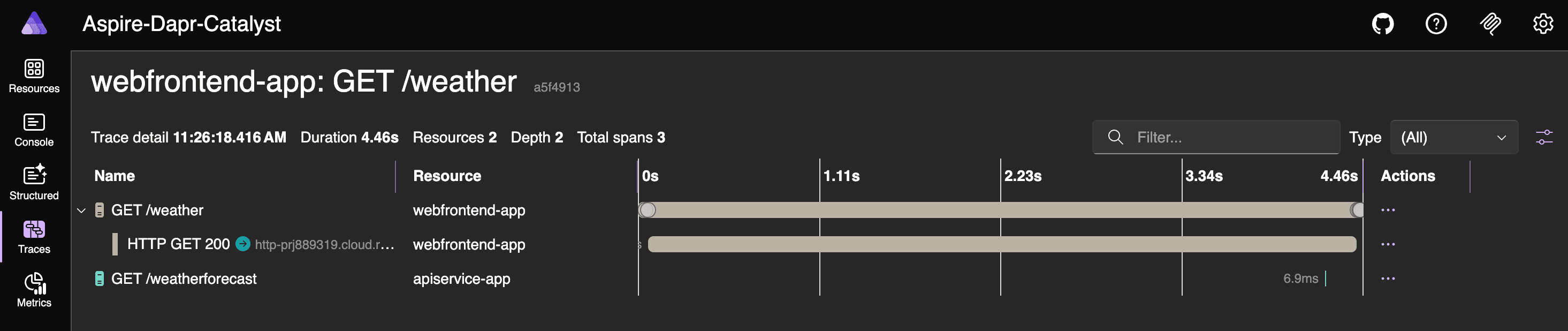
You can review the Aspire traces to understand how the Dapr sidecar is managed by Catalyst.
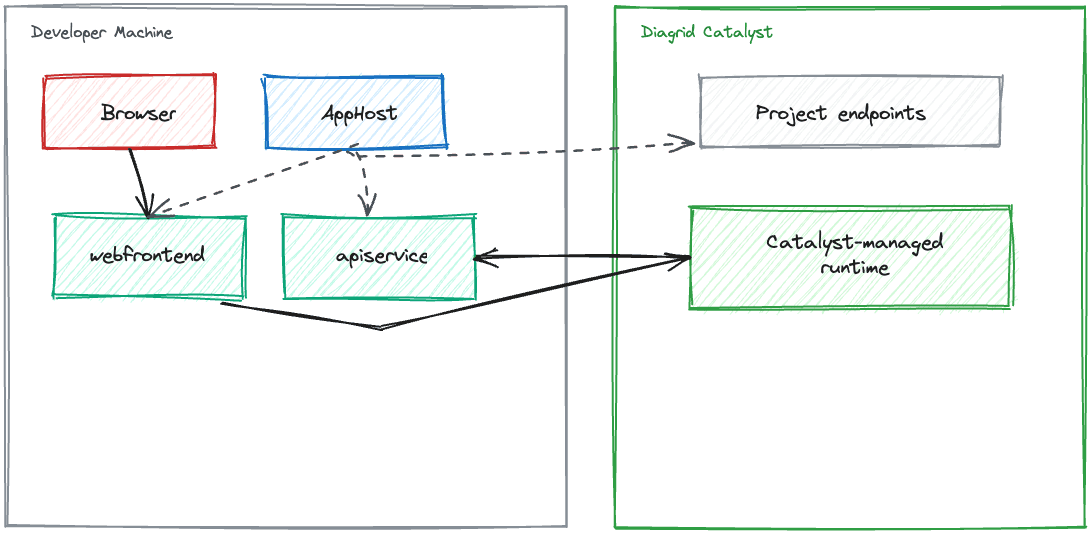
This shows local applications with Catalyst-managed Dapr, as illustrated in the diagram below.
You can delete the project from Catalyst at any time with the following command.
diagrid project delete aspire-dapr-catalystNext, we will move to the two KinD-based modes: KinD workloads with cluster-side Dapr injection and KinD workloads with Catalyst-managed Dapr.
KinD Workloads & Dapr Injection
Let’s add support for execution modes 3 and 4 in the code. In earlier blog posts, I used the Aspirate (Aspire 8) CLI to generate Kubernetes manifest files. This time, I am using Aspire’s built-in features, with some additional logic for Dapr integration.
The AppHost.cs file now looks like this.
// AppHost.cs

using Aspire_Dapr_Catalyst.ServiceDefaults;

var builder = DistributedApplication.CreateBuilder(args);
var appHostSettings = AppHostSettings.Create(builder);

var apiService = builder.AddProject<Projects.Aspire_Dapr_Catalyst_ApiService>(AppResourceNames.ApiService)
    .WithHttpHealthCheck("/health");

var webFrontend = builder.AddProject<Projects.Aspire_Dapr_Catalyst_Web>(AppResourceNames.WebFrontend)
    .WithExternalHttpEndpoints()
    .WithHttpHealthCheck("/health")
    .WithReference(apiService)
    .WaitFor(apiService);

// AppHost mode map:
// 1. aspire run
// 2. DAPR_EXECUTION_MODE=catalyst aspire run
// 3. aspire publish --non-interactive -o Aspire-Dapr-Catalyst.AppHost/aspire-output
// 4. DAPR_EXECUTION_MODE=catalyst aspire publish --non-interactive -o Aspire-Dapr-Catalyst.AppHost/aspire-output

LocalAppHostConfigurator.ConfigureServiceExecution(builder, appHostSettings, apiService, webFrontend);
LocalAppHostConfigurator.ConfigureLocalOtelServiceNames(appHostSettings, apiService, webFrontend);

KubernetesPublishingConfigurator.Configure(builder, appHostSettings, apiService, webFrontend);

builder.Build().Run();
To support execution modes 3 and 4, I also added KubernetesPublishingConfigurator.cs, KubernetesPublishingTypes.cs, and KubernetesWorkloadConfigurator.cs.
# KubernetesPublishingConfigurator.cs

using Aspire_Dapr_Catalyst.ServiceDefaults;

internal static class KubernetesPublishingConfigurator
{
    // Applies only to the two publish modes:
    // 3. Kubernetes output with in-cluster Dapr sidecars
    // 4. Kubernetes output with Catalyst connection settings
    public static void Configure(
        IDistributedApplicationBuilder builder,
        AppHostSettings appHostSettings,
        IResourceBuilder<ProjectResource> apiService,
        IResourceBuilder<ProjectResource> webFrontend)
    {
        if (!appHostSettings.IsPublishMode)
        {
            return;
        }

        var kubernetes = builder.AddKubernetesEnvironment(AppHostComputeEnvironmentNames.Kubernetes);
        var kubernetesExecutionMode = appHostSettings.UseCatalyst
            ? KubernetesExecutionModes.Catalyst
            : KubernetesExecutionModes.DaprSidecars;

        if (kubernetesExecutionMode == KubernetesExecutionModes.Catalyst)
        {
            var catalystPublishParameters = CatalystKubernetesParameters.Create(builder);

            ConfigureCatalystKubernetesEnvironment(webFrontend, catalystPublishParameters);
        }

        apiService
            .WithComputeEnvironment(kubernetes)
            .PublishAsKubernetesService(resource => KubernetesWorkloadConfigurator.Configure(
                resource,
                AppResourceNames.ApiService,
                kubernetesExecutionMode));

        webFrontend
            .WithComputeEnvironment(kubernetes)
            .PublishAsKubernetesService(resource => KubernetesWorkloadConfigurator.Configure(
                resource,
                AppResourceNames.WebFrontend,
                kubernetesExecutionMode));
    }

    // Applies only to mode 4, where the published webfrontend talks to Catalyst instead of a cluster-side daprd.
    private static void ConfigureCatalystKubernetesEnvironment(
        IResourceBuilder<ProjectResource> resource,
        CatalystKubernetesParameters catalystParameters)
    {
        resource
            .WithEnvironment(AppEnvironmentVariables.DaprExecutionMode, ExecutionModes.Catalyst)
            .WithEnvironment(AppEnvironmentVariables.DaprHttpEndpoint, catalystParameters.ProjectHttpEndpoint)
            .WithEnvironment(AppEnvironmentVariables.DaprGrpcEndpoint, catalystParameters.ProjectGrpcEndpoint)
            .WithEnvironment(AppEnvironmentVariables.DaprApiToken, catalystParameters.WebFrontendApiToken);
    }
}
// KubernetesPublishingTypes.cs
// Used only by the two publish modes to select the generated deployment shape:
// 3. cluster-side Dapr sidecars
// 4. Catalyst-backed workloads
internal static class KubernetesExecutionModes
{
public const string DaprSidecars = "dapr-sidecars";
public const string Catalyst = "catalyst";
}
// Used only by modes 3 and 4 when generating Kubernetes workload environment variables.
internal static class KubernetesTelemetryDefaults
{
public const string KubernetesOtlpEndpoint = "http://jaeger.observability.svc.cluster.local:4317";
public const string OtlpGrpcProtocol = "grpc";
}
// Used only by mode 4 to collect publish-time Catalyst values for the generated chart.
internal sealed class CatalystKubernetesParameters
{
// Published into the generated chart for webfrontend Catalyst connectivity in mode 4.
public IResourceBuilder<ParameterResource> ProjectHttpEndpoint { get; private init; } = null!;
// Published into the generated chart for webfrontend Catalyst connectivity in mode 4.
public IResourceBuilder<ParameterResource> ProjectGrpcEndpoint { get; private init; } = null!;
// Secret published only for the mode 4 webfrontend App ID token.
public IResourceBuilder<ParameterResource> WebFrontendApiToken { get; private init; } = null!;
public static CatalystKubernetesParameters Create(IDistributedApplicationBuilder builder)
{
return new CatalystKubernetesParameters
{
ProjectHttpEndpoint = builder.AddParameter(
"catalyst-k8s-project-http-endpoint",
() => builder.Configuration[CatalystKubernetesConfigurationKeys.ProjectHttpEndpoint] ?? string.Empty,
publishValueAsDefault: true,
secret: false),
ProjectGrpcEndpoint = builder.AddParameter(
"catalyst-k8s-project-grpc-endpoint",
() => builder.Configuration[CatalystKubernetesConfigurationKeys.ProjectGrpcEndpoint] ?? string.Empty,
publishValueAsDefault: true,
secret: false),
WebFrontendApiToken = builder.AddParameter(
"catalyst-k8s-webfrontend-dapr-api-token",
() => builder.Configuration[CatalystKubernetesConfigurationKeys.WebFrontendApiToken] ?? string.Empty,
publishValueAsDefault: false,
secret: true)
};
}
}
// Used only by mode 4 to read publish-time environment variables before generating Kubernetes output.
internal static class CatalystKubernetesConfigurationKeys
{
public const string ProjectHttpEndpoint = "CATALYST_K8S_PROJECT_HTTP_ENDPOINT";
public const string ProjectGrpcEndpoint = "CATALYST_K8S_PROJECT_GRPC_ENDPOINT";
public const string WebFrontendApiToken = "CATALYST_K8S_WEBFRONTEND_DAPR_API_TOKEN";
}// KubernetesWorkloadConfigurator.cs
using Aspire_Dapr_Catalyst.ServiceDefaults;
using Aspire.Hosting.Kubernetes;
using Aspire.Hosting.Kubernetes.Resources;
internal static class KubernetesWorkloadConfigurator
{
private const string DaprTracingConfigName = "app-tracing";
private const string ReadWriteOnceAccessMode = "ReadWriteOnce";
private const string StorageRequestName = "storage";
private const string StorageRequestSize = "1Gi";
public static void Configure(KubernetesResource resource, string appId, string kubernetesExecutionMode)
{
var workload = resource.Workload;
if (workload is null)
{
return;
}
var isWebFrontend = string.Equals(appId, AppResourceNames.WebFrontend, StringComparison.Ordinal);
if (string.Equals(kubernetesExecutionMode, KubernetesExecutionModes.DaprSidecars, StringComparison.Ordinal))
{
ApplyDaprAnnotations();
}
else if (isWebFrontend)
{
NormalizeCatalystEnvironmentTemplates();
}
foreach (var container in workload.PodTemplate.Spec.Containers)
{
if (!string.Equals(container.Name, appId, StringComparison.Ordinal))
{
continue;
}
AddOpenTelemetryEnvironment(container, appId);
if (isWebFrontend)
{
ConfigureWebFrontendPersistence(container);
}
break;
}
if (isWebFrontend)
{
resource.AdditionalResources.Add(CreateWebFrontendPersistentVolumeClaim());
}
void ApplyDaprAnnotations()
{
workload.PodTemplate.Metadata ??= new ObjectMetaV1();
var annotations = workload.PodTemplate.Metadata.Annotations;
var helmPortExpression = $"{{{{ .Values.parameters.{appId}.port_http }}}}";
annotations["dapr.io/enabled"] = "true";
annotations["dapr.io/app-id"] = appId;
annotations["dapr.io/app-port"] = helmPortExpression;
annotations["dapr.io/app-protocol"] = "http";
annotations["dapr.io/log-level"] = "info";
annotations["dapr.io/config"] = DaprTracingConfigName;
}
void ConfigureWebFrontendPersistence(ContainerV1 container)
{
workload.PodTemplate.Spec.SecurityContext ??= new PodSecurityContextV1();
workload.PodTemplate.Spec.SecurityContext.FsGroup = WebFrontendDataProtection.DotNetContainerUserId;
workload.PodTemplate.Spec.Volumes.Add(new VolumeV1
{
Name = WebFrontendDataProtection.VolumeName,
PersistentVolumeClaim = new PersistentVolumeClaimVolumeSourceV1
{
ClaimName = WebFrontendDataProtection.ClaimName
}
});
container.VolumeMounts.Add(new VolumeMountV1
{
Name = WebFrontendDataProtection.VolumeName,
MountPath = WebFrontendDataProtection.KeysPath
});
container.Env.Add(new EnvVarV1
{
Name = AppEnvironmentVariables.DataProtectionKeysPath,
Value = WebFrontendDataProtection.KeysPath
});
}
void NormalizeCatalystEnvironmentTemplates()
{
if (resource.ConfigMap is not null)
{
resource.ConfigMap.Data[AppEnvironmentVariables.DaprHttpEndpoint] =
"{{ .Values.config.webfrontend.DAPR_HTTP_ENDPOINT }}";
resource.ConfigMap.Data[AppEnvironmentVariables.DaprGrpcEndpoint] =
"{{ .Values.config.webfrontend.DAPR_GRPC_ENDPOINT }}";
}
if (resource.Secret is not null)
{
resource.Secret.StringData[AppEnvironmentVariables.DaprApiToken] =
"{{ .Values.secrets.webfrontend.DAPR_API_TOKEN }}";
}
}
}
private static void AddOpenTelemetryEnvironment(ContainerV1 container, string appId)
{
container.Env.Add(new EnvVarV1
{
Name = AppEnvironmentVariables.OtelExporterOtlpEndpoint,
Value = KubernetesTelemetryDefaults.KubernetesOtlpEndpoint
});
container.Env.Add(new EnvVarV1
{
Name = AppEnvironmentVariables.OtelExporterOtlpProtocol,
Value = KubernetesTelemetryDefaults.OtlpGrpcProtocol
});
container.Env.Add(new EnvVarV1
{
Name = AppEnvironmentVariables.OtelServiceName,
Value = AppTelemetryConventions.GetServiceName(appId)
});
}
private static PersistentVolumeClaim CreateWebFrontendPersistentVolumeClaim()
{
var persistentVolumeClaim = new PersistentVolumeClaim
{
Metadata = new ObjectMetaV1
{
Name = WebFrontendDataProtection.ClaimName
},
Spec = new PersistentVolumeClaimSpecV1
{
Resources = new VolumeResourceRequirementsV1()
}
};
persistentVolumeClaim.Spec.AccessModes.Add(ReadWriteOnceAccessMode);
persistentVolumeClaim.Spec.Resources.Requests[StorageRequestName] = StorageRequestSize;
return persistentVolumeClaim;
}
}
internal static class WebFrontendDataProtection
{
public const string KeysPath = "/home/app/.aspnet/DataProtection-Keys";
public const string VolumeName = "data-protection-keys";
public const string ClaimName = "webfrontend-data-protection-keys";
public const long DotNetContainerUserId = 1654;
}With the AppHost changes almost complete, let’s move on to preparing the KinD cluster and the supporting files.
Set up a KinD cluster
Create a file named kind-cluster-config.yaml. This configuration instructs KinD to provision a Kubernetes cluster consisting of one control plane node and two worker nodes. It also enables future ingress setup and exposes container ports to the host machine.
# kind-cluster-config.yaml
kind: Cluster
apiVersion: kind.x-k8s.io/v1alpha4
nodes:
- role: control-plane
  kubeadmConfigPatches:
  - |
    kind: InitConfiguration
    nodeRegistration:
      kubeletExtraArgs:
        node-labels: "ingress-ready=true"
  extraPortMappings:
  - containerPort: 80
    hostPort: 8081
    protocol: TCP
  - containerPort: 443
    hostPort: 8443
    protocol: TCP
- role: worker
- role: worker
Run the KinD create cluster command to create the cluster.
kind create cluster --config kind-cluster-config.yamlInitialize Dapr in Kubernetes.
dapr init --kubernetesVerify the status of the Dapr components:
dapr status -kForward a port to Dapr dashboard:
dapr dashboard -k -p 9999Install & configure metrics-server on the KinD Kubernetes Cluster.
# components.yaml
metadata:
   labels:
     k8s-app: metrics-server
 spec:
   containers:
   - args:
     - --cert-dir=/tmp
     - --secure-port=4443
     - --kubelet-preferred-address-types=InternalIP,ExternalIP,Hostname
     - --kubelet-use-node-status-port
     - --kubelet-insecure-tls   <==== Add this
     - --metric-resolution=15s
     image: k8s.gcr.io/metrics-server/metrics-server:v0.6.2
     imagePullPolicy: IfNotPresent
     livenessProbe:
       failureThreshold: 3
       httpGet:
         path: /livez
kubectl apply -f components.yamlWith the cluster in place, let’s proceed with generating the Kubernetes-related files.
aspire publish --non-interactive -o Aspire-Dapr-Catalyst.AppHost/aspire-outputBuild container images and load into KinD cluster.
dotnet publish Aspire-Dapr-Catalyst.ApiService/Aspire-Dapr-Catalyst.ApiService.csproj \
  -c Release /t:PublishContainer \
  -p:ContainerRepository=apiservice \
  -p:ContainerImageTag=latest
dotnet publish Aspire-Dapr-Catalyst.Web/Aspire-Dapr-Catalyst.Web.csproj \
-c Release /t:PublishContainer \
-p:ContainerRepository=webfrontend \
-p:ContainerImageTag=latestkind load docker-image apiservice:latest --name kind
kind load docker-image webfrontend:latest --name kindInstall ingress-nginx
kubectl apply -f https://raw.githubusercontent.com/kubernetes/ingress-nginx/controller-v1.15.1/deploy/static/provider/kind/deploy.yaml
kubectl -n ingress-nginx patch deployment ingress-nginx-controller --type merge -p '{"spec":{"template":{"spec":{"nodeSelector":{"kubernetes.io/os":"linux","ingress-ready":"true"}}}}}'
kubectl -n ingress-nginx rollout status deployment/ingress-nginx-controller --timeout=180s
kubectl -n ingress-nginx wait --for=condition=complete job/ingress-nginx-admission-patch --timeout=180s
Deploy the generated chart and Wait for rollout.
helm upgrade --install aspire-dapr \
  Aspire-Dapr-Catalyst.AppHost/aspire-output \
  --namespace aspire-dapr \
  --create-namespace
kubectl -n aspire-dapr rollout status deploy/apiservice-deployment
kubectl -n aspire-dapr rollout status deploy/webfrontend-deploymentApply the frontend ingress and access the web application. The contents of webfrontend-ingress.yaml are shown below:
# webfrontend-ingress.yaml
apiVersion: networking.k8s.io/v1
kind: Ingress
metadata:
  name: webfrontend-ingress
  namespace: aspire-dapr
  annotations:
    nginx.ingress.kubernetes.io/enable-opentelemetry: "true"
    nginx.ingress.kubernetes.io/opentelemetry-trust-incoming-span: "true"
spec:
  ingressClassName: nginx
  rules:
  - http:
      paths:
      - path: /
        pathType: Prefix
        backend:
          service:
            name: webfrontend-service
            port:
              name: http
kubectl apply -f webfrontend-ingress.yamlYou can now access the web application at http://localhost:8081/ in your browser.

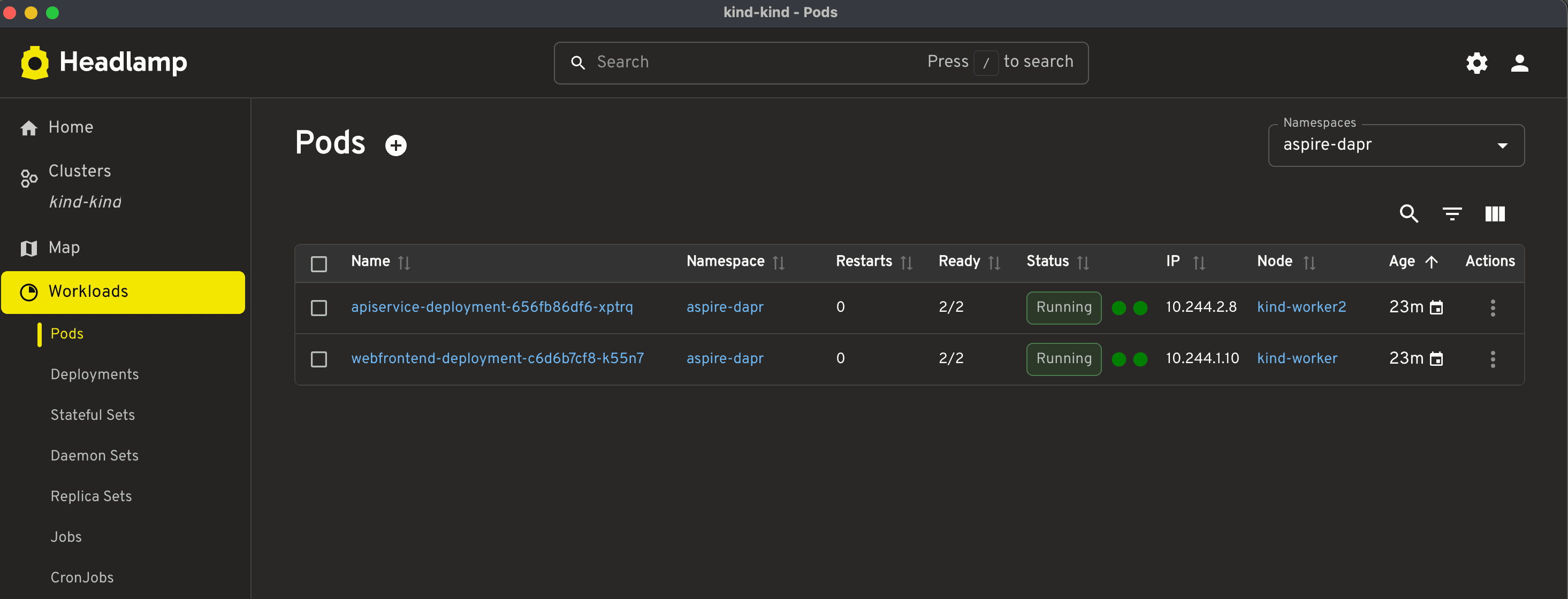
Note: The pod readiness status shows 2/2, which means both containers in the pod are ready: the application container and the sidecar.
If you want to enable tracing, run the commands below. The contents of jaeger.yaml, dapr-sidecar-tracing-config.yaml, and ingress-nginx-opentelemetry-config.yaml are shown below:
# jaeger.yaml
apiVersion: v1
kind: Namespace
metadata:
  name: observability
---
apiVersion: apps/v1
kind: Deployment
metadata:
  name: jaeger
  namespace: observability
spec:
  replicas: 1
  selector:
    matchLabels:
      app: jaeger
  template:
    metadata:
      labels:
        app: jaeger
    spec:
      containers:
      - name: jaeger
        image: cr.jaegertracing.io/jaegertracing/jaeger:2.16.0
        ports:
        - containerPort: 16686
          name: query
        - containerPort: 4317
          name: otlp-grpc
        - containerPort: 4318
          name: otlp-http
        - containerPort: 9411
          name: zipkin
        resources:
          requests:
            cpu: 100m
            memory: 256Mi
          limits:
            cpu: 500m
            memory: 512Mi
---
apiVersion: v1
kind: Service
metadata:
  name: jaeger
  namespace: observability
spec:
  selector:
    app: jaeger
  ports:
  - name: query
    port: 16686
    targetPort: query
  - name: otlp-grpc
    port: 4317
    targetPort: otlp-grpc
  - name: otlp-http
    port: 4318
    targetPort: otlp-http
  - name: zipkin
    port: 9411
    targetPort: zipkin
# dapr-tracing-config.yaml
apiVersion: v1
kind: Namespace
metadata:
name: observability
---
apiVersion: apps/v1
kind: Deployment
metadata:
name: jaeger
namespace: observability
spec:
replicas: 1
selector:
matchLabels:
app: jaeger
template:
metadata:
labels:
app: jaeger
spec:
containers:
- name: jaeger
image: cr.jaegertracing.io/jaegertracing/jaeger:2.16.0
ports:
- containerPort: 16686
name: query
- containerPort: 4317
name: otlp-grpc
- containerPort: 4318
name: otlp-http
- containerPort: 9411
name: zipkin
resources:
requests:
cpu: 100m
memory: 256Mi
limits:
cpu: 500m
memory: 512Mi
---
apiVersion: v1
kind: Service
metadata:
name: jaeger
namespace: observability
spec:
selector:
app: jaeger
ports:
- name: query
port: 16686
targetPort: query
- name: otlp-grpc
port: 4317
targetPort: otlp-grpc
- name: otlp-http
port: 4318
targetPort: otlp-http
- name: zipkin
port: 9411
targetPort: zipkin# ingress-nginx-opentelemetry-config.yaml
apiVersion: v1
kind: ConfigMap
metadata:
name: ingress-nginx-controller
namespace: ingress-nginx
data:
enable-opentelemetry: "true"
opentelemetry-config: "/etc/ingress-controller/telemetry/opentelemetry.toml"
opentelemetry-operation-name: "HTTP $request_method $service_name $uri"
opentelemetry-trust-incoming-span: "true"
otlp-collector-host: "jaeger.observability.svc.cluster.local"
otlp-collector-port: "4317"
otel-service-name: "ingress-nginx"
otel-sampler: "AlwaysOn"
otel-sampler-ratio: "1.0"
otel-sampler-parent-based: "true"kubectl apply -f jaeger.yaml
kubectl apply -f dapr-sidecar-tracing-config.yaml
kubectl apply -f ingress-nginx-opentelemetry-config.yaml
kubectl -n ingress-nginx rollout restart deployment/ingress-nginx-controller
kubectl -n ingress-nginx rollout status deployment/ingress-nginx-controller --timeout=180s
kubectl -n observability rollout status deployment/jaeger --timeout=180sNote: Although it is possible to create a single script file to set up the entire environment end to end and another to tear down the cluster, I intentionally kept the steps separate so that each command is easier to understand and follow.


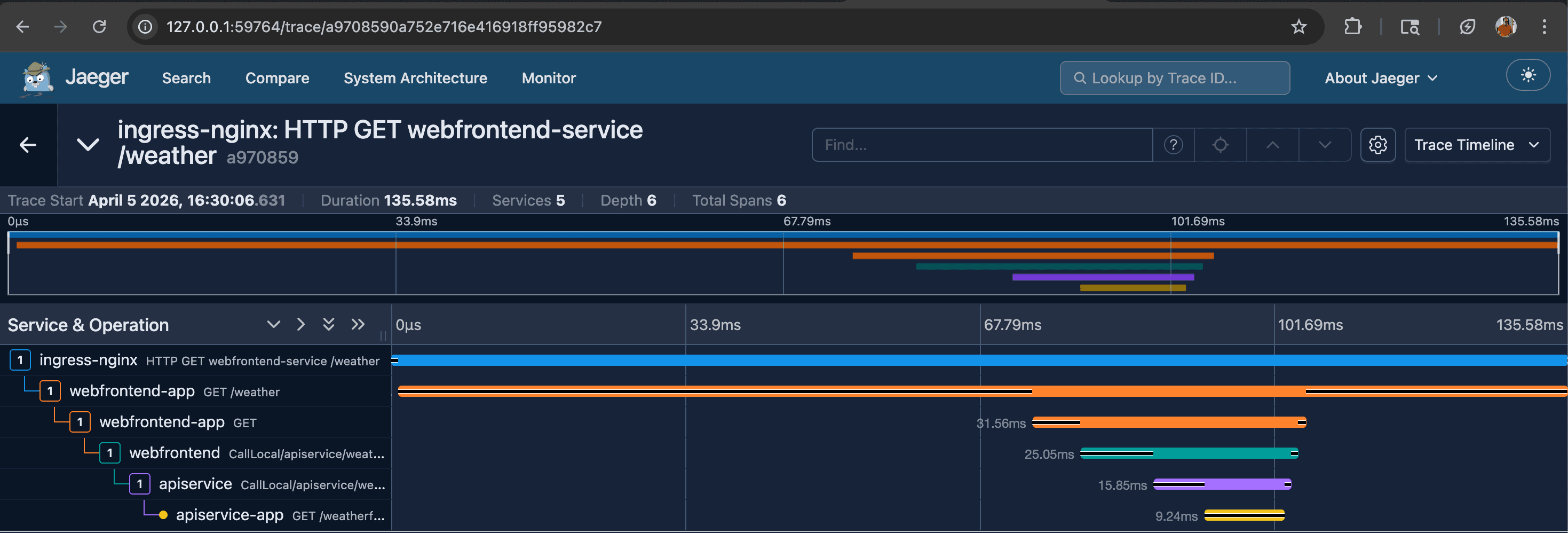
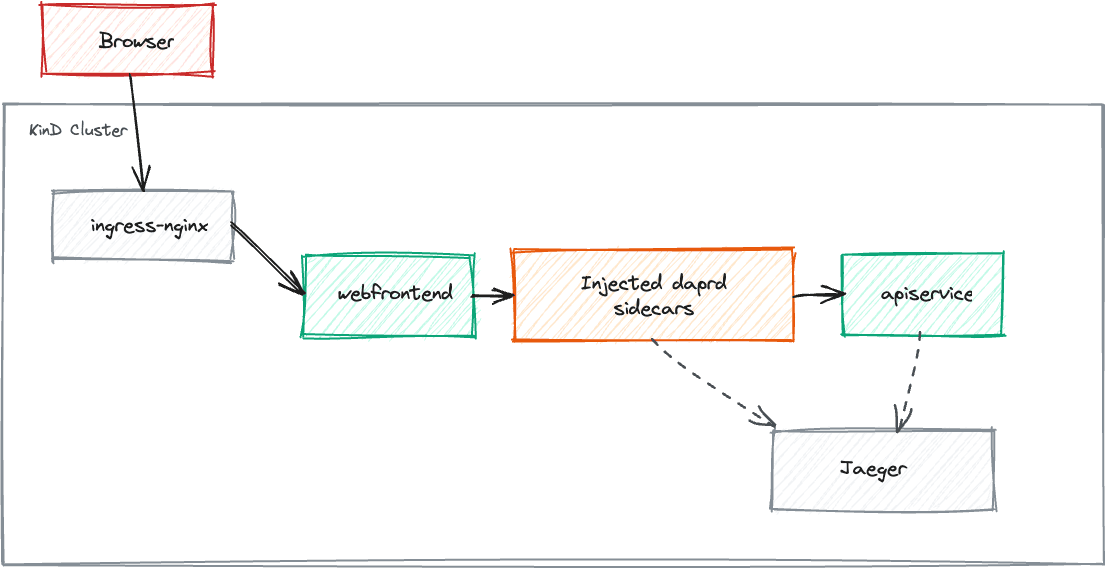
This shows KinD workloads with cluster-side Dapr injection, as illustrated in the diagram below.
KinD Workloads & Catalyst-managed Dapr
Most steps are the same as in KinD workloads with cluster-side Dapr injection. The main difference is how the Kubernetes-related files are generated. Before running the command below, ensure that you have completed the following steps in Catalyst:
- Create a Catalyst project (e.g., aspire-dapr-catalyst).
- Create an App ID for webfrontend
- Create an App ID for apiservice
- Resolve the Catalyst project HTTP endpoint, gRPC endpoint, and the webfrontend App ID API Token
- Expose apiservice back to Catalyst
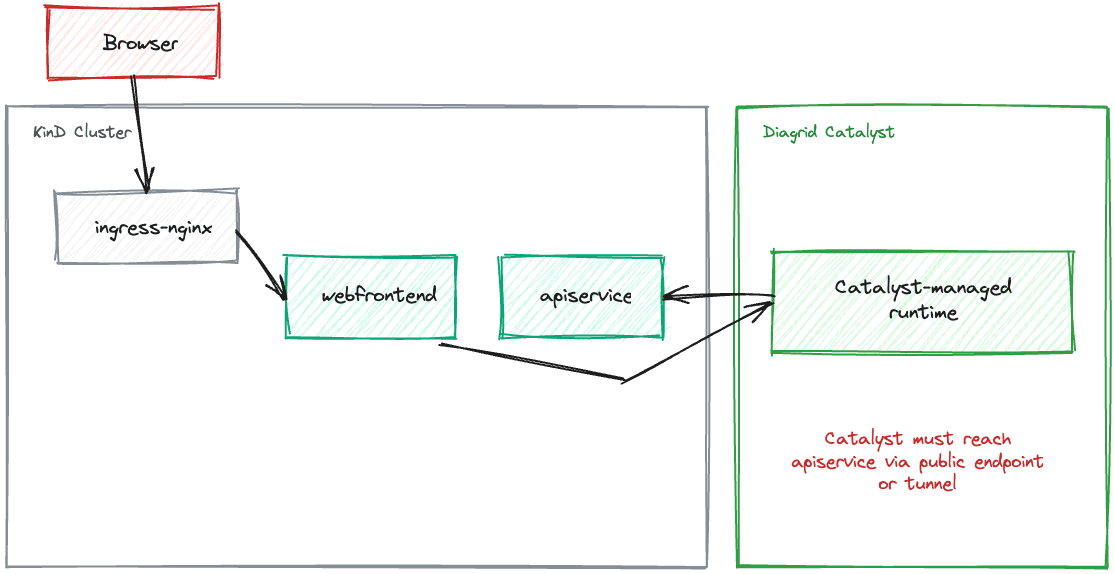
Note: In this mode, webfrontend talks to the Catalyst-managed Dapr runtime, while apiservice stays in KinD and is exposed back to Catalyst through the local bridge. To enable that bridge, run the commands below:
kubectl -n aspire-dapr port-forward svc/apiservice-service 8082:8080
diagrid dev run --app-id apiservice --app-port 8082 --project aspire-dapr-catalyst --approve
What these commands do:
- The
kubectlcommand exposes the KinDapiserviceservice onlocalhost:8082 - The
diagridcommand tells Catalyst to route App IDapiservicetraffic to that local port - Together, they form the local KinD-to-Catalyst bridge for inbound calls to
apiservice
Important: Make sure you run the local bridge-related command only after the apps have been published and deployed to KinD and the pods are ready.
DAPR_EXECUTION_MODE=catalyst aspire publish --non-interactive -o Aspire-Dapr-Catalyst.AppHost/aspire-output
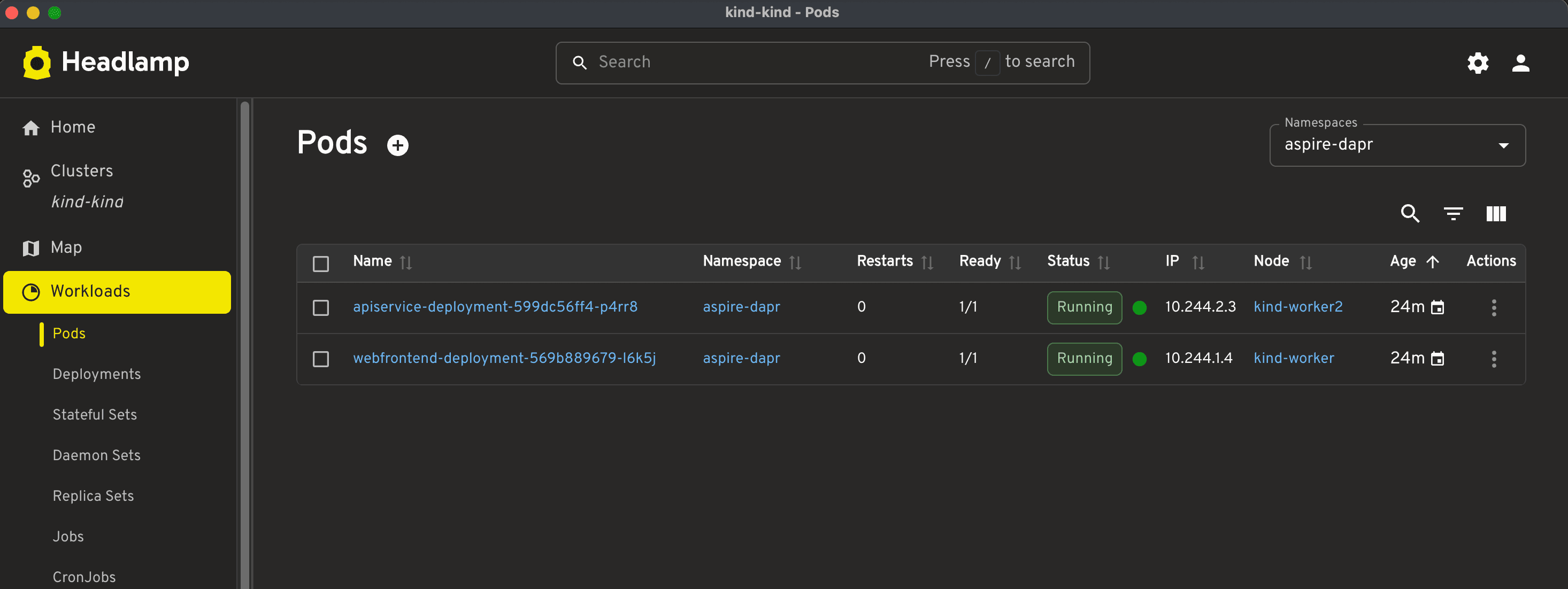
Note: The pod readiness status shows 1/1, which means the pod has one ready application container, and the Dapr sidecar is managed by Catalyst outside the pod.

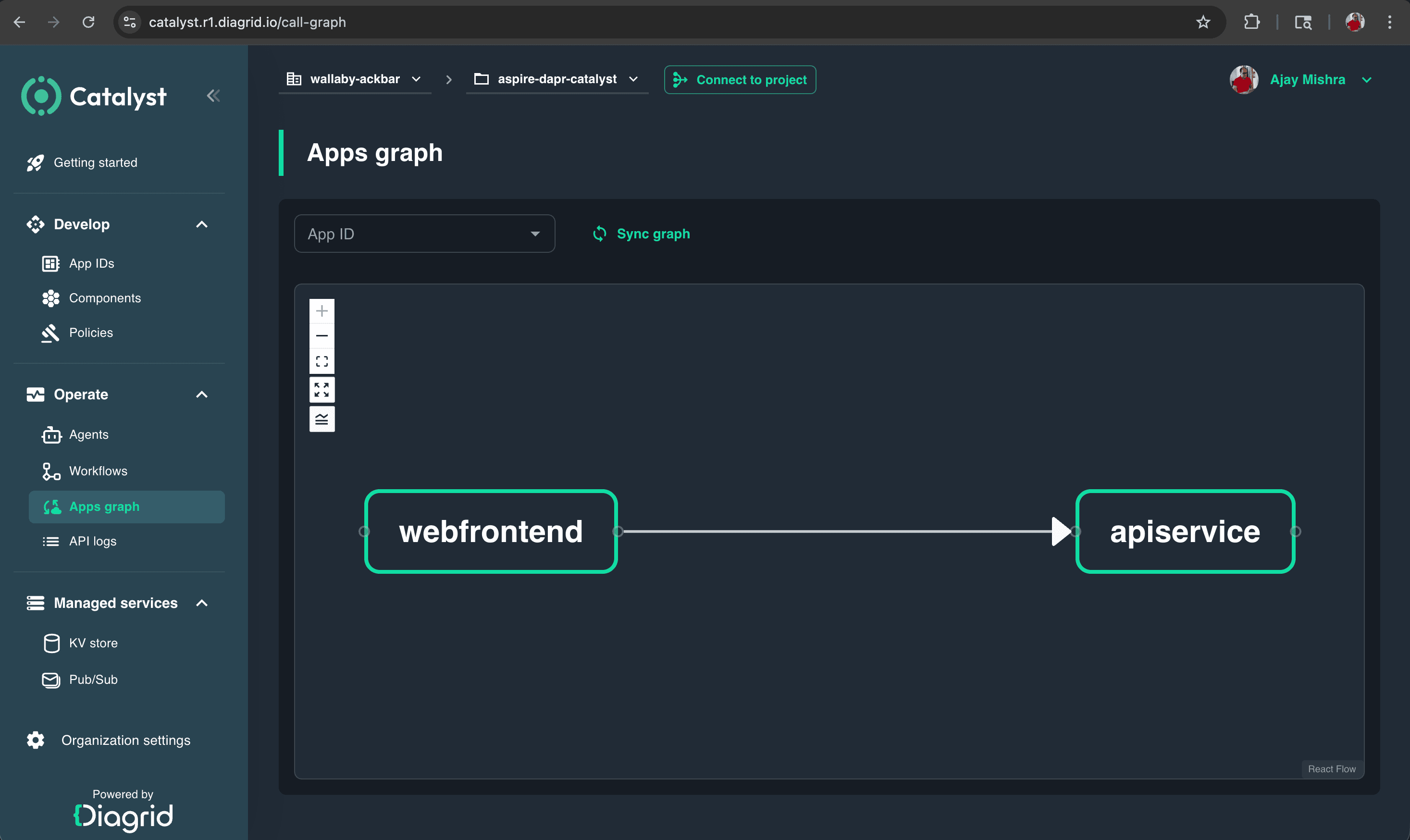
With the Diagrid CLI, you can create the project and App IDs, resolve the project endpoints, and obtain the API token for webfrontend.
This shows KinD workloads with Catalyst-managed Dapr, as illustrated in the diagram below.
Conclusion
To me, the biggest strength of Diagrid Catalyst is that it lets developers keep the familiar Dapr development model while reducing much of the runtime and operational complexity. Walking through all four modes from local apps with local Dapr, to local apps with Catalyst-managed Dapr, to KinD workloads with cluster-side Dapr injection, and finally KinD workloads with Catalyst-managed Dapr helps readers understand the complete flow from development to something much closer to production.
What makes this journey valuable is that it shows where Catalyst starts to shine: simplified management, smoother connectivity, and better visibility as the architecture evolves. At the same time, this blog explores only part of what Diagrid Catalyst can do, so it is best seen as a practical starting point rather than a complete exploration of the platform.