This blog post demonstrates how to use the Conversation API (or building block) of Dapr and .NET Aspire to build an application that securely and reliably interacts with Large Language Models (LLMs). It offers a unified API entry point for communicating with underlying LLM providers e.g., AWS Bedrock, Anthropic, DeekSeek, GoogleAI, Hugging Face, Mistral, Ollama and OpenAPI.
NOTE: The Conversation API is currently in alpha.
With built-in support for Prompt Caching, PII (personally identifiable information) obfuscation, and tool calling, the Conversation API makes it easier to build secure, efficient, and feature-rich AI applications.
Prerequisites
- Basic understanding of how Dapr and Aspire(formerly .NET Aspire) work. You may also refer to my earlier posts for more information on Dapr and Aspire.
LLM (Large Language Model)
As you may have noticed from my earlier posts, I try to run and configure everything locally to avoid relying on cloud vendors. Since not everyone has access to cloud resources, learning and experimentation shouldn’t be restricted by these limitations. Following the same philosophy, I’ll be using Ollama to run the models locally.
You can install and run Ollama on macOS, Windows and Linux. It provides one of the simplest ways to get started with large language models such as GPT-OSS, Gemma 3, DeepSeek-R1, Qwen 3, and many others. To learn more about Ollama, you can refer to the official documentation.
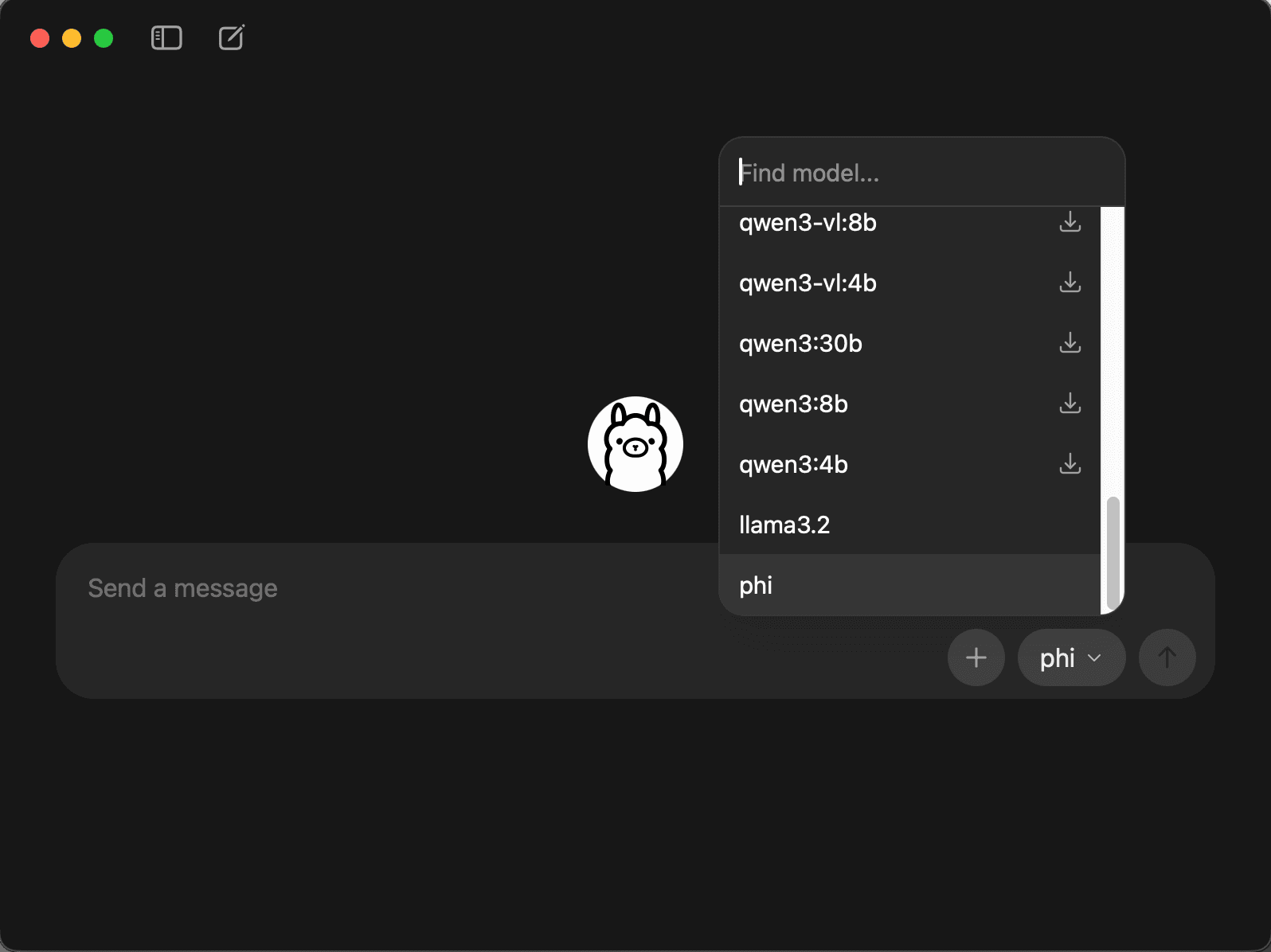
Once installed, you can launch the Ollama app and select the model you want to download. I used Llama 3.2 and Phi. Please review your hardware capabilities and the model requirements before downloading them.
After the download completes, you can begin sending messages to the model and review its responses.
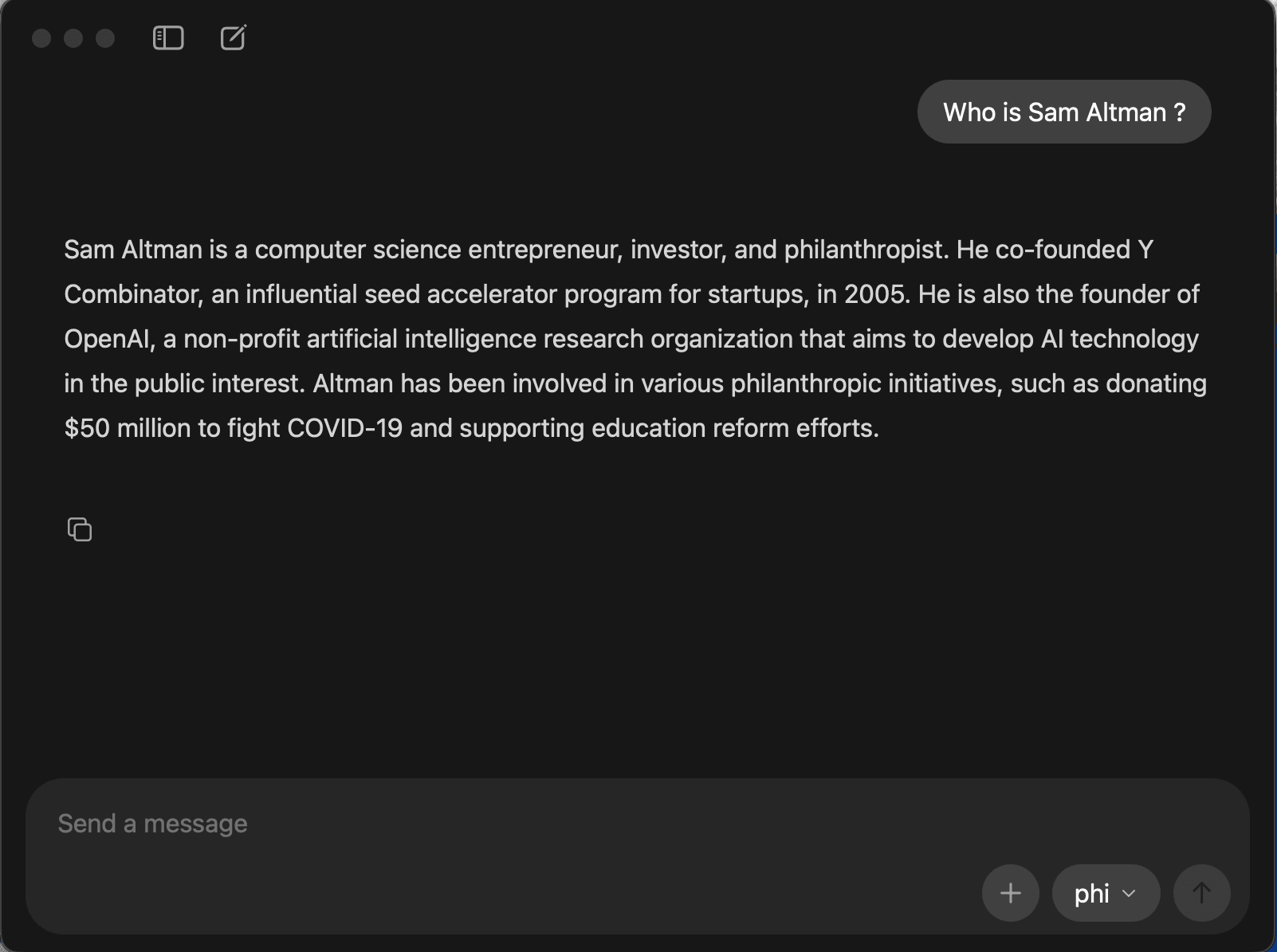
Using the Ollama CLI, you can perform a variety of actions.
ollama --help
Large language model runner

Usage:
  ollama [flags]
  ollama [command]

Available Commands:
  serve       Start ollama
  create      Create a model
  show        Show information for a model
  run         Run a model
  stop        Stop a running model
  pull        Pull a model from a registry
  push        Push a model to a registry
  signin      Sign in to ollama.com
  signout     Sign out from ollama.com
  list        List models
  ps          List running models
  cp          Copy a model
  rm          Remove a model
  help        Help about any command

Flags:
  -h, --help      help for ollama
  -v, --version   Show version information

Use "ollama [command] --help" for more information about a command.
Since I have downloaded the Llama 3.2 and Phi models, I can see that both are available.
ollama list
NAME               ID              SIZE      MODIFIED
phi:latest         e2fd6321a5fe    1.6 GB    3 hours ago
llama3.2:latest    a80c4f17acd5    2.0 GB    3 hours ago
ollama ps
NAME ID SIZE PROCESSOR CONTEXT UNTIL
phi:latest e2fd6321a5fe 2.4 GB 100% GPU 4096 4 minutes from now
llama3.2:latest a80c4f17acd5 2.8 GB 100% GPU 4096 4 minutes from now Now that the models are ready, we can move on to the next step—preparing the demo application.
Demo App
The demo application consists of three projects: AspireWithDapr.AppHost, AspireWithDapr.ServiceDefaults, and AspireWithDapr.Web. The AppHost and ServiceDefaults projects are part of Aspire, while AspireWithDapr.Web is a Blazor app used to send messages to LLMs through the Dapr Conversation API.
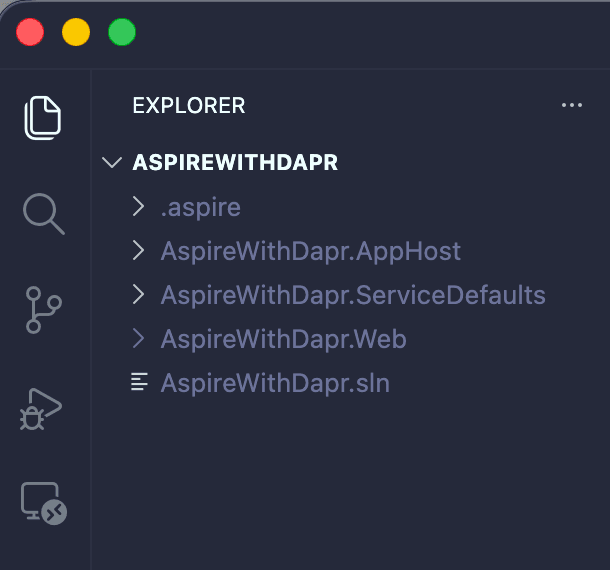
To create the proposed solution and related projects, please refer to my previous blog posts and use the .NET CLI, Visual Studio Code, or Visual Studio. Since the primary goal is to showcase the Dapr Conversation API, the implementation will remain aligned with that objective.
The web application interface looks like this:
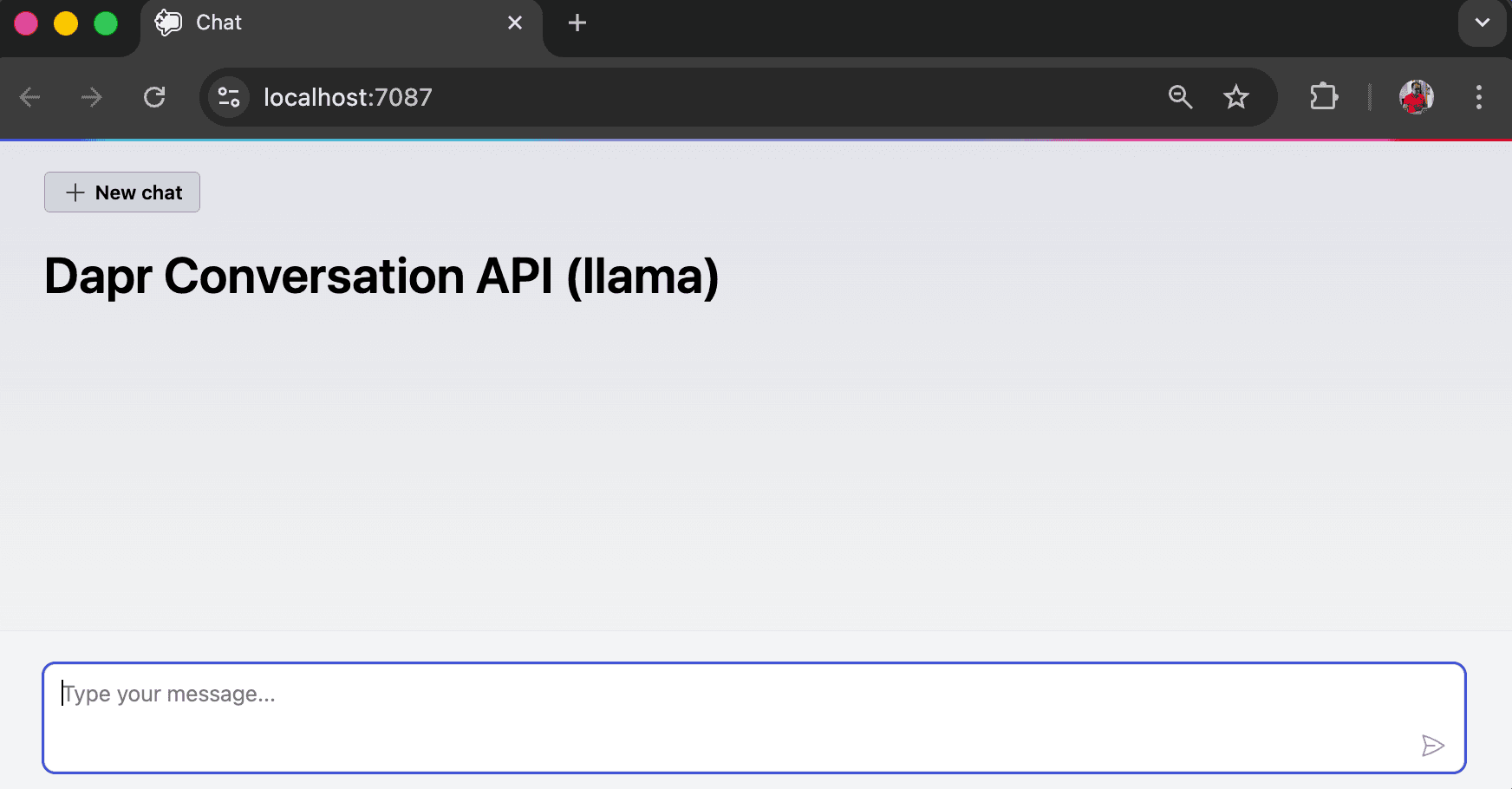
Project-specific changes related to the Dapr Conversation API will be explained in the subsequent sections.
NOTE: Below, I’ve included the details of my development environment, such as the Aspire, Dapr, and .NET versions used throughout this solution.
aspire --version
13.0.0
dapr --version
CLI version: 1.16.3
Runtime version: 1.16.2dotnet --version
10.0.100App Host
The App Host (AspireWithDapr.AppHost) is a .NET project that orchestrates the app model. To enable Dapr support, the CommunityToolkit.Aspire.Hosting.Dapr NuGet package will be added to App Host project using the command shown below.
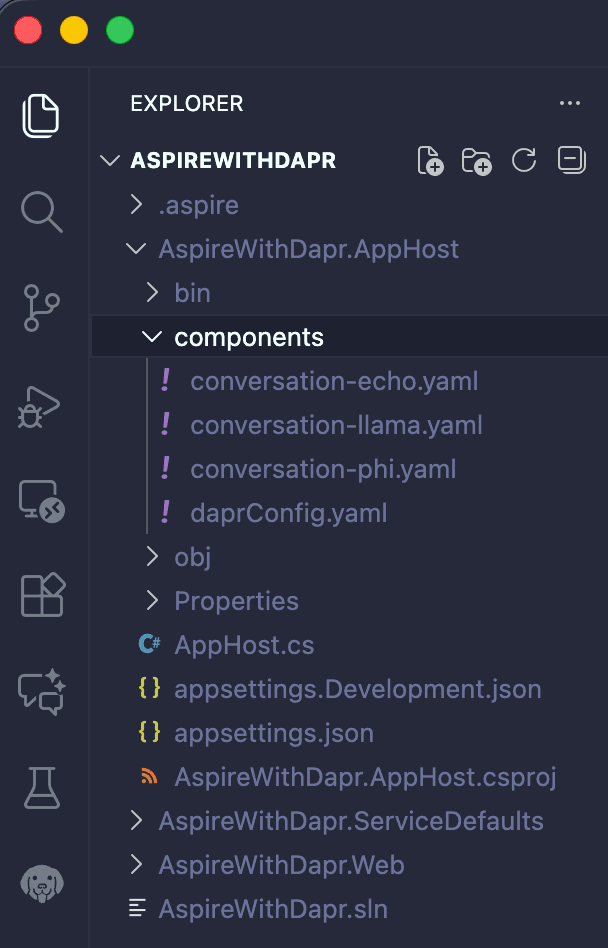
dotnet add package CommunityToolkit.Aspire.Hosting.DaprOnce the package has been added, the next step is to create the following Dapr component files within the sub-folder of the App Host project.
The Dapr Conversation API offers an Echo mock LLM component to accelerate early development and testing. You can later swap it out for any supported conversation components.
apiVersion: dapr.io/v1alpha1
kind: Component
metadata:
  name: echo
spec:
  type: conversation.echo
  version: v1
scopes:
  - conversation-app
As mentioned previously, we have downloaded both Llama 3.2 and Phi, and we can swap between them through the unified Conversation API without altering the code. For each model, the component files have been created as follows:
apiVersion: dapr.io/v1alpha1
kind: Component
metadata:
  name: llama
spec:
  type: conversation.ollama
  version: v1
  metadata:
    - name: baseUrl
      value: http://localhost:11434 # When you install and run Ollama locally, it starts an HTTP server at http://localhost:11434
    - name: model
      value: llama3.2 # It is model name.
    - name: cacheTTL # It is used for Prompt Caching
      value: 10m
scopes:
- conversation-appapiVersion: dapr.io/v1alpha1
kind: Component
metadata:
name: phi
spec:
type: conversation.ollama
version: v1
metadata:
- name: baseUrl
value: http://localhost:11434 # When you install and run Ollama locally, it starts an HTTP server at http://localhost:11434
- name: model
value: phi # It is model name.
- name: cacheTTL # It is used for Prompt Caching
value: 10m
scopes:
- conversation-appThis file enables Zipkin integration in addition to the default tracing capabilities provided by .NET Aspire.
apiVersion: dapr.io/v1alpha1
kind: Configuration
metadata:
  name: daprConfig
  namespace: default
spec:
  tracing:
    samplingRate: "1"
    zipkin:
      endpointAddress: "http://localhost:9411/api/v2/spans"
Once all components (Echo, Llama, and Phi) and the configuration file (Zipkin) have been added, the structure will appear as shown below:
Having added the CommunityToolkit.Aspire.Hosting.Dapr package, we will now use it in the App Host’s Program.cs file. This code ensure that the Dapr sidecar, including loading components from the components folder and the configuration file, runs alongside the Web App, when start the app.
using CommunityToolkit.Aspire.Hosting.Dapr;

var builder = DistributedApplication.CreateBuilder(args);

var webApp = builder.AddProject<Projects.AspireWithDapr_Web>("conversation-app")
    .WithHttpHealthCheck("/health")
    .WithDaprSidecar(new DaprSidecarOptions
    {
        ResourcesPaths = ["components"],
        Config = "components/daprConfig.yaml"
    });

builder.Build().Run();
The Aspire Dashboard console logs for the Dapr CLI display entries for the loaded components and configuration.
level=info msg="Component loaded: echo (conversation.echo/v1)"
level=info msg="Component loaded: llama (conversation.ollama/v1)"
level=info msg="Component loaded: phi (conversation.ollama/v1)"
Starting process... {"Executable": "/conversation-app-dapr-cli-raegdepg", "Reconciliation": 4, "Cmd": "/usr/local/bin/dapr", "Args": ["run", "--app-id", "conversation-app", "--config", "/Users/architect/Source/AspireWithDapr/AspireWithDapr.AppHost/components/daprConfig.yaml", "--resources-path", "/Users/architect/Source/AspireWithDapr/AspireWithDapr.AppHost/components", "--app-port", "5064", "--dapr-grpc-port", "52219", "--dapr-http-port", "52222", "--metrics-port", "52223", "--app-channel-address", "localhost", "--app-protocol", "http"]}Web App
The Web App (AspireWithDapr.Web) is a Blazor Web project that powers the Chat UI and enables seamless communication with LLMs via the Dapr Conversation API. To use the Conversation API, add the Dapr.AI (Dapr AI SDK for performing operations associated with artificial intelligence) NuGet packages to the Web App project using the following command:
dotnet add package Dapr.AIThe Program.cs file in the Web App has been updated to enable integration with the Dapr Conversation API.
# Program.cs
#pragma warning disable DAPR_CONVERSATION

using AspireWithDapr.Web.Components;
using AspireWithDapr.Web.Services;
using Dapr.AI.Conversation.Extensions;

var builder = WebApplication.CreateBuilder(args);
builder.AddServiceDefaults();
builder.Services.AddRazorComponents().AddInteractiveServerComponents();

builder.Services.AddDaprConversationClient();
builder.Services.AddSingleton<DaprConversationService>();

var app = builder.Build();

app.MapDefaultEndpoints();

if (!app.Environment.IsDevelopment())
{
    app.UseExceptionHandler("/Error", createScopeForErrors: true);
    app.UseHsts();
}

app.UseHttpsRedirection();
app.UseAntiforgery();

app.UseStaticFiles();
app.MapRazorComponents<App>()
    .AddInteractiveServerRenderMode();

app.Run();
The new DaprConversationService class manages most Conversation API logic. It includes a scrubPii variable that toggles PII Scrubbing on or off.
#pragma warning disable DAPR_CONVERSATION

using System.Diagnostics;
using System.Diagnostics.Metrics;
using Dapr.AI.Conversation;
using Dapr.AI.Conversation.ConversationRoles;
using Microsoft.Extensions.AI;

namespace AspireWithDapr.Web.Services;

public sealed class DaprConversationService(
    DaprConversationClient conversationClient,
    IConfiguration configuration,
    ILogger<DaprConversationService> logger)
{
    private static readonly ActivitySource ActivitySource = new("AspireWithDapr.LLM");
    private static readonly Meter Meter = new("AspireWithDapr.LLM");
    private static readonly Counter<long> LlmCallCounter = Meter.CreateCounter<long>("llm.calls.total", "calls", "Total number of LLM calls");
    private static readonly Histogram<double> LlmLatencyHistogram = Meter.CreateHistogram<double>("llm.call.duration", "ms", "LLM call duration in milliseconds");
    private static readonly Counter<long> LlmTokenCounter = Meter.CreateCounter<long>("llm.tokens.total", "tokens", "Total number of tokens processed");

    private readonly string _componentName = configuration["Dapr:ConversationComponent"] ?? "ollama";

    public async Task<DaprConversationResult> ConverseAsync(
        IReadOnlyList<ChatMessage> messages,
        ChatOptions options,
        CancellationToken cancellationToken = default)
    {
        using var activity = ActivitySource.StartActivity("llm.converse");
        activity?.SetTag("llm.component", _componentName);
        activity?.SetTag("llm.temperature", options.Temperature?.ToString() ?? "null");
        activity?.SetTag("llm.conversation_id", options.ConversationId ?? "new");

        var lastUserMessage = messages.LastOrDefault(m => m.Role == ChatRole.User);
        if (lastUserMessage == null)
        {
            logger.LogWarning("No user message found in conversation");
            activity?.SetStatus(ActivityStatusCode.Error, "No user message found");
            return new DaprConversationResult(string.Empty, null);
        }

        var userMessageText = lastUserMessage.Text ?? string.Empty;
        activity?.SetTag("llm.user_message_length", userMessageText.Length);
        activity?.SetTag("llm.message_count", messages.Count);

        var scrubPii = false;
        activity?.SetTag("llm.scrub_pii", scrubPii.ToString().ToLowerInvariant());

        logger.LogInformation(
            "Calling LLM component '{Component}' with {MessageCount} messages (ConversationId: {ConversationId}, ScrubPII: {ScrubPII})",
            _componentName, messages.Count, options.ConversationId ?? "new", scrubPii ? "Enabled" : "Disabled");

        // Log original message (in debug mode)
        if (logger.IsEnabled(LogLevel.Debug))
        {
            var messageLabel = scrubPii ? "Original user message (before PII scrubbing)" : "Original user message";
            logger.LogDebug("{MessageLabel}: {Message}", messageLabel, userMessageText);
        }

        var conversationInput = new ConversationInput(
        [
            new UserMessage
            {
                Content = [new MessageContent(userMessageText)]
            }
        ]);
        var conversationOptions = new ConversationOptions(_componentName)
        {
            Temperature = options.Temperature,
            ContextId = options.ConversationId,
            ScrubPII = scrubPii
        };

        var stopwatch = Stopwatch.StartNew();
        ConversationResponse response;
        try
        {
            response = await conversationClient.ConverseAsync(
                [conversationInput],
                conversationOptions,
                cancellationToken);
        }
        catch (Exception ex)
        {
            stopwatch.Stop();
            activity?.SetStatus(ActivityStatusCode.Error, ex.Message);
            logger.LogError(ex, "Error calling LLM component '{Component}'", _componentName);
            throw;
        }
        stopwatch.Stop();

        var text = string.Empty;
        var tokenCount = 0;
        foreach (var output in response.Outputs)
        {
            foreach (var choice in output.Choices)
            {
                var content = choice.Message?.Content ?? string.Empty;
                text += content;
                tokenCount += EstimateTokenCount(content);
            }
        }

        var latencyMs = stopwatch.Elapsed.TotalMilliseconds;
        LlmCallCounter.Add(1, new KeyValuePair<string, object?>("component", _componentName));
        LlmLatencyHistogram.Record(latencyMs, new KeyValuePair<string, object?>("component", _componentName));
        LlmTokenCounter.Add(tokenCount, new KeyValuePair<string, object?>("component", _componentName));

        activity?.SetTag("llm.response_length", text.Length);
        activity?.SetTag("llm.response_tokens", tokenCount);
        activity?.SetTag("llm.latency_ms", latencyMs);
        activity?.SetTag("llm.conversation_id", response.ConversationId ?? "null");

        logger.LogInformation(
            "LLM call completed: Component={Component}, Latency={LatencyMs}ms, ResponseLength={ResponseLength}, Tokens={Tokens}, ConversationId={ConversationId}",
            _componentName, latencyMs, text.Length, tokenCount, response.ConversationId ?? "null");

        // Log response (in debug mode)
        if (logger.IsEnabled(LogLevel.Debug))
        {
            var responseLabel = scrubPii ? "LLM response (after PII scrubbing)" : "LLM response";
            logger.LogDebug("{ResponseLabel}: {Response}", responseLabel, text);
        }

        return new DaprConversationResult(text, response.ConversationId);
    }

    private static int EstimateTokenCount(string text)
    {
        return Math.Max(1, text.Length / 4);
    }
}

public sealed record DaprConversationResult(string Text, string? ConversationId);
The following custom types have been added to enable seamless interaction with the Conversation API.
namespace AspireWithDapr.Web.Models;

public enum ChatRole
{
    System,
    User,
    Assistant
}

public sealed class TextContent
{
    public string Text { get; set; } = string.Empty;

    public TextContent()
    {
    }

    public TextContent(string text)
    {
        Text = text;
    }
}

public sealed class ChatMessage
{
    public ChatRole Role { get; }
    public string? Text => Contents.FirstOrDefault()?.Text;
    public IReadOnlyList<TextContent> Contents { get; }

    public ChatMessage(ChatRole role, string text)
    {
        Role = role;
        Contents = [new TextContent(text)];
    }

    public ChatMessage(ChatRole role, IReadOnlyList<TextContent> contents)
    {
        Role = role;
        Contents = contents;
    }
}

public sealed class ChatOptions
{
    public double? Temperature { get; set; }
    public string? ConversationId { get; set; }
}
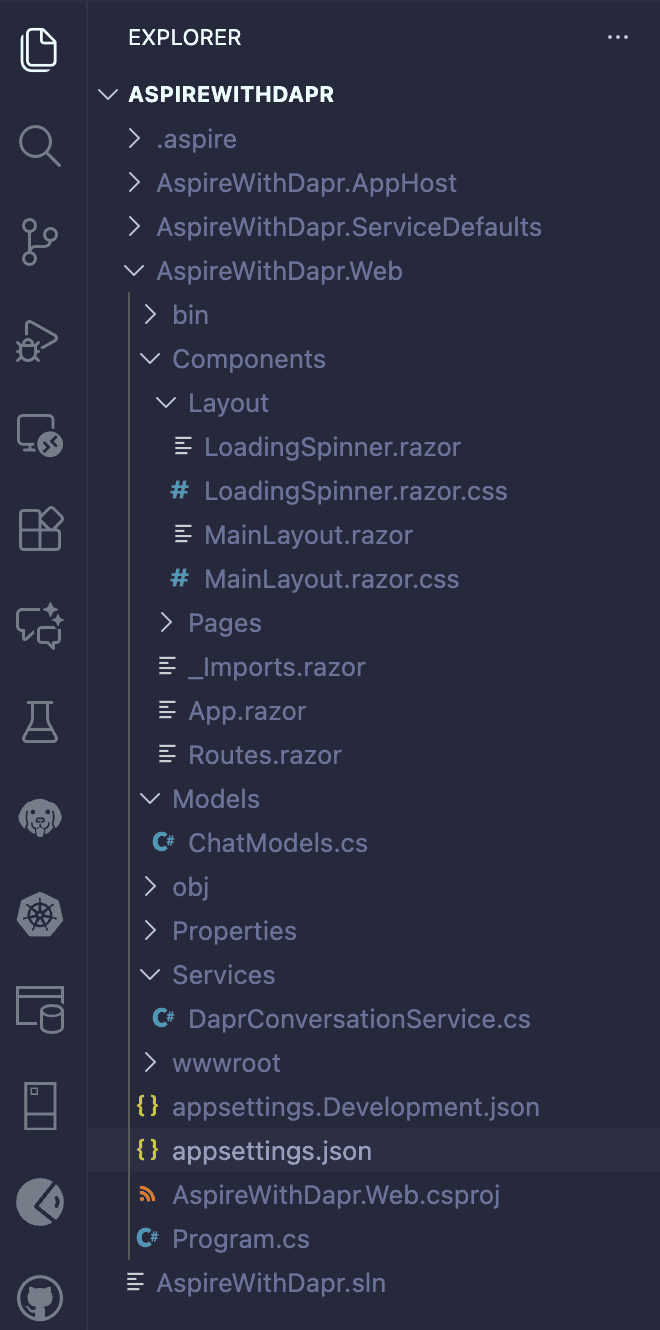
Below is an overview of the final Web application structure. Blazor component code, including layouts, pages, and routing, has been intentionally omitted from this blog to give you the flexibility to design the UI according to your needs.
An entry has been added to appsettings.json enabling users to choose models (e.g., echo, llama, phi) and view the resulting LLM responses.
"Dapr": {
    "ConversationComponent": "llama"
  }
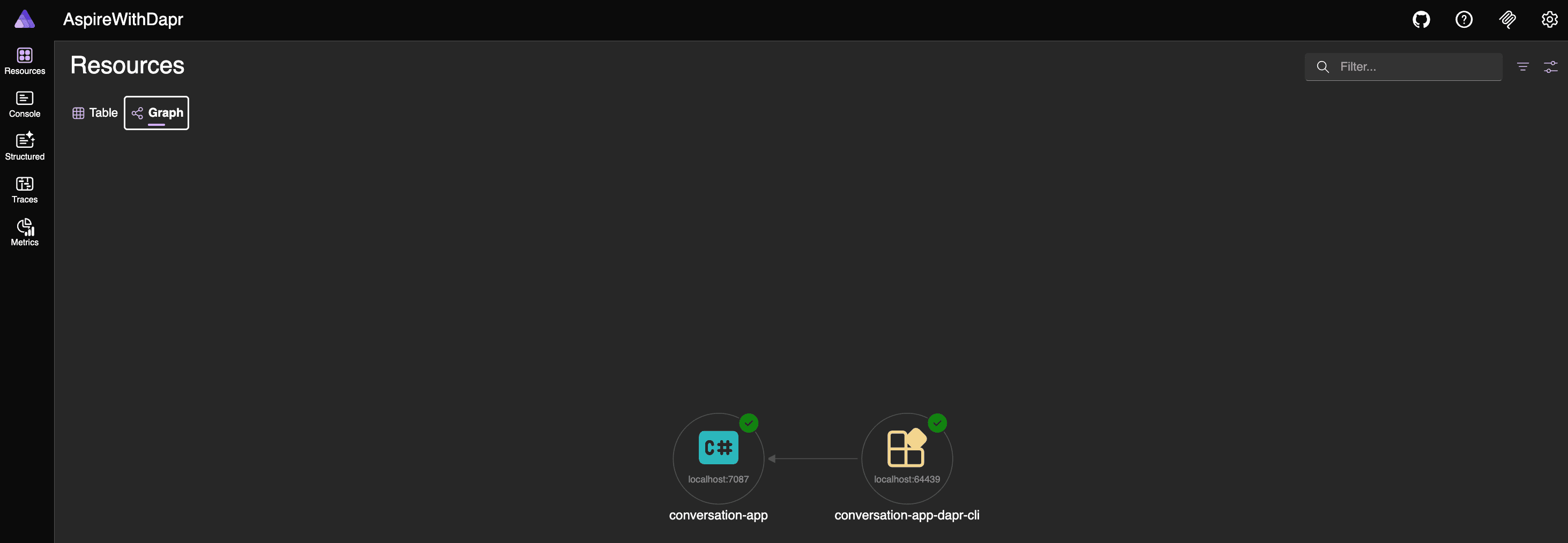
Your application is now ready to run. After executing the following command, navigate to the Aspire Dashboard to explore Resources, Console Logs, Structured Logs, Traces, and Metrics:
aspire run
Prompt Caching
The Conversation API supports caching through the cacheTTL parameter, improving performance and lowering costs by reusing previous model responses. Dapr hashes the prompt and settings, returns a cached response if available, or calls the model and stores the result if not. This reduces latency, avoids repeated external API calls, and eliminates unnecessary provider charges. Each Dapr sidecar manages its own local cache. Both component files (conversation-llama.yaml, conversation-phi.yaml) define cacheTTL; see the App Host section for reference. It is evident that the initial call to the LLM via the web application takes longer, whereas subsequent calls with the same input return immediately.
Personally identifiable information (PII) obfuscation
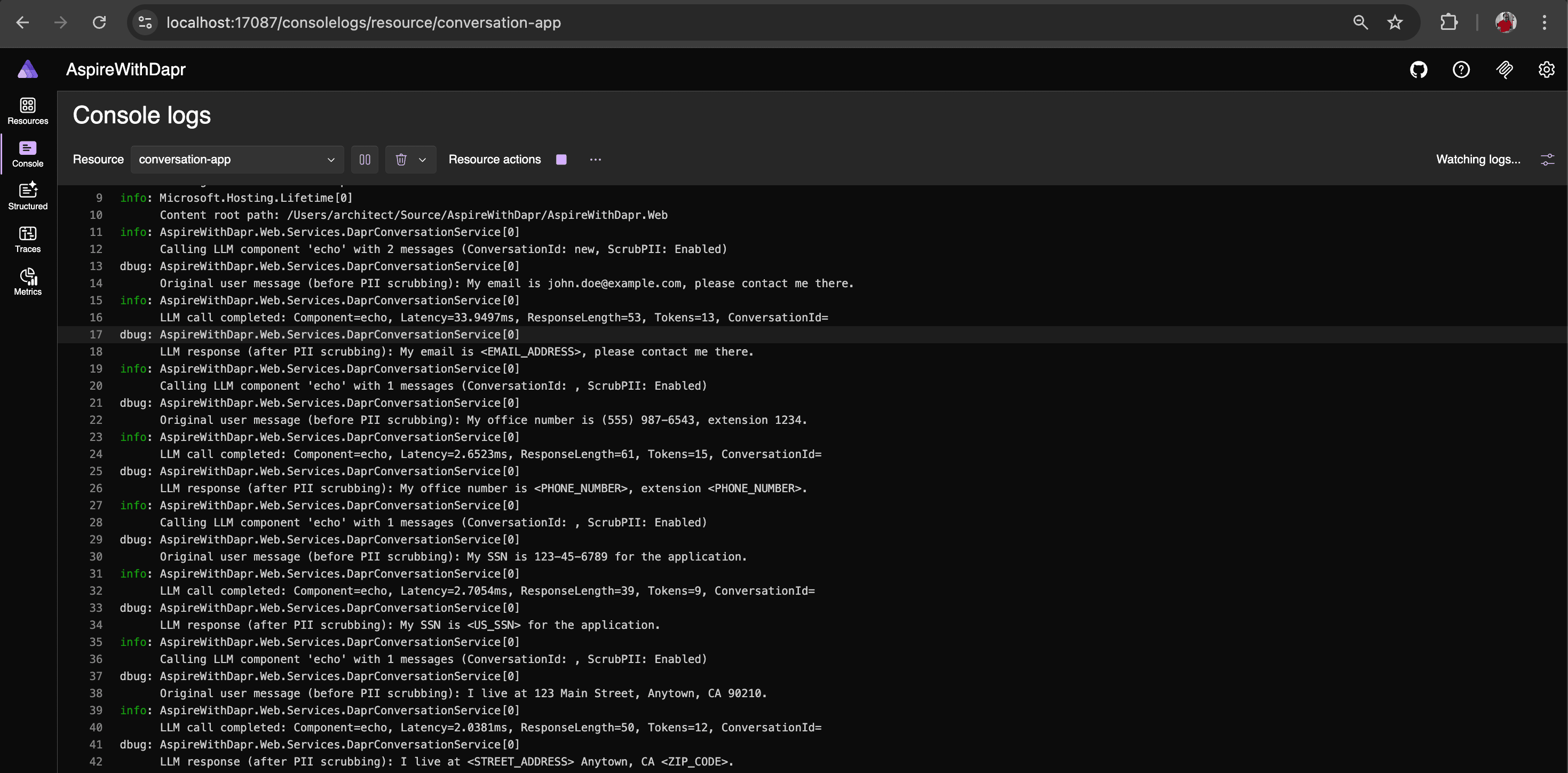
PII obfuscation detects and strips sensitive personal data from inputs and outputs, helping protect user privacy and prevent exposure of identifiable information.
You may begin testing with the Echo component and later switch to a real LLM. PII obfuscation does not function as expected with real LLMs. Since the Dapr Conversation API is currently in alpha, this limitation may be addressed in future updates.
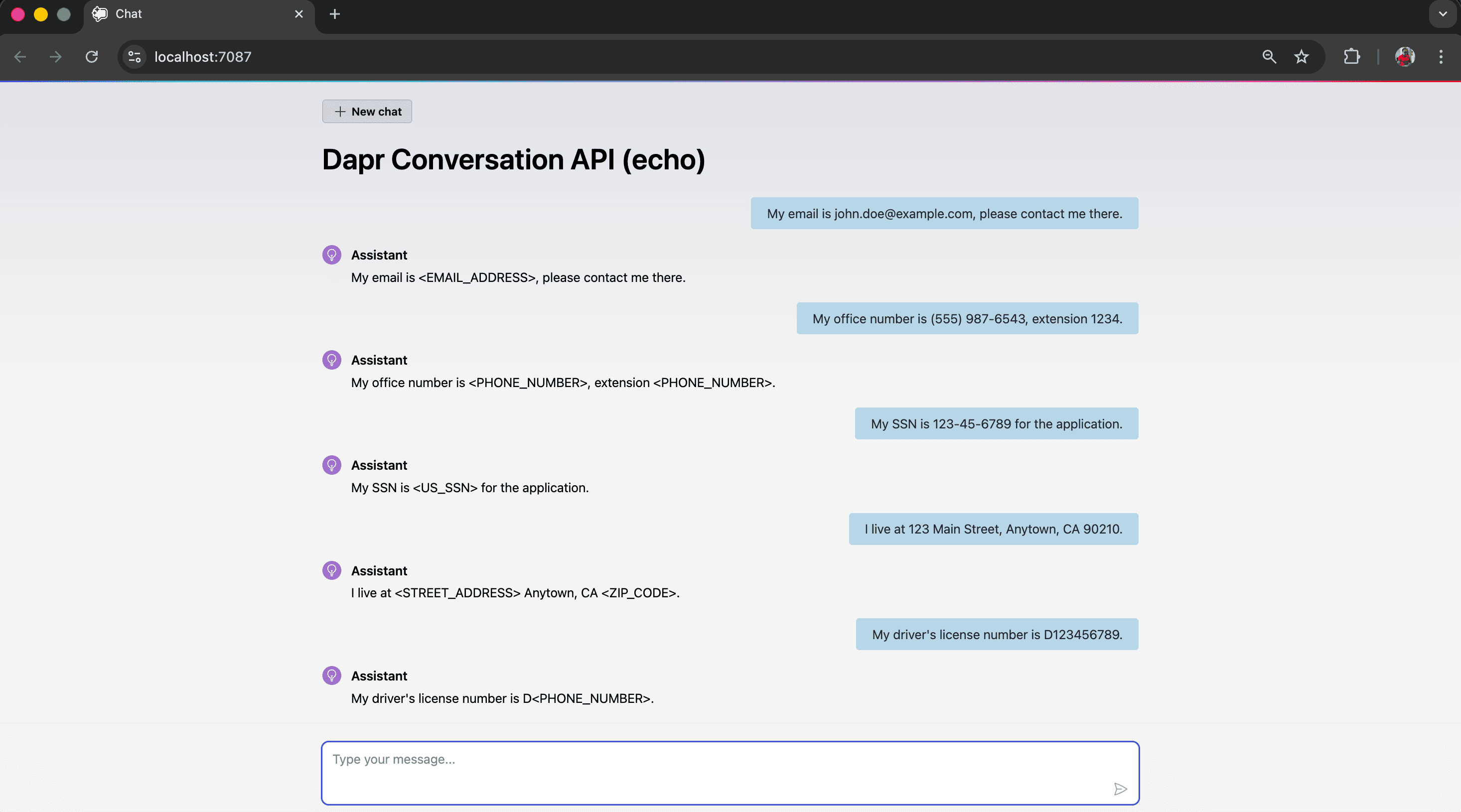
From the logs, you can observe the content before and after PII scrubbing (obfuscation); logging has been enabled to capture this.
Tool Calling
The Dapr Conversation API empowers LLMs with advanced tool-calling capabilities, enabling seamless interaction with external functions and APIs. With this power, you can build intelligent AI applications that:
- Instantly execute custom functions based on user input
- Connect effortlessly with external services and databases
- Generate dynamic, context-aware responses
- Orchestrate multi-step workflows and automated processes
Unlock the potential of your AI applications and create smarter, more responsive experiences for your users.
NOTE: Tool-calling functionality is not covered in this blog and will be addressed in a future post. The implementation is relatively simple, as it adheres to OpenAI’s function-calling format.
Conclusion
With Dapr Conversation API, changing LLM providers becomes as simple as updating configuration rather than altering application logic. This not only increases flexibility but also enables us to evaluate and adopt the best-performing LLM provider whenever our needs evolve. With native support for Prompt Caching, PII obfuscation, and tool calling, the Conversation API makes it straightforward to build AI applications that are secure, efficient, and feature-rich.